Welcome to our community

Be a part of something great, join today!

  • Hey all, just changed over the backend after 15 years I figured time to give it a bit of an update, its probably gonna be a bit weird for most of you and i am sure there is a few bugs to work out but it should kinda work the same as before... hopefully :)

a bit disappointed with the 4K coming from the Scarlet

" You can't sell picky professionals snake oil. They want the good stuff"

Love that
 
I was concern before ask the initial question in how this post was going to be received. but now I'm really glad with all the learning and the end result. @Phil Holland I'm really looking forward for you indeep post about the subject
Cheers
 
I updated the image, by color correcting only. Sharpness same. Now you can see how color/contrast effects your perception of the sharpness!
Wow, now his 'cheap lens', as you said, looks better. Compare to Phil's image. I color matched his. Sharpness different.

Thanks Les, yep I mentioned that a couple posts down from my original reply to you. There is more than just resolution that affects how we perceive sharpness. Although the glass in a lens also plays a big part in contrast/color.

I usually only do sharpening for stills, I haven't found it that necessary for anything is motion, except for maybe locked off shots with small details or when focus is towards infinity. This may change though when delivering 4k becomes more of a reality.
 
On that note, here's an example of image that's been processed to be "sharp" but also has a film grain pattern applied to it:
phfx_HSP_AddictedMask.jpg


And here's an example of an image that I would describe as ruthlessly sharp and clean:
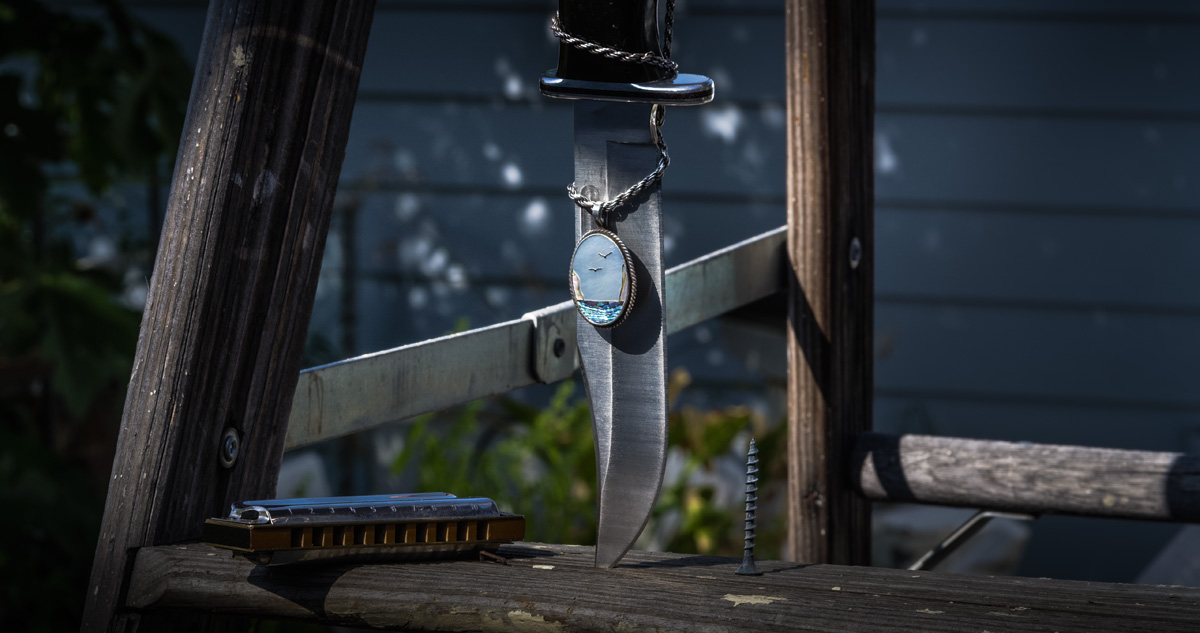
phfx_knifeNecklace.jpg

Amazing images Phil!
 
Thanks Les, yep I mentioned that a couple posts down from my original reply to you. There is more than just resolution that affects how we perceive sharpness. Although the glass in a lens also plays a big part in contrast/color.

I usually only do sharpening for stills, I haven't found it that necessary for anything is motion, except for maybe locked off shots with small details or when focus is towards infinity. This may change though when delivering 4k becomes more of a reality.

Yes, sharpening and other things will have to be tuned and applied as we need to make closer to 4K images. After all, you can't call an image 4K just because it has 4096 pixels in the horizontal direction.
I have been striving to get the sharpest images I can recently, and I blame it all on seeing the movie "Samsara" in 4K. This film, which was scanned at 8k from 65mm modern film stock, is for me the hallmark of image quality. No fake 4K there.

I would like to start a thread in the near future concerning the difficulties of achieving real 4K footage. Focus, motion, vibration, post processing methods and limitations should be bullet points.
I really hope the examples people post here start coming up as full resolution sample images. It's 2012. Enough 1920 and YouTube already !
I am not advocating all shots should be crisp pixel peeper delights, but footage should have it's fair share of ultrasharp images Otherwise, what's the point of the whole program, if you know what I mean.
 
Hey Les, does removing the OLPF give you better/cleaner ISOs performance or worse? I seem to recall the Monochrome having a less-strong OLPF and it's partly the reason it gets an ISO2000 rating compared to ISO800 or traditional MX. It would take a lot of unsharp mask for me to get an image to look like that one you showed on post#86.

Also, I find that the "OLPF compensation" (aka "Sharpening" in RCX ... above Denoise and Detail) actually makes the image look like ass. After "1" it seem to pixelate rather than sharpen... I've had much better results with just clarity and/or unsharp mask within RCX.
 
Mike, While the OLPF on the EPIC-Monochrome is optimized for the monochrome sensor, the EPIC-Monochrome does not get improved ISO because of the OLPF, it is because the no light is lost going through the bayer filter.

Hey Les, does removing the OLPF give you better/cleaner ISOs performance or worse? I seem to recall the Monochrome having a less-strong OLPF and it's partly the reason it gets an ISO2000 rating compared to ISO800 or traditional MX. It would take a lot of unsharp mask for me to get an image to look like that one you showed on post#86.

Also, I find that the "OLPF compensation" (aka "Sharpening" in RCX ... above Denoise and Detail) actually makes the image look like ass. After "1" it seem to pixelate rather than sharpen... I've had much better results with just clarity and/or unsharp mask within RCX.
 
I just came to think that the reason Scarlet's 4K looks a bit dissapointing to some is that the OLPF is designed for 5K. Ideally for 4K that OLPF should be designed much lighter. Look at how soft 2K is - the OLPF is overkill at that stage. The 'problem' is that we have a pseudo 5K mode / 5K stills mode, which is why there's no dedicated 4K OLPF in Scarlets.


Does anyone know if IR/UV filter is in the OLPF or in a seperate glass in front of sensor?
 
Michael, doesn't the Scarlet window the sensor to get to 4K?
 
Yep the scarlet windows or crops to get 4k so the 'pixel density/area' stays consistent across all resolutions.

Michel I would assume that IR/UV is built into the OLPF. Would it not have to be in order for removable OLPF's (variable behind-the-lens ND filter levels) to work... then again are they still happening?
 
The OLPF is designed to perform best for 5K motion (probably with downsample to 4K in mind). That's 60% more pixel to tame compared to 4K. Would it be a 4K sensor, the OLPF would definately be lighter than how the actual OLPF performs now when sensor is windowed to 4K.

Chris, thanks, yes probably IR/UV inside OLPF. I might take it off and do some tests.
 
Yes. and I have a new love for my camera since. 4K .... bring it on. Now I can actually get real 4K.

( see my post# 86 in this thread. I could NEVER get that resolution before, even with a $55K lens. )

Thanks Les. Which OLPF filter are you using now?
 
I'm not sure I agree... the OLPF is designed primarily to remove aliasing whilst allowing as much resolution as possible. As the 'pixel density to area' ratio is constant at any chosen resolution the OLPF succeeds to the same level at all resolutions.

If you mean it should have been lightened so that the image appears sharper, then more aliasing is allowed through which would mean the OLPF is doing a worse job in regards to its primary function wouldn't it?

I thought the intensity of the OLPF was the same across all Red cameras including the R1 which was also a 4k camera...?
 
Maybe a better way to put it is the OLPF is designed to let through approx 3.2k optical resolution within the windowed area used for 4k and approx 4k optical resolution in the area used for 5k... Which it does across all epics and scarlets doesn't it?
 
I don't think the OLPF on R1 has the same intensity, 2K from R1 isn't as soft as from Epic/Scarlet. That's what I meant, optimizing the balance between resolution and killing aliasing for 5K seems to be different than tweaking it for 4K or lower. Guess it doesn't matter as there are no alternative OLPFs anyway :)
 
Chris, I don't know it, I just guess!! But it's what other's on this board have noticed as well after comparing R1 to Epic/Scarlet at 4K and lower resolutions.
 
I don't think the OLPF on R1 has the same intensity, 2K from R1 isn't as soft as from Epic/Scarlet. That's what I meant, optimizing the balance between resolution and killing aliasing for 5K seems to be different than tweaking it for 4K or lower. Guess it doesn't matter as there are no alternative OLPFs anyway :)

Les seems to be have replaced the OLPF with an IR filter only, and then tweaking post to mimic the OLPF effect (and remove aliasing.) Definitely a hot concept if easy/cheap to do.
 
Correct, I removed the optical low pass filter and replaced it with an IR Filter.
You will get a lot of aliasing with this method using ordinary postprocessing so be prepared for that.
The optical low pass filter is designed for a certain pixel spacing on the sensor and not the resolution of the picture coming out of the camera. Its purpose is to spread the light just a very small amount To avoid aliasing problems. Red chose a filter that guarantees absolutely no aliasing for motion picture use. They selected on the conservative side for aliasing reasons.
I am prepared to do the trade off and postprocess using some special techniques to get rid of most, if not all of the aliasing.
 
Back
Top