

John Schick
Well-known member
I've been trying out the latest Scarlet beta firmware (3.3.12), and I was thinking about a couple of feature requests:
1. More control for mapping buttons. From what I can tell, there's no way to map the rocker button on the side handle to change the FLUT value in increments (1, 2, 3, etc.) without having to create a separate preset for each individual FLUT value and then mapping the button to change between 10 different presets).
It would be nice to have a dedicated menu option for changing a parameter (FLUT, ISO, Aperture, Shutter Speed, etc.) based on an incremental value (-3, -2, -1, 1, 2, 3).
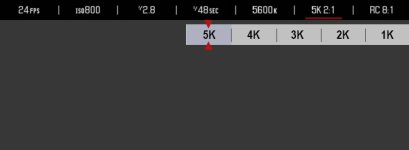
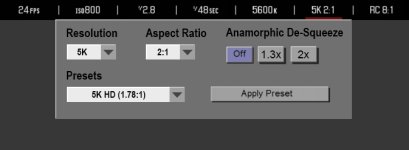
2. Possible separation between Resolution and Aspect Ratio. What if there was an advanced menu option where you could select your Aspect Ratio (2.4:1, 2:1, 1.9:1, 1.78:1, 1.33:1, etc.) separately from Resolution. The the regular Resolution "scroll bar" is cleaned up to just (5k, 4k, 3k, 2k, 1k - and eventually 6k). Depending on your selected resolution & aspect ratio, the camera will crop the sensor and adjust your max frame rate.
Under the advanced options, you could also add a checkbox for Anamorphic mode - which will de-squeeze the image on the monitor. Maybe you could also choose the amount of de-squeeze (2x, 1.3x).
SAMPLE ILLUSTRATIONS:
Regular Resolution Menu:

Advanced Resolution Menu:

1. More control for mapping buttons. From what I can tell, there's no way to map the rocker button on the side handle to change the FLUT value in increments (1, 2, 3, etc.) without having to create a separate preset for each individual FLUT value and then mapping the button to change between 10 different presets).
It would be nice to have a dedicated menu option for changing a parameter (FLUT, ISO, Aperture, Shutter Speed, etc.) based on an incremental value (-3, -2, -1, 1, 2, 3).
2. Possible separation between Resolution and Aspect Ratio. What if there was an advanced menu option where you could select your Aspect Ratio (2.4:1, 2:1, 1.9:1, 1.78:1, 1.33:1, etc.) separately from Resolution. The the regular Resolution "scroll bar" is cleaned up to just (5k, 4k, 3k, 2k, 1k - and eventually 6k). Depending on your selected resolution & aspect ratio, the camera will crop the sensor and adjust your max frame rate.
Under the advanced options, you could also add a checkbox for Anamorphic mode - which will de-squeeze the image on the monitor. Maybe you could also choose the amount of de-squeeze (2x, 1.3x).
SAMPLE ILLUSTRATIONS:
Regular Resolution Menu:
Advanced Resolution Menu:


 I should have known there isn't a feature on the Scarlet your not using!


