Matt Gerard
Well-known member
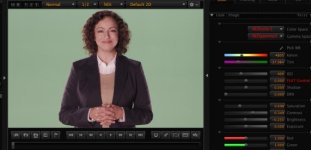
OK, I'm trying to figure something out here. We do a lot of greenscreen shoots with the EPIC rotated 90º. We recently rented out our camera to a very reputable camera/DIT/tech a couple weeks ago. Ever since it came back (or around that time) we have been fighting a greenish cast on our subjects when shooting green screen. OK, before you go on, here is the link for the r3d still.
http://www.creativeftp.com/_Odbe4Hb-2THF2R
We have our wall/floor painted digicomp green, she is about 15' away from the wall. The floor is coverd with packing blankets, as it is not head to toe. All lights are 3200k. The wall is lit by florecents, also at 32k. other lights are a combo of kinoflos and arri hot lights.
We have also shot with a blue drop that we hang in front of the green and light with the same cyc lights as the green, but don't have the color cast problem we do with the green.
I have done a full reset of the camera and is set for RC3 and RG3. When looking at our 17" panasonic SDI monitor, the green looks washed out. Its not very saturated as you see with your eye. This is monitoring with RC3 and RG3 turned on. RAW looks as to be expected, a little darker (shooting at ISO800) and flatter. Alhtough it seems that the green "pops" more when looking at RAW. Odd.
My question is, are we overlighting the green? The panny monitor we have for some reason won't play well with the EPIC and won't display the waveform. But that's another problem
I do have a dimmer pack and board available, and the flo's are dimmable, so I'm going to try to throttle back the green for the same amount of key, fill and greaser lights that the DP uses. I'm not the DP, I'm the tech, so I need to figure this out. What am i missing? I think we are just overlighting the green, but the the bossman disagrees and is trying to do the 80b filter and shoot at 56k in the camera trick. I know we should be using 56k lights when shooting green, but we rent our studio out alot and that wouldn't fly with 99% of the renters.
http://www.creativeftp.com/_Odbe4Hb-2THF2R
We have our wall/floor painted digicomp green, she is about 15' away from the wall. The floor is coverd with packing blankets, as it is not head to toe. All lights are 3200k. The wall is lit by florecents, also at 32k. other lights are a combo of kinoflos and arri hot lights.
We have also shot with a blue drop that we hang in front of the green and light with the same cyc lights as the green, but don't have the color cast problem we do with the green.
I have done a full reset of the camera and is set for RC3 and RG3. When looking at our 17" panasonic SDI monitor, the green looks washed out. Its not very saturated as you see with your eye. This is monitoring with RC3 and RG3 turned on. RAW looks as to be expected, a little darker (shooting at ISO800) and flatter. Alhtough it seems that the green "pops" more when looking at RAW. Odd.
My question is, are we overlighting the green? The panny monitor we have for some reason won't play well with the EPIC and won't display the waveform. But that's another problem
I do have a dimmer pack and board available, and the flo's are dimmable, so I'm going to try to throttle back the green for the same amount of key, fill and greaser lights that the DP uses. I'm not the DP, I'm the tech, so I need to figure this out. What am i missing? I think we are just overlighting the green, but the the bossman disagrees and is trying to do the 80b filter and shoot at 56k in the camera trick. I know we should be using 56k lights when shooting green, but we rent our studio out alot and that wouldn't fly with 99% of the renters.