Welcome to our community

Be a part of something great, join today!

  • Hey all, just changed over the backend after 15 years I figured time to give it a bit of an update, its probably gonna be a bit weird for most of you and i am sure there is a few bugs to work out but it should kinda work the same as before... hopefully :)

NEW GROUP BUY: MICROREMOTE WIRELESS FOLLOW FOCUS

DL,

That is an interesting power solution! What kind of voltage will that spit out?

Tom,

As for setting up the camera run stop. We're working on getting a guide together to explain this process but for the time being, here's my quick version.

1) Plug Run/Stop Cable into Basestation's Accessory Port and RED Sync Cable
2) Power on the microRemote
3) BEFORE Calibrating, hold the CAL button, and without releasing it, tap the set button. Then release both.
4) All the system lights will flash either once (arri momentary trigger) OR twice (RED continuos feed).
5) If they only flashed once, preform step 3 again (no need to power cycle) and the system should then be ready to trigger your RED.
6) Calibrate the system on a lens
7) Hit the "Camera" Button on the Wireless Handheld controller. The camera light on the wireless controller and accessory light on the basestation should flash.

The microRemote Basestation will remember your choice of run/stop protocol, and you will only need to do this once!
 
Last edited:
Just got mine today... Love it, and the t-shirt is awesome!

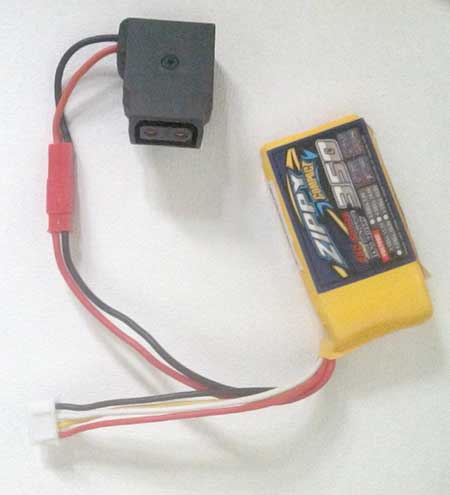
Anyway, I don't run on v-mount batteries very often, so here's the alternate power source I soldered together this morning:

microremote-lipo.jpg


Got a female D-tap connector from thebroadcastshop.com and a 350mah lipo battery off ebay.
How long can you run the Basestation of the LiPo? I power my Epic's via LiPo on a RC Heli, so a lightweight solution like this is great for dslr's.
 
DL,

That is an interesting power solution! What kind of voltage will that spit out?

Thanks... The batteries put out 12.6v fully charged; I'll going to try and always swap them out before falling below 12.0v.

How long can you run the Basestation of the LiPo? I power my Epic's via LiPo on a RC Heli, so a lightweight solution like this is great for dslr's.

To be honest, I haven't had a chance to do a full test, nor is there anything published about how much the basestation itself draws. I'll let you know once I have a chance... the plan is to also use ours on a multicopter setup; I'm just gonna make another cable to go from our gimbal battery to the d-tap adapter.
 
My RR micro remote arrived yesterday. I started testing it with my Leica R lenses. I've noticed a serious problem. Good news, it seems to stay calibrated after power cycling. Bad news, I can only hit focus marks turning the controller in one direction. Here is what is happening: Facing the controller with the antenna facing up, if I turn the focus knob counter clockwise I hit my focus mark every time, when I turn the knob from clockwise it misses every time. This is independent of what direction the controller is set to. Which makes me think the problem is with the transmitter and not the motor. My first thought, since there is so much talk about the torque capacity of the motors, was that it might be a problem with the weight of the lens. However I get exactly the same results with the heavier focusing 35mm Summilux as with the 50mm Summilux which focuses like butter.

In other news, the receiver gets power from a 1b Lemo connector. Does anyone know of a source for a cable to get power from a steadicam sled to the receiver? I believe it's 1b 302 to 1b 302. Maybe Red Rock could make these cables?

If anyone else has tested focus marks with their units, can you let me know how it's working for you?

Thanks

Michael

Im having similar issues with my unit. Have you found a solution?
 
Just finished a fairly comprehensive day of testing with the system on behalf of the ACS with Scott Dolan one of the focus pullers from Great Gatsby. We tested on Zeiss ZE, ultra primes and Super Speeds. Generally happy with the performance and will now process footage and record a Video Review with Mike Seymour hopefully within a week. Will post here when its complete and online on both FXGuide and ACS websites.
 
Right out the box on my first test i was pretty happy with it, smooth and responsive. Yesterday I did another test and the operation was jumpy and less responsive, and the marks were not holding. I could hit the marks going one way but when returning to them the other direction the unit was not hitting the marks, i had to wiggle back and forth before it would find them again, obviously not a good thing. Has anyone else had erratic results? I know Michael Winokur posted about a similar problem.
 
Mark,

Have you tried changing the channel that you are on? It sounds like you may be experiencing some interference that is mucking up the responsiveness. Please review page 17 of the manual for instructions on how to do this. You may also want to change the microGain setting (as seen on page 16) to your desired sensitivity. If you're still having issue's contact support@redrockmicro.com and they can help you further.

Terry,

I have not heard any news on the follow focus emulator recently, but I'll check up on that for you.
 
I am having same issue as Mark- clockwise and counter clockwise to the same mark on the disc result in different marks on the lens. I changed channels, and played with torque levels. Taking torque to maximum 10 resulted in more accurate results, still not perfect. Perhaps my lens requires too much torque for the motor, its a 85 zeiss mkII speed, stiff but not overly stiff. Mark, have you played with torque settings and had any better results?
 
I am having same issue as Mark- clockwise and counter clockwise to the same mark on the disc result in different marks on the lens. I changed channels, and played with torque levels. Taking torque to maximum 10 resulted in more accurate results, still not perfect. Perhaps my lens requires too much torque for the motor, its a 85 zeiss mkII speed, stiff but not overly stiff. Mark, have you played with torque settings and had any better results?

Adam,

Please contact support@redrockmicro.com. There are a few more tweaks like adjusting the backlash of the motor that support can walk you through doing.
 
Hi Loren,

In addition to the backlash and torque (7 is the sweet spot number, if it'll work for your lens...), I understand that support is working on a firmware update. Any field experience that show the first two adjustments with complete success? Tech told me today that they were waiting for feedback from endusers.

Thank you very much

Fury
 
Nick,

We've got plenty of units out in the field not reporting any issues, including systems on high-level jobs.

That is why we're taking the actions we are with these reports and actively gathering as much data as possible. I am confident we will get this solved quickly.

Anyone who is having any issues with the microRemote please don't hesitate to contact support@redrockmicro.com or PM me.
 
Nick,

We've got plenty of units out in the field not reporting any issues, including systems on high-level jobs.

That is why we're taking the actions we are with these reports and actively gathering as much data as possible. I am confident we will get this solved quickly.

Anyone who is having any issues with the microRemote please don't hesitate to contact support@redrockmicro.com or PM me.


Hi Loren,

Reassuring to read that. Just wondering if anyone, who has had the issues reported above, has had joy, with just Torque and backlash adjustments. Since your confidence is persuasive, no need for a list of troublesome lenses.

Thank you very much

Fury
 
Is it too much for RR to just post the instructions for adjusting backlash, etc. for all to see?

Got this, at least:


"Helping on the backlash:


To adjust the backlash, start by locating the two hex
set screws (size .050) at the top of the Motor. First, gently loosen the
set screw on the flat side by only half a turn. CAREFUL NOT TO REMOVE THE
SCREW COMPLETELY. This will allow for the set screw on top to be rotated.
(Usually a quarter to half turn in any direction.)
When finished adjusting, remember to gently tighten the set screw on the
flat side of motor to lock it in place. Test for backlash and rotate top
set screw another 20 degrees if not satisfied with the amount of play."

Thank you very much

Fury


Back
Top