Welcome to our community

Be a part of something great, join today!

  • Hey all, just changed over the backend after 15 years I figured time to give it a bit of an update, its probably gonna be a bit weird for most of you and i am sure there is a few bugs to work out but it should kinda work the same as before... hopefully :)

Feature request - PROXIES - the Holly Grail

Feature request - PROXIES - the Holly Grail


  • Total voters
    16

Peter Majtan

Well-known member
Joined
Feb 29, 2008
Messages
3,986
Reaction score
0
Points
36
Location
Tokyo, Japan
Website
www.petermajtan.com
I am (and I believe many others here are) excited about the (hopefully soon to come) new Proxy Module:
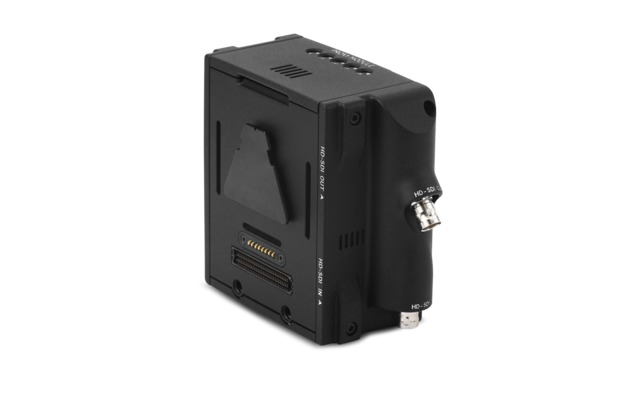
products_primary_ProxyModuleRear2.png

http://www.red.com/store/products/proxy-module

However there is a small issue - the design of the module is such that it simply takes the monitoring path from the brain and records it compressed in your favorite flavor as a 1080P proxy onto the new smaller MINIMAGs (which is basically the same design as of any other proxy solution out there in the wild ATM). While this works perfectly fine for all the footage recorded at the same base frame rate - it doesn't help with any off-speed stuff (over/under cranking and time-lapse photography). Regardless of the actual speed you are recording your RAW data at - the proxy is always recoded at the base frame rate...

We all wish to have the Holly Grail of proxy recording which would actually match the real speed of the recorded RAW data.
Now I do understand the logistics and issues of trying to compress 300 FPS into proxy format in real-time - which clearly is unrealistic to ask for - but I believe there is a simple solution that does not involve any HW engineering...:

We all know that the new Proxy Module records the video output of the monitoring path from the brain...
And we all also know that when you play any off-speed footage back on the brain - it simply recalculates it into real-time - so high speed plays nicely as slow motion and any time-lapse is appropriately sped up as well. This is the core relationship between the project frame rate and the actual recorded frame rate...

So - what I am humbly requesting is that there is a function in the playback section that allows the new Proxy Module to record the proxies while in the Playback mode (just as it does during the Record mode) along with the relevant meta-data (TC, EC, naming, etc...). This is not that far fetched considering that after all the playback comes out through the same video path as the live view during recording...

I hope this is not too much to ask and such a function would put this new Proxy Module way ahead of all the competition out there and would therefore rise its value enormously...

:sifone: Peter
 
i've added a poll, which really isn't a poll. I just want a RED to know how many people would find this equally as exciting as myself, so they (RED) could assign it a reasonable level of priority. So if you like this idea - please add your vote to the option 1 (the option 2 is really not an option, it is simply required by the poll format)...
 
For me I find this approach unpractical. Who has the time to be out in the field recording varispeed footage to the proxy module. I would rather preserve my battery and do this on my laptop with the RED Rocket at home base. Plus this ties up the camera when it can be shooting :) To be honest, I would put the money into the card if you don't have one yet over this proxy module.
 
For me I find this approach unpractical. Who has the time to be out in the field recording varispeed footage to the proxy module. I would rather preserve my battery and do this on my laptop with the RED Rocket at home base. Plus this ties up the camera when it can be shooting :) To be honest, I would put the money into the card if you don't have one yet over this proxy module.

Bob - this is one of those things that if you don't need it (or it simply doesn't suit your workflow) - don't use it.
It doesn't require any HW engineering or modifications. It only requires minor SW R&D (and I do know what I am talking about).
Yet the functionality that this ads is enormous...

I do understand the benefits of RR - if you remember I was the first to actually design, develop and build a portable RR enclosure for field work (I demonstrated it to Ted and few of the key members at his house back in 2009). That enclosure (Launchpad) is still to date the only battery-powered RR enclosure in the world...
But you can't ignore the fact that by far the vast majority does not have (or simply can't afford) a RR. At less then half the price of a RR this new Proxy Module with this little SW addition could be the right solution for many. Remember that you would only use it for the off-speed shots, as all the normal speed stuff is recorded as proxy in RT during recording.
For many peeps out there this IMHO simple and elegant solution would make all the difference between deciding whether to buy this module or not...

I, for one, took the advantage of the generous offer by RED and have ordered the new RR-X with my Dragon update at the drastically discounted price.
I am eyeing this new module as it would definitely save a lot of time in post / DIT and greatly enhance the value of my service - if it could support this function.
For me without this function it simply does not make sense. Every single project I have shot to date included off-speed shot. They average about 5~10 % of each project, but I have also shot projects where 100% of shots were off-speed. There is plenty of time during the shoot, or after the shoot to "process" these off-speed shots. Remember that the module would handle this in RT, so even if you have somehow managed to shoot 30 min of off-speed shots, it will only take 30 min to do this...

:sifone: Peter

PS: Remember that RR on its own does not do anything. At the very least you would need a laptop, external enclosure and a fast HDD to generate proxies in real time. So add at least $ 3500 ~ 5000 USD to the cost of the RR. You only need to add a MINIMAG (or two) and the MINIMAG REDSTATION for this Module to do that same job (generating proxies) - all up well under $ 4000 USD. So you are looking at a 1/2 or even just a 1/3 of a cost of RR solution. Yes, the RR can do many other things this module can not, but we are talking here only about the proxy generation...

Another case-in-point would be the many peeps here that work as one-man army, or need to carry as little HW as possible for various reasons. Adding a portable RR solution is sometimes not just a money-related issue. Think being able to work without an access to mains power...
 
The way you propose is exactly the way I use my Atomos Samurai on quick turnaround jobs with slow mo.
i just record the playback to the Samurai when I get back to the office. Ass I don't have a Red rocket, this is a great feature for me at least. Hopefully the proxy module can do this too. I have my Samurai, so I won't get the proxy anyway I think though.
 
Used RED Rocket cards are around the same price as this proxy module. I still think you get way more advantage from the card. The amount of time I spend editing is way more then when shooting. I also have a Samurai that I feel is more robust that the proxy module if you;re going to go that route. But the module is definitely neater.
 
Hyper deck shuttle from black magic works great and is only a few hundred dollars
 
The way you propose is exactly the way I use my Atomos Samurai on quick turnaround jobs with slow mo.
i just record the playback to the Samurai when I get back to the office. Ass I don't have a Red rocket, this is a great feature for me at least. Hopefully the proxy module can do this too. I have my Samurai, so I won't get the proxy anyway I think though.

Hyper deck shuttle from black magic works great and is only a few hundred dollars

You both are right. Any of the 3-rd party proxy recorders can do this.

However the main advantage of this module is that it will not require additional power solution (more batteries and chargers to carry, or having more cables added to the clutter on the camera) and more importantly, it will record the appropriate RED meta-data, including the clip naming, which will greatly simplify the reconform in post (a crucial step when working with proxies and the one that is currently the most affected by the off-speed shots)...

To really simplify this - it is the equivalent of the millions of peeps out there that used their DV/HDV camcorders to capture the digital video to their computers. Yes - everyone advised to not to use your camera for this. But that did not stop the vast majority in doing so. Only very few opted to purchase a dedicated deck for offloading the footage. Fortunately in this case there are no moving parts (aside of the fans) to wear out and also, one would not need to do this for all the footage, only for the off-speed shots...

I simply can not see any down-side to this solution. Bob (or anyone else) - can you?

:sifone: Peter
 
Let's face it - one of the key practical reasons for projects and/or rentals being lost to the Alexa (and yes, even to the HDSLRs) is the relative simplicity of the their workflow.
You shoot and at the end of the day you have a bunch of "editor-friendly" files in your favorite flavor, be it DNXHD, ProRes, or even H.264.
And you can argue as much as you want about the RR or the ability of pretty much all the NLEs out there to work natively with RAW data (I have been there myself too many times to count) - the client and/or the production company simply does not give a rat's ass...

Putting "look" and "feel" aside - this is the single most important reason for the loss of work for many on this forum (just do a quick search)...

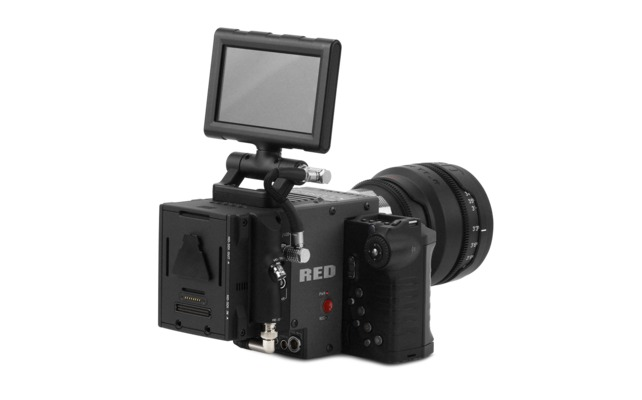
Epic (or even a Scarlet!!!) with +1 Module Adaptor (to allow the simultaneous use of both EVF and LCD) and this new Proxy Module would be major game-changer when dealing with these clients...:

products_primary_ProxyAttached.png


:sifone: Peter
 
There is no right or wrong answer here. Everyone has different clients and their own workflows. The +1 for me is a no-go because I rely on the wireless HDMI to the directors monitor. The proxy module requires mini-mags (not terrible though). The Samurai records the same name as the raw files too. I actually like the fact my samurai runs all day on it's own two batteries instead of sucking from the cameras battery. That all aside, I still prefer to provide the client ProRes files directly from my RAW files after I have done my first pass color correct. I shoot as best I can to final on set but I guess I like to make sure everything looks perfect before handing files over to the client. To each their own I say. More options are good for everyone.
 
I was on the same boat regarding all the issues above. I got a +1 to use the monitor and the viewfinder at the same time. Wanted to record 1080 so I wouldn't lose more quick turn around jobs. And this is my solution:
image_zpsc8fd5f82.jpg

image_zpsa9efafe6.jpg


This way I get the 1080 recording (albeit without the same naming as the R3D files), and some video distribution, with SDI and HDMI out, even having the +1 module.
This setup is working really great.
 
My request to RED would be to have a playback mode that only plays the off speed clips, one after the other with SDI flags that would trigger an external recorder, for separate clips.
 
My request to RED would be to have a playback mode that only plays the off speed clips, one after the other with SDI flags that would trigger an external recorder, for separate clips.

Seeing your setup above makes me really appreciate how compact the proxy module is... :reddevil:

That aside - I like the idea of a "semi-automated dump" of all off-speed clips to the proxy module.
But I would also like to just see (or set) a button that simply triggers the current clip loaded in the playback window to be recorded onto the proxy module...

:sifone: Peter
 
My request to RED would be to have a playback mode that only plays the off speed clips, one after the other with SDI flags that would trigger an external recorder, for separate clips.
+1 for this. It's a bit of a pain to hit play for every clip you want to record to the Samurai
 
Seeing your setup above makes me really appreciate how compact the proxy module is... :reddevil:

That aside - I like the idea of a "semi-automated dump" of all off-speed clips to the proxy module.
But I would also like to just see (or set) a button that simply triggers the current clip loaded in the playback window to be recorded onto the proxy module...

:sifone: Peter

True about the size, but on top of proxies, what you have there is a whole power distribution system as well as video distribution. By the time you add that to the proxy module, I bet the sizes won't be that different.
 
Just skimmed tough this thread. som amybe this is covered. But I would actually much rather have a little module. kind of like a pix 240 or such that could record the SDI from the camera. Basically a red HD recorder that double checked timecodes etc against the mag in camera.
A cheap solution that used the camera for downress and playback and in real time recorded all clips on the mag over to another mag. but in small proress.


So basically in the end of the day in the hotelroom or such I could take all the SSD's and use the camera scaledown and get realtime conversions. kind of using the camera as a realtime rocket...
 
Perhaps it could be set to auto-convert off-speed footage when in standby:

This may well have been mentioned in one of the many threads clamouring for this module, but in case it hasn't, here's a thought: the mini module need not even convert to ProRes / DNxHD while the camera is recording. In fact, live conversion may be limiting. If it does the conversion between takes, it will need much less horsepower (especially for slowmo shots). It would also mean the mini module could use slower media (off the shelf 2.5" SSDs or *cough* spinning drives?), convert to multiple formats and make a backup of the R3Ds (no need to carry a laptop if you are short on RedMags). Let's say it has 3 options: RAW, ProRes and DNxHD. Select the format(s) you need and, between takes, the mini module checks for new clips on whatever RedMag is in the camera and converts them to your selected format(s). Three LEDs indicate if conversion/backup to the desired formats is in process or complete. Ideally the backup/transcode would happen in the background, pausing and resuming when necessary, but even if it needed to be manually started and stopped this would be a very useful module.


Some advantages:


- make backups in the field of the original RAW files (leave the laptop at home).
- transcode to multiple formats.
- tweak your look in camera after the shoot and re-compress without a computer.
- hand off standard 2.5" drive to client shortly after the shoot.
- clients get RAW and compressed footage (RED should like this because there's a better chance the RAW footage will be used or at least saved).
- media write speed not critical, so off-the-shelf SSDs can be used (though RedMags are still needed for recording).


Oh, and maybe put a USB port on it for firmware/looks/blackshades and charging the RedMote.
 
The cam doing this kind of stuff in standby is not a good option. You need to have a control over this. You don't want the camera to be "working" between takes - you want it to cool down. it will also waste a lot of power, as it would need to abort any clip being processed when you suddenly want to record. I can easily see a lot of folks complaining about this. This function only makes sense when it is fully controlled and requested by the op/DIT. You can then chose the appropriate time (lunch brake, location/set change, evening after the shoot, etc...) when you won't use battery power needed for recording, or otherwise interrupting the flow of the shoot. At this point you could chose whether to dump all the off-speed clips at once, or just a single particular clip currently loaded into the playback mode.


:sifone: Peter
 
Just skimmed tough this thread. som amybe this is covered. But I would actually much rather have a little module. kind of like a pix 240 or such that could record the SDI from the camera. Basically a red HD recorder that double checked timecodes etc against the mag in camera.
A cheap solution that used the camera for downress and playback and in real time recorded all clips on the mag over to another mag. but in small proress.


So basically in the end of the day in the hotelroom or such I could take all the SSD's and use the camera scaledown and get realtime conversions. kind of using the camera as a realtime rocket...

This is basically what I am requesting. Adding the ability of the Proxy Module to transcode during playback will facilitate this, while also solving the issue of the off-speed clips...

:sifone: Peter
 
Back
Top