L. Langer
Well-known member
Jarred what do you mean? Switched what?
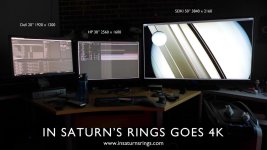
From using 30-inch monitors to a 50-inch UHDTV.

Follow along with the video below to see how to install our site as a web app on your home screen.

Note: this_feature_currently_requires_accessing_site_using_safari
Jarred what do you mean? Switched what?

Hey guys, so here is what we see on our Seiki with a Decklink 4K connected with HDMI.
OK, the SEIKI is acting up a bit and I'm wondering if anyone else is having this issue. I seem to recall reading someone else reporting this, but can't find it... 1080p works fine. When I feed it 3840x2160 from an OPPO 103 now it intermittently loses sync and goes black for a second and then comes back on, reporting the proper 3840x2160p @ 24Hz as the mode. Seems to do it when the screen drops suddenly to very dark or there's a jump cut or other transition. Now I have to pull the SEIKI off the wall or lug one of my workstations over to try to duplicate the issue with another 4K source.


Heh heh.. beg to differyou just need a big desk.
Judder: When I play my 4K footage, I still see judder on the 50", but the same exact media on the 30" shows no judder. I'm beginning to think it's having trouble sending the data down the HDMI path. 1.7 gigabits/sec, or something like that, isn't easy.
Are you guys getting smooth playback when playing long play 4K red footage with the computer ? You are playing 4K red footage, right .... that's what this monitor is made for IMO.

Did anyone confirm if this works with the deckling 4K? On the verge of ordering it...

Heh heh.. beg to differ
too much secret stuff on our desks right now to take a pic.. but we all switched.


Anyone hooked this up via HDMI out of the Epic/Scarlet? If so, how does it look?
... For pushing 4K, you'll need the newer cables from Monoprice -- the ones with the red on the connectors and of those, the ones rated as "high speed". I think they only come in lengths up to 10 feet at that speed rating.