Welcome to our community

Be a part of something great, join today!

  • Hey all, just changed over the backend after 15 years I figured time to give it a bit of an update, its probably gonna be a bit weird for most of you and i am sure there is a few bugs to work out but it should kinda work the same as before... hopefully :)

The Gentleman's Underwater Bubble Blower Thread

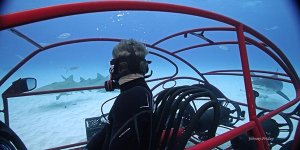
Ferocious too. Unnatural behavior for a shark, generated by the yachties cleaning their fish at dock. The Bull population at that marina is well established, anything that gets dropped overboard, think drunk spring break students, is immediately torn to shreds. Shark attack file waiting to be written.

Maybe the shark researchers need to rewrite their 'most dangerous list'; in my mind, Bulls have it over even the Whites and Tigers. The only other marine critter I can think of that even comes close is the Oz saltwater croc.

Maybe the yachties need a serious education. Ya think?

Only other place I've seen this so well developed, and I'm sure there are lots more, is the beach at Mogadishu in Somalia. Big slaughter house just up the river that that runs through the city, empties into the ocean, blood and guts dumped into the river all day long, every day. Not sure of the various species, but lost two Russian nurses going for a snorkel one day, word has it they were Zambezi sharks, possibly Tigers involved.

Not the fault of the sharks, they just take advantage of really dumb-shit things humans do.
 
Yep well they use the opportunity. But I am curious if they would actually eat the human or just hit it.

This is not experiment I wish to try but it would be interesting on scientific merit.

People like to not use their brains or think they have little impact. They do not think of the wider picture on land or in water.
 
My sons swim in the Big Game Club marina - playing with the nurse sharks that hang out under the slips with the local Alice Town kids. I'm gonna send them a link to your picture with the caption, "I told you not to..."
 
Anybody got any "understandable" explanation on what this thing exactly does and if it is of any use for us u/w filmmakers?
Codex Digital - the Vault
 
Anybody got any "understandable" explanation on what this thing exactly does and if it is of any use for us u/w filmmakers?
Codex Digital - the Vault

all it is is a computer with giant hdd or hdd's attached and built in LTO (tape backup) all in one. takes RAW camera data and then you can convert that RAW data to any other codec....kind of like Premier...drop an R3d on the timeline and you can then push out a DPX or TIFF or whatever you like....


I don't see much if any application you can't perform as with your home computer, good storage (in Esata or SAS), and backup in place along with RCX and Premier and/or FCPx or some other NLE that can handle RAW files from multiple cameras....

Might be useful for a production company to carry an all in one device....but then if someone drops it, guess you better have your backup Box...
 
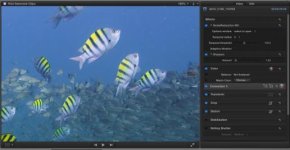
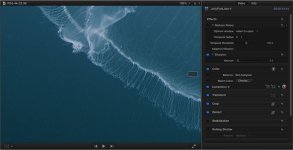
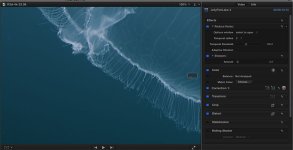
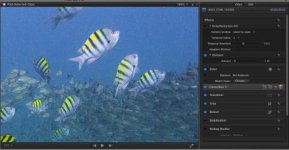
For those shooting and processing 4k footage and then blowing up at 100%....Neat Video does a nice job. Albeit, it has it's issues running at 4k/5k....but here's a few examples of random (my guess sensor noise).
I've been using Neat Video a long while now, and very happy with it in a 1080p timeline...4k you will see a lot more noise than a shot at 4k scaled to 1080p. But also, be careful how much noise reduction you use in the y channel...

...well these images sure suck....not very large. but you can see noise and result from them. And to add...these are 100% zooms at 4k as you can see in the viewer windos and area i'm zooming to.
 

Attachments

  • Seargents-NoNoiseReduction.jpg
    Seargents-NoNoiseReduction.jpg
    19.8 KB · Views: 0
  • Seargents-NoiseReduction.jpg
    Seargents-NoiseReduction.jpg
    19.6 KB · Views: 0
  • Jelly2-noNoiseReduction copy.jpg
    Jelly2-noNoiseReduction copy.jpg
    66.2 KB · Views: 0
  • Jelly2-NoiseReduction copy.jpg
    Jelly2-NoiseReduction copy.jpg
    57.1 KB · Views: 0
For those shooting and processing 4k footage and then blowing up at 100%....Neat Video does a nice job. Albeit, it has it's issues running at 4k/5k....but here's a few examples of random (my guess sensor noise).
I've been using Neat Video a long while now, and very happy with it in a 1080p timeline...4k you will see a lot more noise than a shot at 4k scaled to 1080p. But also, be careful how much noise reduction you use in the y channel...

...well these images sure suck....not very large. but you can see noise and result from them. And to add...these are 100% zooms at 4k as you can see in the viewer windos and area i'm zooming to.
I also think Neat Video does a great job with 1080p but in 4-5K the processing-time takes ages....
(I know, I'm waiting on the Mac Pro 2013....)
 
I also think Neat Video does a great job with 1080p but in 4-5K the processing-time takes ages....
(I know, I'm waiting on the Mac Pro 2013....)

Michael, are you using it in Pr, AE or FCPx?
....i find it does just fine in AE or Pr. but in FCPx is has HUGE issues and after 3 days of problems, i finally found a half assed workaround. Not great, but works. and yes, 4k/5k it takes forever. Does help to have a good graphics card optimized for whichever NLE you are using and as much RAM as you can stack.
 
Michael, are you using it in Pr, AE or FCPx?
....i find it does just fine in AE or Pr. but in FCPx is has HUGE issues and after 3 days of problems, i finally found a half assed workaround. Not great, but works. and yes, 4k/5k it takes forever. Does help to have a good graphics card optimized for whichever NLE you are using and as much RAM as you can stack.
I'm still on FCPX but plan to make the switch to PR/AE/DVR "in the near future".
I'm on an iMac with 32GB and external RED ROCKET (which doesn't help the Neat Video processing of course).

Which issues did you encounter with NV on FCPX? And what did you come up with?
 
I'm still on FCPX but plan to make the switch to PR/AE/DVR "in the near future".
I'm on an iMac with 32GB and external RED ROCKET (which doesn't help the Neat Video processing of course).

Which issues did you encounter with NV on FCPX? And what did you come up with?

Where to begin?
First, why are you changing from FCPx to Pr/AE? Sounds like you are going PC? and just curious why switching? Does FCPx not do what you need?

....Well, huge processing time with NV when using on FCPx--more than AE & Pr. But also, when i move the curser onto the workspace of fCpx and click any place...wheel begins to spin and then (SOMETIMES), i get black frames after the render process....basically my workflow is to add NV first, then click on it to analyze the clip and then when done I then UNCheck NV and leave it as an effect that is NOT actually used yet...then continue on with all other color work. At end when i'm happy and all rendered with the other color work, i then wait till end of the day and turn on the Neat Vid effect and let it render over night....that's it. I've also reported this to Vlad at NeatVid and they are looking into it. he seems to think it's not a problem with apple, but the red plugin for FCPx.

***keep in mind this is when working on a 4k or 5k timeline. When i'm on a 1080p tilmeline, i don't have much of any problems.
 
Where to begin?
First, why are you changing from FCPx to Pr/AE? Sounds like you are going PC? and just curious why switching? Does FCPx not do what you need?

....Well, huge processing time with NV when using on FCPx--more than AE & Pr. But also, when i move the curser onto the workspace of fCpx and click any place...wheel begins to spin and then (SOMETIMES), i get black frames after the render process....basically my workflow is to add NV first, then click on it to analyze the clip and then when done I then UNCheck NV and leave it as an effect that is NOT actually used yet...then continue on with all other color work. At end when i'm happy and all rendered with the other color work, i then wait till end of the day and turn on the Neat Vid effect and let it render over night....that's it. I've also reported this to Vlad at NeatVid and they are looking into it. he seems to think it's not a problem with apple, but the red plugin for FCPx.

***keep in mind this is when working on a 4k or 5k timeline. When i'm on a 1080p tilmeline, i don't have much of any problems.
Hmmm.... food for thought.... my replies won't be that straight forward I think...
Why change? Well, it's more about a gut feeling than factual. I actually love FCPX, its simplicity, its intuitive and such but, on the other hand, I feel there are too many workaround and add-ons required to have it do what you want. Yes it handles R3D natively but.... how!? I don't call that integrated.
On the other hand I love being able to use FCPX and RED CINE-X in symbiosis.... I switch from one to another "constantly".
I don't believe that's possible with Adobe and I haven't tried it yet with DaVinci Resolve.
Color correction in FCPX is a joke. OK, masks get you further than you would think but it has its limitations. So grading for me is a reason to switch to DVR.
Then again you could say "work more on your shots so you don't need the 'heavy' grading". Yup, point taken! Alas I am not able to shoot every frame "perfect" so I often rely on heavy grading.

Switching from Mac to PC makes sense in a technical perspective (performance) but I simply don't want to go back to Windows (personal preference).
So nothing forces me to ditch FCPX.
I just hope Tim Cook keeps his promise and one of the next months we will see the "birth" of an amazing new Mac Pro.

For DSLR footage I stick to FCPX because I find this format to work perfectly in that biotop. And intensive grading isn't possible anyway so the FCPX color option suffice for me.
But for 4-5K (and "soon" 6K) the rendering is a PITA. But I blame that more on th machine than on the software.
Well... this is all my personal 50c :-/
 
Hmmm.... food for thought.... my replies won't be that straight forward I think...
Why change? Well, it's more about a gut feeling than factual. I actually love FCPX, its simplicity, its intuitive and such but, on the other hand, I feel there are too many workaround and add-ons required to have it do what you want. Yes it handles R3D natively but.... how!? I don't call that integrated.
On the other hand I love being able to use FCPX and RED CINE-X in symbiosis.... I switch from one to another "constantly".
I don't believe that's possible with Adobe and I haven't tried it yet with DaVinci Resolve.
Color correction in FCPX is a joke. OK, masks get you further than you would think but it has its limitations. So grading for me is a reason to switch to DVR.
Then again you could say "work more on your shots so you don't need the 'heavy' grading". Yup, point taken! Alas I am not able to shoot every frame "perfect" so I often rely on heavy grading.

Switching from Mac to PC makes sense in a technical perspective (performance) but I simply don't want to go back to Windows (personal preference).
So nothing forces me to ditch FCPX.
I just hope Tim Cook keeps his promise and one of the next months we will see the "birth" of an amazing new Mac Pro.

For DSLR footage I stick to FCPX because I find this format to work perfectly in that biotop. And intensive grading isn't possible anyway so the FCPX color option suffice for me.
But for 4-5K (and "soon" 6K) the rendering is a PITA. But I blame that more on th machine than on the software.
Well... this is all my personal 50c :-/

Well, this should not fall into a PC vs. Mac discussion as their is far too much of that all over this and several forums. But, some things that you may want to know and maybe do...is that Davinci works just fine with FCPx and in fact that's where you would likely finish your project regardless of FCPx or Premier. I agree FCPx has it's downside in color, but same with Premier. I use both, but for most my work when doing stock images i find myself using FCPx. It really does get you there in one fell swoop easily and most of my deliverables are Prores and that's one thing i can count of is for FCPx to render out what is see visually on my color monitor. Same can't be said for when i'm using Premier or After Effects and rendering out to prores. BUT, this is where FCPx and Premeir are dogs....the post. Davinci has far better tools and color grading spaces to work in. After effects actually lets you choose color spaces and gamma space such as setting 16-235 or 0-255....this is a real pain when delivering for television yet grading on your NLE that does not allow for super blacks and whites.---i hope i said that right....but the point is much more about working in a proper color space that you intend the final delivery to be viewed in.

....As for me personally, i could go pc or mac, BUT, then there's a HUGE investment in PC software that i already own and this is also a decision many posts houses have to live with....so i'm in the same bucket with a lot of money invested in software as well as plugins for Apple. I think this Mac vs. Apple will likely bounce back and forth for a long time. So bottom line is that if you can get the job done with either one, then maybe consider sticking with software you own. Unless that is you are in desperate need of running a post house and need blazing results at end of the day and upgrading to better and faster hardware does not matter to your wallet....But that's not likely man of us.

Yes in Adobe you can go back to RCX and make changes and they show up in Premier....so that's same as FCPx.
....as to shooting better--well we all can stand to do that, but it won't change much when comes to a RAW image and all the heavy color grading required to work the RAW image....it's just the nature of RED RAW. In fact in some cases it may not be the best choices for many productions we work on in natural history work...when budgets just don't allow for heavy/costly grading sessions...and i find a lot of producers choose red without this knowledge. In that case, best to go shoot something like that for quick turnaround tv/web delivery on a EX1 or even F900. Anyway, nobody here gets away with no grading because of their quality underwater cinematography skills. Theres a big myth....so you are not alone.

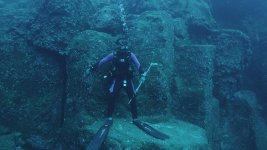
*** i took it upon myself for this post to upload some before and after RAW to One Lights...
 

Attachments

  • Ledge01-Before.jpg
    Ledge01-Before.jpg
    55.2 KB · Views: 0
  • Ledge01-After.jpg
    Ledge01-After.jpg
    68.6 KB · Views: 0
  • RAW-Look.jpg
    RAW-Look.jpg
    57.9 KB · Views: 0
  • Colored-Look.jpg
    Colored-Look.jpg
    70.6 KB · Views: 0
Well, this should not fall into a PC vs. Mac discussion as their is far too much of that all over this and several forums. But, some things that you may want to know and maybe do...is that Davinci works just fine with FCPx and in fact that's where you would likely finish your project regardless of FCPx or Premier. I agree FCPx has it's downside in color, but same with Premier. I use both, but for most my work when doing stock images i find myself using FCPx. It really does get you there in one fell swoop easily and most of my deliverables are Prores and that's one thing i can count of is for FCPx to render out what is see visually on my color monitor. Same can't be said for when i'm using Premier or After Effects and rendering out to prores. BUT, this is where FCPx and Premeir are dogs....the post. Davinci has far better tools and color grading spaces to work in. After effects actually lets you choose color spaces and gamma space such as setting 16-235 or 0-255....this is a real pain when delivering for television yet grading on your NLE that does not allow for super blacks and whites.---i hope i said that right....but the point is much more about working in a proper color space that you intend the final delivery to be viewed in.

....As for me personally, i could go pc or mac, BUT, then there's a HUGE investment in PC software that i already own and this is also a decision many posts houses have to live with....so i'm in the same bucket with a lot of money invested in software as well as plugins for Apple. I think this Mac vs. Apple will likely bounce back and forth for a long time. So bottom line is that if you can get the job done with either one, then maybe consider sticking with software you own. Unless that is you are in desperate need of running a post house and need blazing results at end of the day and upgrading to better and faster hardware does not matter to your wallet....But that's not likely man of us.

Yes in Adobe you can go back to RCX and make changes and they show up in Premier....so that's same as FCPx.
....as to shooting better--well we all can stand to do that, but it won't change much when comes to a RAW image and all the heavy color grading required to work the RAW image....it's just the nature of RED RAW. In fact in some cases it may not be the best choices for many productions we work on in natural history work...when budgets just don't allow for heavy/costly grading sessions...and i find a lot of producers choose red without this knowledge. In that case, best to go shoot something like that for quick turnaround tv/web delivery on a EX1 or even F900. Anyway, nobody here gets away with no grading because of their quality underwater cinematography skills. Theres a big myth....so you are not alone.

*** i took it upon myself for this post to upload some before and after RAW to One Lights...
Gosh... you just postponed my decision to turn to PR/AE again :-)
I think I'm going to wait for the new Mac Pro first anyway. If that proves to be a mind-blowing machine, I'll happily stay Mac and remain in doubt about FCPX/PR/AE :-)
If it's a disappointing upgrade like the last one, I'm switching to PC and will have to leave FCPX.

I talked a lot with HH about post and RED and he's is actually disappointed in Apple.
Apple lost his trust by not being clear about their upgrade-path of the Mac Pro and the changes they made from FCP7 to X.
The Epic he also had his reservations but I don't think it's smart to quote his findings here in public... LOL!

Personally I experience a lot of issues with the red and green channels.
It is very difficult to shoot ambient with the Epic Mysterium-X whereas a simple D7000 shoots perfect images in the same conditions.
I talked a lot with Rudi about this and he says there are quite some Epic owners whom experience the same issue.
So I'm currently very keen on my ("free") upgrade to Dragon and hope RED addressed these issues, even if they didn't want to acknowledge and confirm them in the first place :-)
 
Gosh... you just postponed my decision to turn to PR/AE again :-)
I think I'm going to wait for the new Mac Pro first anyway. If that proves to be a mind-blowing machine, I'll happily stay Mac and remain in doubt about FCPX/PR/AE :-)
If it's a disappointing upgrade like the last one, I'm switching to PC and will have to leave FCPX.

I talked a lot with HH about post and RED and he's is actually disappointed in Apple.
Apple lost his trust by not being clear about their upgrade-path of the Mac Pro and the changes they made from FCP7 to X.
The Epic he also had his reservations but I don't think it's smart to quote his findings here in public... LOL!

Personally I experience a lot of issues with the red and green channels.
It is very difficult to shoot ambient with the Epic Mysterium-X whereas a simple D7000 shoots perfect images in the same conditions.
I talked a lot with Rudi about this and he says there are quite some Epic owners whom experience the same issue.
So I'm currently very keen on my ("free") upgrade to Dragon and hope RED addressed these issues, even if they didn't want to acknowledge and confirm them in the first place :-)
Well again, i think this is a decision to be made based on actual working results. I talked to Howard about this and he really likes the PC with speed and upgradability and i can't agree more with him. Howard is one of the smart ones. That said, i think waiting for what apple comes out with is a wise decision. There's a lot more to this decision than just the speed of which computer-PC or Mac. As mentioned, what sort of investment does one have in software and hardware for either PC or Mac. That's currently where i stand. Also, i work in both Premier, After Effects as well as FCPx and find myself really liking FCPx for basic stock work. I think until one really sits down for a few weeks, you cannot make any determination based on these threads on how good one or the other is Pr or FCPx....Hell, i love After Effects and Premier...but use those when i need them. I think when apple upgrades, we'll see a new chipset that will fit our needs. But doubt we'll ever have the ease of upgrading like PC's....But i''ve now become a fan of FCPx and only adopted it about a month or two ago...otherwise i was full time in Pr/Ae. But having ability to use both sure is nice, so we can only do that on a mac.
I guess having both would be a luxury, but for most of us one man bands, not really practical. Oh...now let me mention using my Retina display with Magma chasis and Red Rocket card...that thing files better than my 2009 macpro loaded to the hilt with RAM, Quadro 4000 card etc.....

I would be careful of throwing Apple under the bus at this point. What's missing with both of these Programs: FCPx and Adobe that is really critical is Batch Processing that FCP7 has....that's a killer NOT having it. Also, a way of using the smart folders and keywords in FCPx to actually make those folders or keywords into working Metadata nailed to the actual asset and not just within the program-- that would sure be a winner.

Howard i think is committed to going PC after talking with him, but we plan to do some side by side tests to see how each pans out. With luck he'll hold off till Apple releases their new MacPro...but i tend to feel him leaning towards a new solution NOW...i think he's had his machine for over 6 or 7 years. So he's just dying for more speed.

...As for the epic underwater...well, i think all of us see a bid difference. I was happier with my red1 images underwater....i'm hoping for a better color science. I wonder if the problems are due to the OLPF of the Epic.
 
Back
Top