Welcome to our community

Be a part of something great, join today!

  • Hey all, just changed over the backend after 15 years I figured time to give it a bit of an update, its probably gonna be a bit weird for most of you and i am sure there is a few bugs to work out but it should kinda work the same as before... hopefully :)

DAVINCI RESOLVE and ***HACKINTOSH HP Z800***

luigivaltulini

Well-known member
Joined
Oct 26, 2009
Messages
2,524
Reaction score
0
Points
36
Location
Switzerland- LUGANO
Website
www.cine5k.ch
OPEN A NEW THREAD.
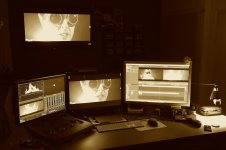
HOW DO YOU KNOW THE PROBLEMS OF THE MAC PRO PCIE ARE MANY, pending the NEW MAC PRO. I HAVE DONE THIS SMALL PROJECT FOR THOSE WHO WANT A MACHINE FOR FULL COLOR CORRECTION WITH THE DAVINCI RESOLVE 8.2.
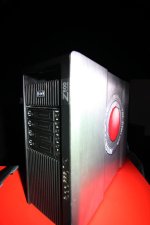
MACHETE 2 FOR HP Z800 IS SIMPLE, FAST, POWERFUL.
EVERYTHING IS BUILT IN ISO, you download VIA FTP, DO NOT DO ANYTHING JUST OPEN CLONER CARBON COPY ISO IMAGE ON A NEW HARD DRIVE AND INSTALL CHAMELEON, BOOOOOOM NOW YOU READY TO HAVE A MACHINE DUAL BOOT OSX 10.7.3 AND IF YOU WANT ANOTHER LINUX OPERATING SYSTEM OR WIN 7.
TO DOWNLOAD YOU WILL HAVE TO WRITE AN EMAIL AND CONFIRM YOUR PURCHASE OF THE LION 10.7.
HOW MUCH FOR MACHETE 2 for HP Z800?
0 is GRATISSS FOR REDUSER.:yesnod:

WHAT WORKS:

ALL-USB PORT
ALL-PORT FIREWIRE 400
CUDA-CARD 460/470/480/570/580 GTX / GTX 590 WORK FOR 2 GPU :)
GUI-CARD: 8600/8800/9800
REDROCKET-CARD
3D-BM Decklink + HDMI
FROM TO CPU-55xx 56xx 6 CORE ARE WELCOME.
RAM-192 GB MAX
SUPPORT MAX-8 SAS OR SATA HARD DRIVE

WHAT DOES NOT WORK OR IN PART:

SLEEP-MODE is PARTIAL TO THIS PROBLEM WITH THE REDROCKET
-AUDIO DISABLED ON BOARD is, PROBLEMS WITH GTX INCLUSION IN THE FUTURE LOOKING TO CORRECT THIS BUG. BOX 2 USB I BELIEVE IS THE BEST.

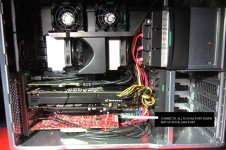
WHERE TO PUT THE CARDS:

Slot 1 -> 3D BLACKMAGIC
SLOT 2 -> X16 CUDA GTX CARD
SLOT 3 ->
SLOT 4 -> GUI X8 CARD
SLOT 5 -> X16 IS FREE FOR ANY NETSTOR / CUBIX (ONLY FOR ADDING REDROCKET BOARDS, AND RAID CARD OR CARD BM)
SLOT 6 -> FREE
SLOT 7 -> X8 RAID CARD OR REDROCKET


THE PERFORMANCE:

Performance with installed 1 gtx 590 (2 gpu)
1 redrocket
1 bm 3d
1 9800 gui
file 5k ws red epic compression 5:1
half debayer
default settings.

Noise reduction : max 3 node realtime
Blur node: 21 realtime


IMPORTANT INGREDIENTS:

- Power Cable Splitter --> http://www.ebay.com/itm/16-PCI-6-pi...885?pt=LH_DefaultDomain_0&hash=item1e55fffdc5

- P0WER SUPPLY FOR YOU INSTALL GTX 590 YOU MUST BUY 1100WATT
850 IS MAX SUPPORT GTX 580.


BIG THANKssss THE ENTIRE TEAM INSANELYMAC FOR THE SUPPORT.

Again, this is a Hackintosh, this system is not supported by anyone.


thanks
Luigi
 

Attachments

  • 3.jpg
    3.jpg
    82.6 KB · Views: 0
  • 2.jpg
    2.jpg
    85.4 KB · Views: 0
  • 1.jpg
    1.jpg
    93.2 KB · Views: 0
  • 4.jpg
    4.jpg
    97.8 KB · Views: 0
You´re the man Luigi!!, thank you very much for your wisdom and your incredible solutions and timesavers!!!
 

Attachments

  • 9.jpg
    9.jpg
    84.3 KB · Views: 0
Sorry why do you build a Hackingtosh for DAVINCI RESOLVE, when its available for win7?
I dont get it :-)
The only positive think you can encode ProRes.

At the moment I am only running the lite version of Resolve on my Thinkpad and win7 workstation.
I had also installed MacOS on these systems but only for testing. It wasn`t that stable for professional work.

The Z800 is a perfect windwos/linux wokstation with no need to run MacOsX.
The only new programm wich is not running on win7 is FCPX.
 
Last edited:
Sorry why do you build a Hackingtosh for DAVINCI RESOLVE, when its available for win7? I dont get it :-) The only positive think you can encode ProRes. At the moment I am only running the lite version of Resolve on my Thinkpad and win7 workstation. I had also installed MacOS on these systems but only for testing. It wasn`t that stable for professional work. The Z800 is a perfect windwos/linux wokstation with no need to run MacOsX. The only new programm wich is not running on win7 is FCPX.
Ciao Fabian, I share his thoughts, but not stability. why not be stable? you have already done this machine and tried it? I have been running for several days and nights I have rendered five videos and three documentaries has been on for two weeks without a shutdown, never off always ok. If this is not for her stability. Probably you did something wrong in compiling dsdt wrong or some kext on your Hackintosh. Windows 7 premiere fails to display a real-time output 1080p hd-sdi from bm 3d, red epic R3D files from 5k and 1 gtx 590, but here with the new 10.7.3 nvidia drivers working. Unfortunately all my clients want to ProRes, and then what to do? I am a supporter as you noted the fact that you want a Windows platform complete with ProRes, it was a beta release of DaVinci and rejoicing, but apparently the final version has not been set, so I arranged to better things. If he had any suggestions I am glad to hear it and I am very sorry that the project does not like but then again I share his thoughts.best hope for a Mac Pro. thanks Luigi
 

Attachments

  • 4.jpg
    4.jpg
    89.7 KB · Views: 0
Last edited:
Please Luigi, attach DEBUG info to get working 9800GT and 590 GTX in Davinci. I've lost it.

Regards.
 
Sorry for the inconvenience.:cry: Error download files from ftp.
As promised a quick tutorial video of how to install machete2.:blush:

procedure:
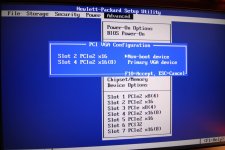
- Download from ftp 1 bios folder contains the photos to set the bios correctly.
1 files, Chameleon boot loader. 1 spare 10.7.3 lion image.

information pcie slots, the girders of the first page.

For debugging in DaVinci:

LsManager.3.NumGPUs = 2
LsManager.3.GPUMapping = 0 1
LsManager.3.GPUMappingEnable = 1

Thanks LUIGI


TUTORIAL video:

install Lion on hp z800
http://www.youtube.com/watch?v=xZ5V-GtHss0

Davinci DEbug
http://www.youtube.com/watch?v=1nfDWFKPwOM
 
thanks luigi, i start install on my Z800. i got some problem. could you give me some suggestion.

1.Where is PCI VGA configuration option? i can't find it in Advanceed tab, so i keep my video card in slot 2.

2.I format new hard drive with GUID partition, and install chameleon standard setting. when i boot from Z800, there is boot0 error message. it's WD 2TB hard drive. i try to format MBR partition and it's work then i can get into starting screen.

3.After starting circle running, screen turn black lose signal. i think maybe my Quadro 6000 not compatible with Machete. Is Quadro 6000 possible to be use in Hackintosh?

i only test to this step today. expecting your advise.

thx
paul
 
Better GUI Card

Better GUI Card

Hi Luigi,

Thanks so much for putting this together. I understand it is built specifically for Divinci Resolve, but I had a few questions to see if it can work well as an all around machine for us. We are moving from FCP/Color to using Premiere and Resolve. Most of our time is spent in editing, so it is important that the machine work well for Premiere as well. As I understand it, Premiere is only accelerated by the GUI card, while Resolve uses any GPU cards you have that aren't the GUI. It would be great if I have this wrong, but that seems to be what I have read.

I was planning on using the slots like this:
Slot 1 -> 3D BLACKMAGIC
SLOT 2 -> GTX 580
SLOT 3 ->
SLOT 4 -> 9800 GUI
SLOT 5 -> Apple Fiber Channel Card connected to RAID
SLOT 6 -> FREE
SLOT 7 -> REDROCKET

Could I use the GTX580 as a GUI card for my editing and then just move the cables and make my 9800 the GUI card when I go into Resolve? Or is this a bad idea and will give me problems in the long run? If this isn't a good idea, could I remove the Fiber Channel card in slot 5 and use a GTX 470 or another GTX 580 in slot 4 as my GUI card for premiere? That would mean getting rid of my Xserve Raid and figuring out another storage solution or course. Any other limitations I might have with this system if I use it for Photoshop, Office, etc.? I'd really like to dump my Mac Pro, but I really need a stable platform as well.

Thank you again for your work on this project and any insight you can provide.

Best,
Walter
 
Hi Luigi,

Thanks so much for putting this together. I understand it is built specifically for Divinci Resolve, but I had a few questions to see if it can work well as an all around machine for us. We are moving from FCP/Color to using Premiere and Resolve. Most of our time is spent in editing, so it is important that the machine work well for Premiere as well. As I understand it, Premiere is only accelerated by the GUI card, while Resolve uses any GPU cards you have that aren't the GUI. It would be great if I have this wrong, but that seems to be what I have read.

I was planning on using the slots like this:
Slot 1 -> 3D BLACKMAGIC
SLOT 2 -> GTX 580
SLOT 3 ->
SLOT 4 -> 9800 GUI
SLOT 5 -> Apple Fiber Channel Card connected to RAID
SLOT 6 -> FREE
SLOT 7 -> REDROCKET

Could I use the GTX580 as a GUI card for my editing and then just move the cables and make my 9800 the GUI card when I go into Resolve? Or is this a bad idea and will give me problems in the long run? If this isn't a good idea, could I remove the Fiber Channel card in slot 5 and use a GTX 470 or another GTX 580 in slot 4 as my GUI card for premiere? That would mean getting rid of my Xserve Raid and figuring out another storage solution or course. Any other limitations I might have with this system if I use it for Photoshop, Office, etc.? I'd really like to dump my Mac Pro, but I really need a stable platform as well.

Thank you again for your work on this project and any insight you can provide.

Best,
Walter


Dear Walter,
This is not meant only for hackintosh DAVINCI, I always use every day adobe premiere 5.5.2, and. 7 final cut. I state that does not use final cut 10. But do not feel the need, Adobe Premiere and much faster in all and above all I can to edit native RED.
I go back to your question. I purposely chose a gui 9800 or 8800 card with up to 512MB, with this trick adobe skills not the 9800 or 8800 for CUDA, but rather but a card with more than 800MB. so adobe would use in your configuration as the GTX 580 GPU computing and mercury would be enabled. in my case, for example, uses the gtx 590, I must tell you that with this neat video card also can use the 2 gpu integrated and become faster. what he wrote and perfect and the system works very well. For now I have assembled and edited about 350 hours of R3D material with this Hackintosh, and more it is less stable as a mac pro.
If you have questions or other tests for me to do gladly accept.
So you can take away all doubt.
I only did this only for hackintosh issues to pcie and I needed a pc / mac with the ability to have 8 disks for backups on the set, without having to carry around discs or external raid.


thanks
Luigi


TEST WITH GPU DIFFERENT:
HP Z800 hackintosh 1100watt power supply , 1 nvidia in x16 slot and 1 nvida in x8 slot

REDROCKET+
2 CARD GTX 580 3GB for card total 6gb ---> RESOLVE RECOGNIZE 2 GPU
5K 2:40 RED EPIC FILES half debayer.
4 NR / 27 NODE BLUR

2 CARD GTX 590 3GB for card total 6gb ---> RESOLVE RECOGNIZE 4 GPU ( MAX SUPPORTED OSX)
5 NR / 33 NODE BLUR

2 OLD CARD GTX 470 1.2GB total 2.4gb --> RESOLVE RECOGNIZE 2 GPU
2 NR / 21 NODE BLUR


Premiere pro 5.5.2
change gtx 590 with gtx 580 3gb , but not see difference , even with a neat video I can use 2 gpu instead of 1, best for noise reduction cuda.
only major difference appears to be when you launch the RESOLVE DAVINCI written Warnig gtx 590 not supported.

I hope to help you understand the questions that I do for email.

thanks
Luigi
 
Thanks Luigi. You have set my mind at ease and I think I'm ready to make the Hackintosh leap. I already have a GTX 580 that I bought before I knew I couldn't really use it in my Mac, and have the fiber card and Red Rocket as well.
So to start I was going to buy this Z800:
<dead link>
And a 9800 like this one for the GUI:
http://www.ebay.com/itm/120864059164
A Blackmagic 3d HD
And probably 24GB more ram

Am I missing anything?

If I find it is working well, we'll probably upgrade to a dual processor machine later, but this seemed like a good price point to begin at.

Thanks again for your help with this little project.

Walter
 
Last edited by a moderator:
Thanks Luigi. You have set my mind at ease and I think I'm ready to make the Hackintosh leap. I already have a GTX 580 that I bought before I knew I couldn't really use it in my Mac, and have the fiber card and Red Rocket as well.
So to start I was going to buy this Z800:
<dead link>
And a 9800 like this one for the GUI:
http://www.ebay.com/itm/120864059164
A Blackmagic 3d HD
And probably 24GB more ram

Am I missing anything?

If I find it is working well, we'll probably upgrade to a dual processor machine later, but this seemed like a good price point to begin at.

Thanks again for your help with this little project.

Walter

ciao Walter ,
perfect for 850 power supply , gtx 580.
if you upgrade to gtx 590 in future remember you change power supply to 1100 watt.

and you must buy this for split 6 to 8 pin
IMPORTANT INGREDIENTS:

- Power Cable Splitter --> http://www.ebay.com/itm/16-PCI-6-pin...item1e55fffdc5


thanks
Luigi

 
Last edited by a moderator:
My next job i'm thinking in PCI-E 3.0 motherboard, 680 GTX (1536 cuda cores) and one 9800 GT 512 MB. Luigi if you want we can play with this.

Ciao friend
 
Back
Top