Welcome to our community

Be a part of something great, join today!

  • Hey all, just changed over the backend after 15 years I figured time to give it a bit of an update, its probably gonna be a bit weird for most of you and i am sure there is a few bugs to work out but it should kinda work the same as before... hopefully :)

Is it me, or does audio SUCK on Scarlet?

Chris Luker

Well-known member
Joined
Mar 12, 2007
Messages
898
Reaction score
0
Points
16
Location
Salt Lake City, sometimes France
Website
www.utahcamerarentals.com
*Solution found!*

I can confirm 100% now that it was the cable that was the problem. Cheap Radio Shack components that I used to make the cables.
I can also confirm that the HOSA XVS-102F cables work. Not the best cables in the world, but better than the ones I made!
Problem solved.

________________________________________________________________________________________________________
________________________________________________________________________________________________________

Ok, troubleshooting all morning...
Seems to be a grounding issue. Touching the mic makes the noise, not touching it makes no noise.
I think it is the cables I made with cheap connectors from the Shack.

_________________________________________________________________________________________________________
_________________________________________________________________________________________________________

Was not the mic!
I just received a RODE NTG2 self powered mic and still get the ticking sound going straight in.
I am getting new cables next week (the Radio Shack parts I used to make mine are crap). Then, if not fixed, the Wooden Camera adapter.
Hope it's not my audio board just not being up to task. :(
__________________________________________________________________________________________________________
__________________________________________________________________________________________________________

Just tried a whole bunch of different cables to try and get audio into my Scarlet X with a crappy Azden SGM2X (because it runs off of internal battery, not Phantom- fresh battery BTW). Ended up making my own since none of the store bought ones worked.
Finally got it to work and record audio.
Meters are all over the place.
When I play back, the audio has hiss and ticks in it.

Here's a sample: Test audio (Yes, my beautiful voice. I'm available for v.o. work too- lol.)

Yes, I know that true audio needs to be on a second system - I am an audio guy by trade - but this is not acceptable at all for run and gun stuff.
Only use I can see is for a scratch track.

This sucks.

If this is normal, I think I'm going to sell the Scarlet and get back into a RED One. That audio was great!

Oh, and no XLRs? Really?
Ya, ya, Pro I/O is coming in the next year or so... for $3k?
 
Last edited:
Just tried a whole bunch of different cables to try and get audio into my Scarlet X with a crappy Azden SGM2X (because it runs off of internal battery, not Phantom- fresh battery BTW). Ended up making my own since none of the store bought ones worked.
Finally got it to work and record audio.
Meters are all over the place.
When I play back, the audio has hiss and ticks in it.

Here's a sample: Test audio (Yes, my beautiful voice. I'm available for v.o. work too- lol.)

Yes, I know that true audio needs to be on a second system - I am an audio guy by trade - but this is not acceptable at all for run and gun stuff.
Only use I can see is for a scratch track.

This sucks.

If this is normal, I think I'm going to sell the Scarlet and get back into a RED One. That audio was great!

Oh, and no XLRs? Really?
Ya, ya, Pro I/O is coming in the next year or so... for $3k?

It's you properly handled, all of the Red cameras have really good audio. I just recorded about 6 hours of near-perfect audio to my Epic. So what's the real problem?
 
Just tried a whole bunch of different cables to try and get audio into my Scarlet X with a crappy Azden SGM2X (because it runs off of internal battery, not Phantom- fresh battery BTW). Ended up making my own since none of the store bought ones worked.
Finally got it to work and record audio.
Meters are all over the place.
When I play back, the audio has hiss and ticks in it.

Here's a sample: Test audio (Yes, my beautiful voice. I'm available for v.o. work too- lol.)

Yes, I know that true audio needs to be on a second system - I am an audio guy by trade - but this is not acceptable at all for run and gun stuff.
Only use I can see is for a scratch track.

This sucks.

If this is normal, I think I'm going to sell the Scarlet and get back into a RED One. That audio was great!

Oh, and no XLRs? Really?
Ya, ya, Pro I/O is coming in the next year or so... for $3k?

Want XLR but don't want to wait/pay $2k-$3k for the IO Module? Get the wooden camera A Box it's a $199 XLR adapter designed for Epic/Scarlet. Or use dual system sound.
 
In many ways - just you...

To make the form factor work, XLRs were left to a module. The audio is unbalanced, so using standard cables for lapel mics etc. will not work as they couple the channels for mono into a stereo input. This shorts out on a Scarlet.

Yes, you can get great audio on the Scarlet but you have do get the cables and balance right. Use straight pass stereo cables like you get from Radio Shack, and set the audio to -30dB on the Scarlet input. This will yield good results.
 
I believe audio into the Scarlet is balanced.

From the Scarlet manual -

"Two 3.5mm phone jacks on the front of the brain support two independent channels of balanced orunbalanced analog microphone level audio inputs. "
 
Surely you knew the Epic/Scarlet didn't have XLR audio inputs before buying?
Yes, of course! Sucks.

It's you properly handled, all of the Red cameras have really good audio. I just recorded about 6 hours of near-perfect audio to my Epic. So what's the real problem?


Good to hear it's not normal. I'm going to try my Neumanns and mixer tonight when they get off of a rental.

Want XLR but don't want to wait/pay $2k-$3k for the IO Module? Get the wooden camera A Box it's a $199 XLR adapter designed for Epic/Scarlet. Or use dual system sound.

Being a pro audio guy, I just don't like the idea of 1/8" balanced plugs. They suck. They don't lock, and they don't make as sure a connection as XLRs - noisy. The A Box is still just and adapter for 1/8" plugs.
Of course on critical production audio dual sound is a must. I'm thinking for just one man quick, light shooting. Don't want to have to deal with a separate audio package when just simply shooting stuff.

In many ways - just you...

To make the form factor work, XLRs were left to a module. The audio is unbalanced, so using standard cables for lapel mics etc. will not work as they couple the channels for mono into a stereo input. This shorts out on a Scarlet.

Yes, you can get great audio on the Scarlet but you have do get the cables and balance right. Use straight pass stereo cables like you get from Radio Shack, and set the audio to -30dB on the Scarlet input. This will yield good results.

Scarlet is supposed to have balanced inputs. I've tried both though...
I am not getting good results from balanced or unbalanced with the audio set to -30dB or any dB.

I'll post any results I can get with the mixer/phantom mic setup.
Frustrated. :(
 
[COLOR=#FFFFFF !important]000[/COLOR]
 
Last edited:
Chris-
sorry for the angst, but certainly there have been hints that some folks are being, er, challenged? in trying to get the audio workflow sorted out.
Appreciate your bringing this up at least! I may be next once my Scarlet lands (next week!). Like most of the ops info we are getting, its piece-meal (this is not a complaint). Maybe this Thread can serve as a central point of Audio info for all of us who may be in the same boat as you in the coming weeks.

Like many of the issues we seem to be facing, our Epic Big Brothers have been down the same road(s) and I have spent months on those threads trying to absorb tricks and techniques that might apply to Scarlet.

The solution seems to be a combination of the right 3.5mini-to-XLR cable AND a particular setting in the Audio Menu (balanced? unbalanced? aaak!). Based on what I "think" people are suggesting I have order THIS from B&H Photo:

http://www.bhphotovideo.com/c/search?Ntt=hosmmraxf1&N=0&InitialSearch=yes

....so I can plug a scratch mic (my old betacam's dynamic on-board mic) directly into my Scarlet. Will it work? damned if I know. Will certainly let everyone know.

Stu Aull
Alaska
 
Thanks for this post. I'm kinda worried about my audio. I picked up the Wooden Camera Abox and run an XLR to Rode NTG2, but I'm worried that it won't work if phantom power isn't enabled on the Scarlet. If anyone has a similar setup and could let me know it'd be much appreciated!
 
...

Based on what I "think" people are suggesting I have order THIS from B&H Photo:

http://www.bhphotovideo.com/c/search?Ntt=hosmmraxf1&N=0&InitialSearch=yes

....so I can plug a scratch mic (my old betacam's dynamic on-board mic) directly into my Scarlet. Will it work? damned if I know. Will certainly let everyone know.

Stu Aull
Alaska

Hate to be the bearer of bad news but I don't think that will work. That is meant to take a mono mic into a stereo jack; both input jacks in the Scarlet are separate mono jacks - one left, one right. I am not an electrical or sound expert but I think people are making this harder than it is. The audio jacks are wired as balanced inputs (RTS). Each one is designed to bring an individual mono signal into the respective audio channel. A stereo mic won't work unless the signal is spilt. A mono mic will work fine if fed into on one of the mono jacks and is wired appropriately.

As an aside, the Scarlet is designed to deliver phantom power but I believe it is not yet enabled. It is also designed to accept mic or line level inputs but again, not sure what is enabled. And finally, it is designed to accept balanced or unbalanced plugs. I don't have my Scarlet yet so I haven't been able to test any of this. The Wooden camera A-Box is a very nice piece of equipment (I have one). It is a simple way to get things to work right. And, I believe, when the time comes, it will deliver phantom power from the Scarlet to the mic.

The right cable can work, but I am not sure this is it.
 
Thanks for this post. I'm kinda worried about my audio. I picked up the Wooden Camera Abox and run an XLR to Rode NTG2, but I'm worried that it won't work if phantom power isn't enabled on the Scarlet. If anyone has a similar setup and could let me know it'd be much appreciated!

Just put a battery in the NTG2 until phantom power is enabled.
 
Hate to be the bearer of bad news but I don't think that will work. That is meant to take a mono mic into a stereo jack; both input jacks in the Scarlet are separate mono jacks - one left, one right. I am not an electrical or sound expert but I think people are making this harder than it is. The audio jacks are wired as balanced inputs (RTS). Each one is designed to bring an individual mono signal into the respective audio channel. A stereo mic won't work unless the signal is spilt. A mono mic will work fine if fed into on one of the mono jacks and is wired appropriately.

As an aside, the Scarlet is designed to deliver phantom power but I believe it is not yet enabled. It is also designed to accept mic or line level inputs but again, not sure what is enabled. And finally, it is designed to accept balanced or unbalanced plugs. I don't have my Scarlet yet so I haven't been able to test any of this. The Wooden camera A-Box is a very nice piece of equipment (I have one). It is a simple way to get things to work right. And, I believe, when the time comes, it will deliver phantom power from the Scarlet to the mic.

The right cable can work, but I am not sure this is it.


Well....bugger.

Since neither of us has our Scarlet yet Terry, we can "race" to see which type of cable actually works! Thx for reply. Still somewhat confused here as to just what the actual/real/final solution will be!

Found THIS thread in (surprise!) "Audio" sub Forum:

http://reduser.net/forum/showthread.php?63328-Audio-Cable-for-Epic-X/page2

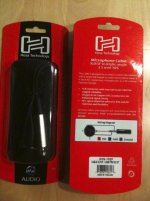
There a user has used THIS cable with apparent success (pic)

Stu Aull
Alaska
 

Attachments

  • Scarlet Audio 3.5-XLR cable.jpg
    Scarlet Audio 3.5-XLR cable.jpg
    79.7 KB · Views: 0
Ha, been using the mic for years and never realized it took a battery. I feel dumb. Thanks for the advice!

LOL I did that with my Stereo mic for a long time... then unscrewed the housing one day and I was like WHOA.... We're all a little dumb sometimes, buddy.
 
Back
Top