Welcome to our community

Be a part of something great, join today!

  • Hey all, just changed over the backend after 15 years I figured time to give it a bit of an update, its probably gonna be a bit weird for most of you and i am sure there is a few bugs to work out but it should kinda work the same as before... hopefully :)

Is it me, or does audio SUCK on Scarlet?

Was not the mic!
I just received a RODE NTG2 self powered mic and still get the ticking sound going straight in.
I am getting new cables next week (the Radio Shack parts I used to make mine are crap). Then, if not fixed, the Wooden Camera adapter.
Hope it's not my audio board just not being up to task. :(
 
I have this problem as well when using AC power. No problems at all using Batteries.

The ticking doesn't show up until I hit record. Then it shows up.

There has to be something else going on here, where interference is getting into the signal.

No problems with Batteries
No problems when not recording.
Problems with AC
Problems ONLY after I hit record.

All of my problems go away when I run off of a redvolt in the handle. Same cables, same mic, same everything except running off of AC.
 
Damn. I hate being wrong. Now that I look at the picture of the A-BOX more closely, the 1/8" plugs do have a double ring on them, indicating they're balanced.

Thanks for the clarification.


EDIT: Actually, Stuart, I think I stand by my original statement, albeit with some qualifiers. Please correct me if I'm wrong.

My understanding of audio is this: Mono is the alternative to stereo. Balanced is the alternative to unbalanced. When I stated "mono" I didn't mean "unbalanced". A balanced cable, as in the case of the A-Box, is still a mono cable. Just as a balanced cable with XLR connectors on both ends still carries a mono signal.

Yes, two signals travel the length of the wire, but not in the left-right sense we think of when we think stereo. The two signals in a balanced cable are, as you put it, '"+" and "-" of the mono signal', in order to cancel out any noise or interference introduced into the cable between connections.

However, the way products are labeled in many cases, a person should be looking for a stereo (double black ring) 1/8" to female XLR cable and choose "Balanced" on the Scarlet (even though that will only produce a balanced mono signal at the input of the Scarlet).

A person using a mono (single black ring) 1/8" to female XLR cable would choose "Unbalanced" on the Scarlet.

Is this correct?


Would someone please confirm that this wiring configuration is correct to produce a balanced mono audio cable that will work on the Scarlet-X:

• XLR pin 1 to jack sleeve
• XLR pin 2 to jack tip
• XLR pin 3 to jack ring

Thank you in advance for your time and assistance.
 
I remember there being an issue of this sort - ticking on audio - with the HVX when it was running off of AC power as well when you used the 32g cards... something about a very precise alignment of shielding issues. Perhaps it's something in this arena? Certain mics/cables and AC power don't go together?
 
So I have a Powered Lav and I see the bars moving and hear myself with headphones but record down and play it back in Premier and I don't hear anything put white noise. Is it something thing I am doing? Its a mono mic with one black ring.
 
how are people listening to there audio files? Are they doing the whole lightroom method?

I have found the easiest way is to just export all of your clips from the day out of Red Cine-X as BWF format. This is basically a wav file I believe. It then creates an audio file the exact length of it's accompanying clip. I can get all my audio back for a full days shoot with just a minute or extra work. And I just pop those back in order in premiere with the R3D files and disable their audio files. on the timeline. Really easy.
 
Would someone please confirm that this wiring configuration is correct to produce a balanced mono audio cable that will work on the Scarlet-X:

• XLR pin 1 to jack sleeve
• XLR pin 2 to jack tip
• XLR pin 3 to jack ring

Thank you in advance for your time and assistance.
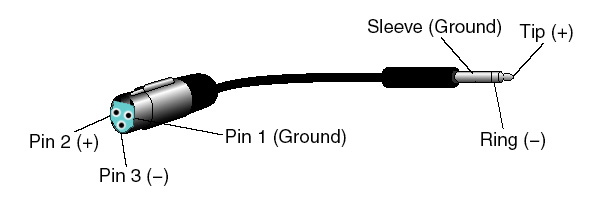
YES!! And THANK YOU for asking the question the proper way. There are MANY ways of wiring a 3-pin XLR to a 3-contact miniplug. So asking if this adapter or that adapter will work is not always going to get you a useful or enlightening answer. The ONLY way of being sure you are using the right miniplug to XLR cable is to KNOW HOW IT IS WIRED.

xlr_trs.jpg


This is a picture of a properly wired TRS --> XLR connector that is fine to use with a Scarlet/Epic set to BALANCED, and would be safe if phantom power was enabled. Thank you, Professor Coutant.

Unfortunately, many connectors that have a 3-contact miniplug on one end and a 3-pin XLR on the other end are dual mono and are made to connect an XLR mic to a DSLR miniplug stereo input. Tip and Ring are connected together - both to XLR pin 2 - on this type of cable! Beware of negative consequences for sound and equipment.

There are many other ways of adding hidden circuits and connections, some of which may even work in some situations. But the ONLY proper XLR --> miniplug cable for Scarlet/Epic is simple - it's pictured above. There are also proper and improper ways of plugging wireless receivers directly into the Scarlet/Epic minplugs, but that's another topic (that, like this one, has been covered before).
 
Last edited:
Thank you Steve!
 
Please share! Your post was super helpful.

EDIT: Here is a link to an XLR - TRS adapter that matches the above description! http://www.fullcompass.com/product/349150.html

You're welcome, and the Full Compass link shows another good wiring diagram. But as the note from Full Compass said, wiring in wireless device cables is sometimes proprietary, so I'm not going to suggest a one-size-fits all solution. I will say that the Sennheiser CL-1 cable (TRS miniplug to TRS miniplug) is also a dual mono cable - so don't use it! Just use a simple stereo to stereo cable available from Radio Shack, though I don't know if they make a short one. Another problem: the Sennheiser receiver likes a screw-lock miniplug, so it doesn't always play nice with a regular one. Screw-lock miniplugs and nice Neutrik right-angle miniplugs are available from Markertek (and maybe Full Compass) if you want to make your own cables.
 
Not sure that's accurate for the A box, but I can say if you use mono cables you must select UNBALANCED audio at the camera.

if you select BALANCED it does use a "stereo" configuration, "left" and "right" are now differential "+" and "-" of the mono signal


In any case, whatever you do, don't select BALANCED audio at the camera, and then use "mono" cables.

If you do that the "+" and "-" will cancel each other out.... i.e. no audio

Stuart,

On my Epic, I can't select Balanced.
This is v2.0.5

It is permanently Unbalanced.


CORRECTION: Having spend 30 minutes, I eventually managed to select Balanced on the menu. The problem is the awful touch screen. Red really need to fix that.
 
Last edited:
I do wish RED had just built mics into the brain so none of this would be necessary. We'd have the ambient sound and the Production Mixers on our projects would do the rest.
 
Be good to find out. They still have BALANCED/UNBALANCED check boxes in the Epic menu but I thought they said they had only enabled unbalanced at the moment.

Is that so? I hope not. It would be good if someone from RED could shed some light on the current audio situation. I would really like to know when phantom power is being enabled as well. Hopefully with the announcement of REDGamma3 that we're not too far from some new firmware which could bring some improvements in the audio department as well.

I made up a cable the other night and did an audio test with my Scarlet, it works nicely and the preamps seem even more quiet than I thought they would be.
 
Back
Top