Welcome to our community

Be a part of something great, join today!

  • Hey all, just changed over the backend after 15 years I figured time to give it a bit of an update, its probably gonna be a bit weird for most of you and i am sure there is a few bugs to work out but it should kinda work the same as before... hopefully :)

Ask David Mullen ANYTHING

David,

Big questions now that you're shooting Epic...

Hows the HDRx, and do you have any samples?

Does striving for that 18 stops do weird things to the motion?

What's your opinion on the whole feature, and what settings do you prefer?

Bonus:

Do you think it would be possible to use an anamorphic adapter on the fixed Scarlet?
 
HDRx works, but it's not a cure-all, you need to think about when to use it. There are some motion issues, but they probably will be reduced as new techniques are developed to blend the B-frames over the A-frames. If there isn't much motion and where I need the extra highlight detail is limited to a specific area that people don't cross, like a window in the shot or the sky above the actors' heads, etc. then I think you might as well go for max HDRx (+6) because you can control how much you blend that extra detail into the normal exposure. If the shot is messier, more motion, more complex, then +3 is a good option. I used it at +4 a lot of times.

There is also the increase in data to keep in mind and the reduced recording times.

I still used things like an ND.60 grad when I could to control bright parts of the frame rather than over-use the HDRx function.

When I do the final D.I., that's when I'll have a better sense of HDRx and how it helps. I just hope which shots used it is somehow flagged in the EDL so I don't have to guess when I watch the D.I.

If you want an anamorphic squeeze, a fixed lens would require something like the old 1.33X adaptors made for DV cameras; I don't think much of them. The optical loss would counteract any improvement from not cropping the frame to get 2.40.
 
Cinematography Study Suggestions

Cinematography Study Suggestions

Hello,
I am attending a lighting and grip course at The Workshops next week, and I am wondering if you have any suggestions on lighting scenarios that I should study? I do have experience lighting, and feel like I have a good understanding of it, but would like to challenge myself in the subtleties of it. Right now my direction is really working on lighting really smooth and sensual skin tones. I have investigated harsh and directional lighting and found it pretty easy... almost like a one-liner.
Any suggestions would be greatly appreciated.
~Dean
 
I'm not sure creating a big soft source for a portrait is particularly hard in a classroom set-up, the hard part tends to be when you are moving quickly in a small location and the camera is moving around, etc. Of course, soft portrait lighting is an art into itself because the angle of the light, the height, etc. can have different effects on different faces.

Roger Deakins is a master at what I'd call dramatic soft lighting, i.e. soft lighting that maintains contrast and thus drama & mood. I'd study one his more intimate dramas, such as "In the Valley of Elah" for example, or "A Beautiful Mind", or "The Man Who Wasn't There". He's like a painter who never uses extraneous brushstrokes. There's light where it needs to be and not where it doesn't.

For a more advanced study, I'd look at the whole history of soft lighting in movies, from the use of Cooper Hewitt soft boxes in late 20's movies, to the use of bounce lighting in the French New Wave, the soft lighting used in British movies of the mid-60's and 70's by David Watkin, Ozzie Morris, John Alcott, the 70's work of Gordon Willis and the use of overhead soft boxes, Storaro's use of large single-source lighting (soft & hard), the post-70's stuff like Philippe Rousselot's use of Chinese Lanterns, Darius Khondji's use of Kinoflos, etc.

Of course, the real secret to getting smooth and sensuous skintones is to hire actresses with smooth and sensuous skintones...
 
Hey David I am sure you can answer this for me.

I am getting restored currently some Russian Lomo Anamorphic lenses, 35mm, 50, and 80mm.
When shooting in anamorphic mode on the RED and after squeezing the footage back to a normal aspect, what is the equivalent MM in a normal lens? IE does 35MM anamorphic = 35MM Normal, if you centre cut the anamorphic to full 16x9 and try and match it with another red shooting normal aspect lenses in the same mode IE 4k ana and 4k 16:9


Thanks in advance
 
Last edited:
The Lomos have a 2X horizontal squeeze, so if shooting 4-perf 35mm you basically have the equivalent of shooting on a spherical lens of half the focal length in terms of equivalency of horizontal view. So a 50mm anamorphic is like a 25mm spherical image cropped to 2.40, assuming the same width of film stock is exposed (in real terms, however, anamorphic photography exposes the Academy width of 35mm and Super-35 exposes the Full Aperture width, so the conversion factor is not exactly 2X, it's more like 1.83X).

However, it's a bit more complicated than that if you want to be particular about field of view differences because of the 1.20 : 1 area of the M-X sensor used for a 2.40 : 1 anamorphic image. In 4K 2:1 spherical mode, you record a 22.12mm width of the sensor; in 4K ANA mode, you record a 14.93mm area of the sensor but the image has a 2X horizontal squeeze (optical).

So you can think of it as having a 29.86mm wide sensor in terms of horizontal field of view (14.93 x 2), compared to a 22.12mm sensor width. That's a 1.35X conversion factor. So your 50mm 2X anamorphic on the Red One in 4K ANA mode would be like shooting on a 37mm spherical lens on the Red One in 4K 2:1 in terms of the horizontal field of view.
 
Thank you David.
You are definately "THE MAN"! And deserve a pay rise!

As I want to mix The anamorphic look with a set of MKIII Super speeds and finish full frame 1080P without cropping the image. So your information will help my director immensely.
 
Thank you David.
You are definately "THE MAN"! And deserve a pay rise!

As I want to mix The anamorphic look with a set of MKIII Super speeds and finish full frame 1080P without cropping the image.

You can't... some cropping has to happen with the 2X anamorphic photography to fill a 16x9 HD screen with no letterboxing. Think of it, you have a 2X squeeze to the image that needs to be unsqueezed. If you don't want to crop, that would mean that once you unsqueeze the recorded image, it becomes exactly 1.78 : 1.

So the recorded image with the 2X optical squeeze would have to have a 0.89 : 1 aspect ratio -- there is no recording mode on the Red One that does that.

The closest is the ANA mode, which records a 1.20 : 1 aspect ratio, so once you unsqueeze the image, you have a 2.40 : 1 aspect ratio. But that's wider than 16x9 so would require letterboxing to fit, or require cropping the sides to get from 2.40 to 1.78.
 
You can't... some cropping has to happen with the 2X anamorphic photography to fill a 16x9 HD screen with no letterboxing. Think of it, you have a 2X squeeze to the image that needs to be unsqueezed. If you don't want to crop, that would mean that once you unsqueeze the recorded image, it becomes exactly 1.78 : 1.

So the recorded image with the 2X optical squeeze would have to have a 0.89 : 1 aspect ratio -- there is no recording mode on the Red One that does that.

The closest is the ANA mode, which records a 1.20 : 1 aspect ratio, so once you unsqueeze the image, you have a 2.40 : 1 aspect ratio. But that's wider than 16x9 so would require letterboxing to fit, or require cropping the sides to get from 2.40 to 1.78.


I understand about cutting the sides off. The main reason we want to shoot anamorphic is for the wicked flares. This will be the "B" camera. I will need to do some tests and draw some marks on the monitor so we know what we are cutting off in anamorphic mode.
 
I understand about cutting the sides off.

Cutting off the sides affects the horizontal field of view, in 4K ANA mode, you will only be using 11.07mm x 12.44mm area of the sensor for the 1.78 image with the 2X anamorphic lens... in some ways that makes the calculations easier because 4K 16:9 mode (but not 4K HD mode) uses a 22.12mm x 11.06mm sensor area -- so your anamorphic shots will use almost exactly half of the sensor area that your spherical lens shots will use, and since your 2X anamorphic lenses sees twice as much horizontally, it means that your 50mm anamorphic image, once cropped to 1.78, will see about the same width as your 50mm spherical lensed shots in normal 4K mode.
 
Hi David,

I have a question for you regarding EPIC and blown out highlights;

I noticed in some of your frame grabs from the incredible looking Kerouac film you shot recently that you really let some stuff go way over (I'm thinking of the scene in the cabin kitchen for example, with the Xenon coming through the window), and I was wondering how you felt about blowing out highlights with the EPIC? It seemed from the stills from your film and from other EPIC footage I've seen that over exposed highlights really bloom in a much more enjoyable way than with the previous RED cameras. Did you find yourself worrying less about protecting the highlights and letting things go? Obviously you used HDRx to great effect in some instances but when you let things go were you happy with the blooming and how the well over exposed areas of the image looked?

I really dislike the way over exposed highlights look on the MX and I'm constantly working to protect them which isn't really my style of lighting. I like to let things go way over sometimes but always shy away from that when shooting RED.

Cheers,

Kevin
 
I can't really imagine me doing lighting where I didn't let some area burn out, it's just part of my style, even when I was shooting on the F900. You just can't let a large area get clipped because the lack of texture in the whites can get annoying to look at -- unless it's supposed to be textureless, like a white limbo or something. But small areas, hot backlights, etc. I've never been afraid of some clipping if it made the shot more interesting. Of course, how it rolled-off into white was different with film than it was with digital.

Epic has that M-X look, it's the same sensor with a better processor, so I think it seems to look "smoother" in regards to hot color and texture, more filmic I guess, and HDRx helps that further, so perhaps I feel more free these days to worry less about controlling overexposure, but I've always used overexposure creatively no matter what camera or format I was using.

For example, I did one of the first F900 features back in 2000, "Jackpot", and I had some flashbacks that I wanted to look a bit surreal, so I went extreme with the contrast:

jackpot4.jpg


jackpot6.jpg


So, yes, there is a lot of clipping in the shots, but I wanted that hot look so I lived with it.
 
Last edited:
Interesting, yeah I really love the way you let highlights and backlights go in U.S. of Tara. I really learned a lot about being bold from that show I should thank you :)

I've taken to often putting trace paper on windows lately to just get rid of texture altogether if I'm going to let it go more than 5 stops over on the M-X.

Thanks for the speedy response.

K
 
Oddly enough, one of the things that taught me that some clipping in HD was OK was watching the original Japanese version of "Iron Chef" when it played on the international cable channels... their intro stories into the life of the competing chef always had stylized lighting, some b&w, and blown-out windows, hot lamps, etc. to make everything look a bit magical, even though it broke every rule about controlling highlights in video. But it looked gorgeous, even if hardly film-like. Sort of taught me that classic interlaced-scan video could be interesting in its own way, that either a shot was visually exciting or it wasn't, didn't matter whether it followed any rules or broke them. Reminds me of that Kubrick comment when some actor complimented some other actor's performance by saying "it was so real..." to which Kubrick replied, "Yes, but was it interesting?"
 
Hi David. I really love this thread and am very grateful for you doing it, also I really liked your work on Jennifer's Body.

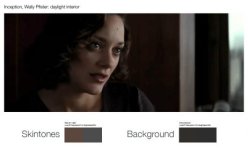
I'm doing a bit of research into visual styles (narrative too) with a view of seeing if they can be applied to documentary. One of the things I'm looking at is the tonal difference between people and the backgrounds they enhabit – I'll also be doing this with documentary film and a few computer games.

It is well stated that a popular style for films these days is to use orange and teal as a the basis of a limited colour pallet, but what do you think about the differences in tonal values in the following daylight interiors? Is this something that has a long history? Is it a style you subscribe to or do you prefer a more 'realistic' look?

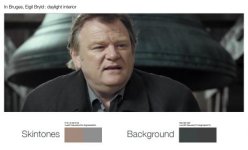
I really liked the cinematography in In Bruges, which I noticed generally used what I would call low overall scene contrast but with high texture contrast.

I've done a bit of analysis of the following frames. Am I just pointing out the blindingly obvious? Also what is the general technique to lighting for such a look?

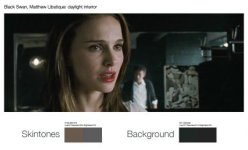
The tonal values for the background vs skintones are as follows:

In Bruges
Skintone
R161 G138 B125
Hue22º Saturation22% Brightness63%

Background
R62 G67 B67
Hue180º Saturation7% Brightness 27%


Black Swan
Skintone
R106 G90 B79
Hue24º Saturation25% Brightness42%

Background
R31 G39 B36
Hue157º Saturation21% Brightness15%

Inception
Skintone
R90 G71 B62
Hue19º Saturation31% Brightness35%

Background
R49 G46 B42
Hue34º Saturation14% Brightness19%

Thanks and kind regards,

Stefan

attachment.php

attachment.php

attachment.php
 

Attachments

  • In-Broges-bell-tower.jpg
    In-Broges-bell-tower.jpg
    14.8 KB · Views: 0
  • Black-Swan-studio.jpg
    Black-Swan-studio.jpg
    15 KB · Views: 0
  • Analysis-of-frames-Inception.jpg
    Analysis-of-frames-Inception.jpg
    11.9 KB · Views: 0
In Burges was a great #$% film! (lots of expletives if you haven't seen it yet) Keep in mind that most of the architecture they had available was un-real, but I couldn't agree more that it was a gorgeous looking film through and through.

I like what you are saying about low contrast, high texture contrast. And I am thinking I might have a predilection for this look. David, I would love to hear your thoughts on this in particular if you would.
 
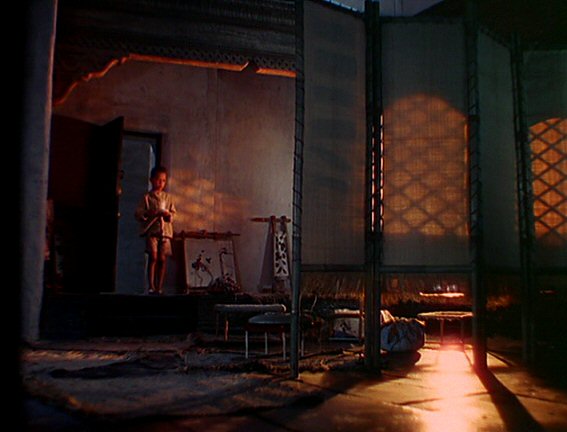
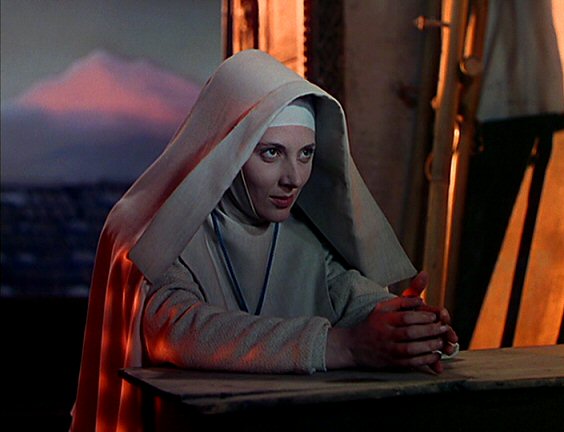
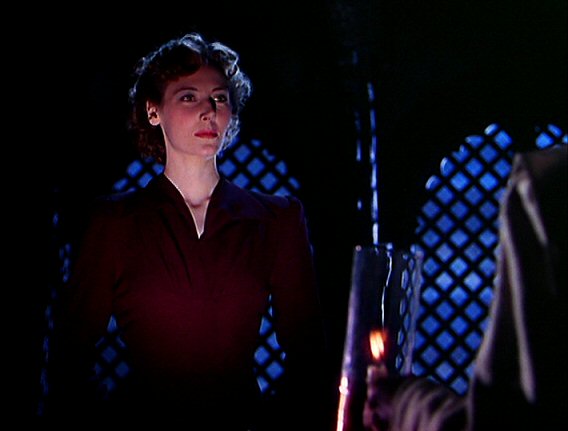
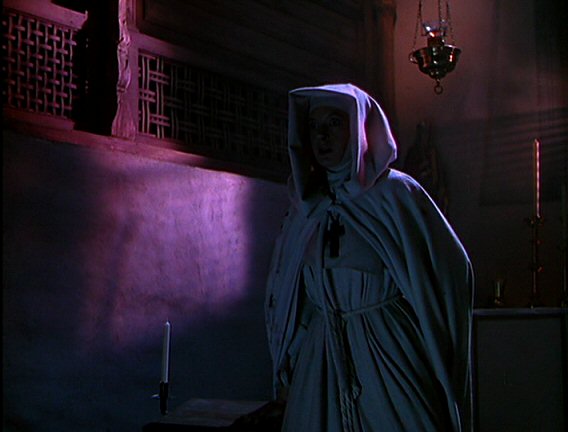
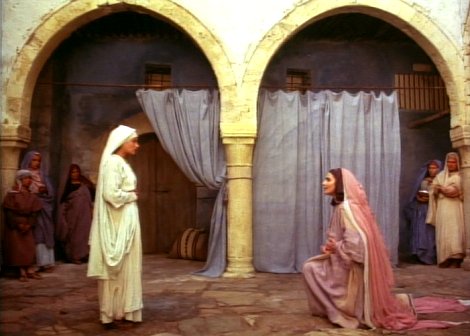
Even in old 3-strip Technicolor movies, half the time, the sets were painted in muted colors and most of the wardrobe was muted, leaving strong color accents to pop out better. Look at these frames from "Black Narcissus" -- you'll notice that most of the wardrobe is white-grey (the nun's habits) and the set walls are muted, the color comes mostly from the lighting and select elements in the frame. When Sister Ruth goes mad and puts on a red dress and wears red lipstick, the visual effect is very striking. I'll also point out that Natalie Portman's red lipstick in that frame above was making a story point as well.

blacknarcissus3.jpg


blacknarcissus4.jpg


blacknarcissus5.jpg


blacknarcissus6.jpg


Now in the case of a movie set in an old European town like Bruges, it's hardly surprising to see muted colors compared to a movie shot in, let's say, Las Vegas.

But a lot of what you are seeing is merely the application of TASTE, as well as picking appropriate tonal values to support the story. Most movies are about people and usually you want the audience to look at them more than the backgrounds or wardrobe (not always, but often.) Even old saturated color Hollywood movies understood this, which is why everyone remembers James Dean and his red jacket in "Rebel Without a Cause" but few people remember the color of the walls in his home.
 
Thanks David. It seems we've got a much more restricted pallet today. I've seen this applied to documentary films with a grade in post and I'm not sure it really works due to the lack of control over sets and most places having bright white walls.

Where would you start with getting the low overal contrast effect with high texture contrast seen in In Bruges?

Stefan
 
"High texture" comes from lighting surfaces from a non-frontal manner so that surface texture comes out -- in that case, higher resolution helps in a number of ways, especially if you like soft lighting, because you'd get the most texture often (but not always) from raking hard light across rough textures. Sometimes you bring out rough textures by reflecting a soft source in a reflective surface though. So more resolution means that you don't have to emphasize texture as much with lighting because the camera / format will pick up fine detail.

Besides harder raking sources, higher contrast lighting also emphasizes texture since fill lighting will reduce contrast and thus the dark edges of the object will be less pronounced. So if you are going to use soft sources, use them from a raking angle and reduce the amount of fill light.

I would consider something like the lighting in "Apocalypse Now" as being highly textured because of the angle of the light and the higher contrast:

apocalypse1.jpg


apocalypse2.jpg


apocalypse3.jpg
 
Back
Top