Welcome to our community

Be a part of something great, join today!

  • Hey all, just changed over the backend after 15 years I figured time to give it a bit of an update, its probably gonna be a bit weird for most of you and i am sure there is a few bugs to work out but it should kinda work the same as before... hopefully :)

Wich preamp/recorder are you're favorite and why?

attachment.php


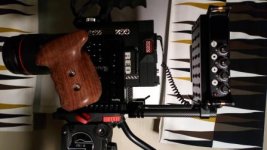
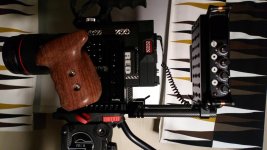
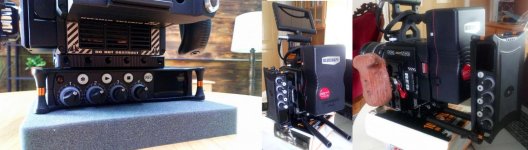
Here is 3 ways to mount the mixpre-6. With a bottomplate you can get the mixpre-6 centered better under the camera. But Im not sure If i should trust this one screw to hold the camera.
Its also nice to mount the mixpre to the side of the camerain terms of footprint to the camera. But I really like to have the left side handle there.
Any other good mounting options I might been missing?
 

Attachments

  • 3_ways_to_mount_the_mixpre-6.jpg
    3_ways_to_mount_the_mixpre-6.jpg
    97 KB · Views: 2
attachment.php

Any other good mounting options I might been missing?

If you could find an adapter that let you screw it directly onto the rods (so it lays flat under the V-Mount Battery) that'd probably be the way to do it.
Something like a lens support with the right screw size (1/4 in 20 thread) or a rod clamp with mounting points.

If that's sort of what you're doing for the behind the V-Mount position, maybe a male to male screw is all you need:
https://www.amazon.com/Male-Tripod-Screw-Converter-Precision/dp/B018SMYL9M
 
I you look at the third picture the xlr cables would come out from the top and bottom. Having them coming from the top would notbe optimal for the cables and put stress on the ports. Is there perhaps ways around this? Like angled xlr cables and some kind of cable clamp to lockethe cable to rods.
 
Look the image with 3 different ways to mount a mixpre-6 to a camera. Most commonly I do it like image to the right.

Under the camera there is a bottom plate. To that bottom plate I connect a dual rod clamp and camera plate.

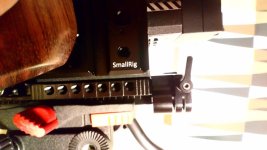
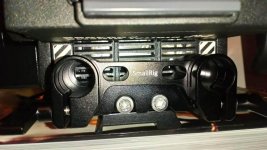
The problem is that the rod clamps hinders me to slide the camera plate forward enough to reach the balance point on the tripod head. (mounted under the cameras baseplate.). This make it impossible to balance the camera on my Satchler FS8 head. I try to post an better image on this tomorrow.

I hope there is some good solution for this to be found.
//Joel
 
Here is a couple of images that shows the problem. As you se its only possible to move the camera forward a cm before the rod clamps will hit the tripod head. The easiest solution is off course to mount the rod clamps the opposite direction like Michael Lindsay did in post #2. But then you block the air flow. But perhaps this is so minor its have no impact.

attachment.php


attachment.php
 

Attachments

  • 0-2.jpg
    0-2.jpg
    20.6 KB · Views: 0
  • side.jpg
    side.jpg
    92.5 KB · Views: 0
  • cu.jpg
    cu.jpg
    89.2 KB · Views: 0
Here is a better view of how much the rod clamps block the vent.

attachment.php


attachment.php
 

Attachments

  • upp.jpg
    upp.jpg
    97.9 KB · Views: 0
  • nedåt.jpg
    nedåt.jpg
    97.9 KB · Views: 0
I use a MixPre-3. For me, the only thing it's missing is timecode-out. So I output audio back to the camera body and sync by waveforms in post.
 
Hi Akin, I think the audio going back in the camera (from the stereo out of the mixpre-6) is satisfying for most jobs. But its great to have the additional masters when needed. One thing that is handy is to unplug the the camera and let the actors watch the playback from the camera while doing a adr on set. If its a tight schedule,or the your shooting far of from the studio and you only have a few shoots where you want to hear the voice of the over the film its a good option to have.


I found another rod clamp that I think would not block the airflow. If you are use rods at the back, please post an image of the rod clamp.
cool-railblock-15mm-rod-clamp.jpg
 
Here is a couple of images that shows the problem. As you se its only possible to move the camera forward a cm before the rod clamps will hit the tripod head. The easiest solution is off course to mount the rod clamps the opposite direction like Michael Lindsay did in post #2. But then you block the air flow. But perhaps this is so minor its have no impact.

attachment.php


attachment.php

Joel,

I've set my rig up almost the exact same way. The only thing I haven't done is buy a Mixpre yet. I'm waiting to see if there will be any Black Friday/Digi Monday specials. The biggest difference I can think of is that my bottom plate is larger (small rig 19mm plate I think), so that when I flip the 15mm mount to the bottom I have no problem getting clearance on my sticks. Maybe you could just add a bigger/quick release plate to give you some space. I'll try to take a picture of it next time I build it up. You're welcome to shoot me an email if you are really motivated, that way I won't forget.

IRT the cables, I'd either do what David said and go with the low profile XLRs or get some RA XLRs. I'd recommend custom cables from Audio Dept to get exactly what you need once you have everything in its place. Hope some of this info helps out!
 
I got the new rodclamp in the image above yesterday and it fits very well. So now I have the rod clamp pointing up instead so it does not block the camera plate under. Also It does not block the vent system above. The only downer on this rod clamp is it has only half the length of the locking part compared to the one I used before. But it should be plenty anyway I hope.

//Joel
 
Shorter rods should help compact up the size of it?

Has anyone tried the little Mozegear CaPre or mini papi?

Price of two of them (heck just one Mini Papi Preamp is more than a Zoom F4!)a is pretty similar to a MixPre3 or MixPre6, and lacks any of the extra functionality you'd get in a MixPre... such as recordering!
 
I got the new rodclamp in the image above yesterday and it fits very well. So now I have the rod clamp pointing up instead so it does not block the camera plate under. Also It does not block the vent system above. The only downer on this rod clamp is it has only half the length of the locking part compared to the one I used before. But it should be plenty anyway I hope.

//Joel

Joel, where did you get the new rod clamp? I'm thinking of the same setup. Thanks!
 
Know I need advice on good cables to go from the mixpre-6 into the red v-lock expander. What are you mixpre guys/gals using?
From my weak memory, I think there was some problems with the mx using ordinary 3.5mm stereo cables since the once on epic mx from were balanced. But the 3.5mm stereo out from the sound devices is unbalanced. Should you turn of the balanced sound in camera and use an ordinary 3.5mm stereo cable? or what works the best?

Joel, I use a Remote Audio CAMCXYD cable to get audio into the v-lock expander. http://www.trewaudio.com/product/remote-audio-camcxyd/ It's a real high quality cable that does a great job, but I'm using a MixPre-D here, so your cable may be different.

See it connected here: https://www.instagram.com/p/BpaQcr9BY5H/?taken-by=blairthornton
 
Last edited:
Hi.. Most of the tine I shoot MOS and my partner is always in Dual system setups... but for occasional direct audio jobs we we have looked for sonething that is:

Cheap and reliable for the odd occasion we just want to go into the camera...


we found this

http://www.filmtontechnik.de/en/prod...ch/dslr-mixer/

IMPORTANT NOTE....and they also made us a tiny 3.5mm to 3.5mm 40euro ground isolator....to make sure you don't get nasty noise when powering any audio device from the same battery as the camera..

So if you want it for dmc2 make sure you get that cable


Hi, I recently switched from powering my MixPre-3 via independent AA batteries to powering the device via the Hawk Woods hirose-to-P-tap input sled. As Michael L notes above, I am indeed getting a nasty noise in the in-camera audio now that I am powering both the camera and the MixPre from the same power source. I have done a few tests and can confirm the Hawk Woods is NOT the issue - this in-camera noise is only present when both devices are sharing a common power source. (Also, the MixPre-3 files are pristine regardless of power source, so the nasty noise is only present in the in-camera audio channels).

Sound Devices recommends using an in-line ground loop isolator in these situations. Does anyone know of an off-the-shelf product that would be small and effective that I could insert between the MixPre and the DSMC2 Base Expander? If not, I will look into custom but thought I'd try the easy way first.

Thanks,

Mark
 
Back
Top