Welcome to our community

Be a part of something great, join today!

  • Hey all, just changed over the backend after 15 years I figured time to give it a bit of an update, its probably gonna be a bit weird for most of you and i am sure there is a few bugs to work out but it should kinda work the same as before... hopefully :)

WHY WON'T CS5.5 w/ NeatVideo Shots RENDER ??

I won't have any time for shooting the wildlife, which is my greatest love.

No reason to worry, once you get the basics, you'll discover that you'll be able to adjust natural colors so efficiently that you need not to sit in front of your computer wondering why it doesn't look right. :-)

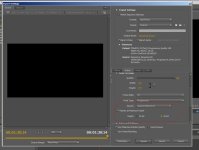
Since I never export from PPro but instead from AE, not being able to say what went wrong in your case. However, haven't had any problems with Neat Video when exporting from AE. But I have noticed that sometimes if there is a mismatch between the chosen bit depth and the bit depth of the filter, then the export may fail. This is why feel it is wortwhile to check what happens if you set the maximum bit depth on. See the attached image of PPro export window.
 

Attachments

  • export-sample.jpg
    export-sample.jpg
    67.9 KB · Views: 0
No worries George,

I created the tutorials exactly for guys such as yourself :)

Hey Brad,

Do you sell those tutorials on DVD by any chance?

If so, please let me know how much they are, including shipping to the USA.

I will continue to watch your tutorial today.

Thanks again, and say hello to the Cockatoos and Kangaroos for me. :yesnod:

.
 
After reading these posts, it has come to my attention that I just may need a better/faster VIDEO CARD for my Windows7 PC, especially after I'm able to afford, purchase, and start using AE CS5.5

As I watch a little of Brad Allen's tutorial I can see that I probably DO need a better video card. I don't know the card I have right now, but will find out and update this post.

Does anyone know of a good, "reasonably priced", Video Card that will make APP CS5.5 and AE CS5.5 work better and faster? Please give me the brand, model, price, and source, but please don't even bother to tell me of a card that costs in the thousands of dollars, 'cause there's no way I can afford that. The RedRocket would be perfect, but I'll be flapping my arms and flying to Mars before I can afford THAT. :blush:

Also, do you think I need more RAM? Currently I have 12.0 GB of RAM Memory.

Thanks for all your help and kindness. It is GREATLY appreciated.

.
 
RAM is the cheapest it has ever been, so maybe check pricing a Crucial.com (owned by Micron, the only US supplier of RAM).

The bottom of this page lists the compatible video cards and has suggestions on VRAM.

http://www.studio1productions.com/Articles/PremiereCS5.htm

If you can find a used GTX-285 with 2GB VRAM, that would be inexpensive and work well.. I don't think you need the most expensive card to play well in 5.5.

The end of that page gives you a lot of useful info on the speed difference between the cards.
 
Hey George, I'm running a GTX570 in my PC and it's performing really well for the $$. Just did a quick search on newegg for you:

http://www.newegg.com/Product/Product.aspx?Item=N82E16814130613

Having said that, NVIDIA's new graphics cards are just around the corner which means that prices will probably drop on the earlier models when they hit the market.

I don't have the tutorials available for sale (I never planned to make money from them) but would be happy to send you the original MP4's if it would help? Just let me know :)
 
Man, have YOU lost me!

The files are R3D files from our Red-One, not some kind of time-lapse sequence comprised of still images.

Or, are you saying to break the R3D files into individual frames? If so, you've got to be kidding? At 30fps, for a long shot, that could take forever. There HAS to be a better way.

I'm sure it's something I don't understand. Which, is nothing new.

.

Too many Scarlets = Reduser becomes DVXuser. Sorry, but I knew this would happen. Seriously, the point at which Reduser becomes a place where people don't know what an image sequence is constitutes a landmark day. I have nothing against noobs, I used to be one. But I wish there were more places for trained pros to swap ideas, and this used to be one.

I suggest a separate "noob forum" for this level of knowledge.
 
Or maybe a separate "elitist" forum for those who can't simply not click on a thread where they aren't useful?
 
George, Red says their cameras are for professionals or those who want to be professionals. I know that you and I (and many others) ask questions that some find tiring, but as evidenced by the response to your questions there are many who are happy to help us out. Reduser is like one big perpetual convention where there are hundreds of discussions happening all the time. It's nice that we are able to mingle with the various experts in their field who just enjoy talking shop and furthering understanding. Reduser is one of the things about RED that doesn't get mentioned very often as being an asset, but for company and customer alike, I think it is critical. Seldom does a company give up complete control of its message. To their credit, RED bites their tongue and just lets the RED tribe hash things out.
 
Here, here, Elsie.

What many people don't understand, is that there are those of us that may not be experts concerning all this new technology, but we ARE experts in other areas with lots of experience behind us. Fortunately for us, Red treats all their customers and users with respect and an openness that is truly rare these days.

Life is an adventure, and all of us are in it to hopefully get the most out of it. In every individual adventure, there are always those with their noses in the air that think they are better than anyone else. The thing is, by being that way, they are depriving themselves of the TRUE adventure; the adventure of getting to really KNOW people and making new friends. We are all equal, whether some want to believe it or not.

Knowledge, experience, and compassion, are to be shared. And, in the sharing, we reap great rewards and benefits.

Take care.

:yesnod:

.
 
Thank you!!

Kindness, thoughtfulness, consideration, and patience, is always appreciated.

.

I often give all three on other beginner forums and in person to beginners. I just don't feel this is the place for that. This used to be a placed for trained pros, and at the very least people on the verge of becoming that, who have at least been to some school of some kind.

By the same token, I love dogs, but I don't think dogs should be allowed in operating rooms. (I'm not comparing people to dogs, you see my point - to each a place and a time.)
 
Too many Scarlets = Reduser becomes DVXuser. Sorry, but I knew this would happen.
Seriously, the point at which Reduser becomes a place where people don't know what an image sequence is constitutes a landmark day. I have nothing against noobs, I used to be one. But I wish there were more places for trained pros to swap ideas, and this used to be one.

It still is.

Here's an idea. Three steps.
Here are the first two:

1) Imagine a feeling of being slammed for trying to learn.
2) Imagine a feeling after helping someone.
 
I often give all three on other beginner forums and in person to beginners. I just don't feel this is the place for that. This used to be a placed for trained pros, and at the very least people on the verge of becoming that, who have at least been to some school of some kind.

By the same token, I love dogs, but I don't think dogs should be allowed in operating rooms. (I'm not comparing people to dogs, you see my point - to each a place and a time.)

Well, Rob, no offense intended, but I GUARANTEE I have been "in the business" MUCH longer than you have. And, know more about working with professional people, actors, directors, producers, and crews, than you do. And, I've shot with more different cameras than I can count. I've also worked WITH some of the biggest directors and most famous actors in Hollywood. I've also been the Director Of Photography on several big budget, Academy Award winning, feature films, let alone the TV documentaries that I've done.

I may be in the process of learning all this new technology, but I am no beginner. But, even if I was, I would expect the kind of attitude described by Hrvoje Simic from REAL professionals. I certainly never hesitate to help someone if they are a beginner or not. In fact, to me, it is more fun and more rewarding TO help beginners.

Compassion - that's the word. ;)

.
 
George, In the time that has passed, I've been working with Neat Video support team and found the solution to my problem. This may very well be the same problem you've been having.

My systems halts when rendering Scarlet 4K footage in AE with Neat Video to PreRes. Any flavor of PreRes will halt it. Rendering to another codec (say h.264) works fine. I have 24Gigs of Ram and 8 core Mac Pro. My settings were 2gigs to each core using 8 cores, which yields 16 gigs of RAM, and then 4 more gigs for AE, which left 4 gigs for all other programs.

That setting has been working great for all my other AE projects and renders, but not so great with Neat Video. Turns out the problem is that Neat Video was eating up more RAM than was allocated. The 8 cores were each eating up 3+ gigs of RAM, thus over stressing my system above the 24gigs and halting the render.

When I switched my AE memory settings to only use 4 cores, the render completes in good time, and all is well. So my suggestion is to reduce your memory and multiproecessor settings, as Neat Video + certain codecs (i.e. ProRes) will eat up more memory that it's allocated. The other solution is to get more RAM.

Hope that helps.
 
I often give all three on other beginner forums and in person to beginners. I just don't feel this is the place for that. This used to be a placed for trained pros, and at the very least people on the verge of becoming that, who have at least been to some school of some kind.

Rob, I can assure you that George is no beginner. He is a cinematographer with decades of experience. But if a cinematographer is going to control the look of the image, Red workflow requires knowledge of post-production as well as cinematography. Exactly where do you think an experienced cinematographer should go to learn how to use the post tools that Red requires if not Reduser?

By the same token, I love dogs, but I don't think dogs should be allowed in operating rooms. (I'm not comparing people to dogs, you see my point - to each a place and a time.)

This is about the rudest post I've seen in a long time. Please get over yourself.
 
Rob, I can assure you that George is no beginner. He is a cinematographer with decades of experience. But if a cinematographer is going to control the look of the image, Red workflow requires knowledge of post-production as well as cinematography. Exactly where do you think an experienced cinematographer should go to learn how to use the post tools that Red requires if not Reduser?

--------------------------------------------------------------------------------------------------------------------

Thank you David. You are a gentleman and a scholar. ;)

.
 
George, In the time that has passed, I've been working with Neat Video support team and found the solution to my problem. This may very well be the same problem you've been having.

My systems halts when rendering Scarlet 4K footage in AE with Neat Video to PreRes. Any flavor of PreRes will halt it. Rendering to another codec (say h.264) works fine. I have 24Gigs of Ram and 8 core Mac Pro. My settings were 2gigs to each core using 8 cores, which yields 16 gigs of RAM, and then 4 more gigs for AE, which left 4 gigs for all other programs.

That setting has been working great for all my other AE projects and renders, but not so great with Neat Video. Turns out the problem is that Neat Video was eating up more RAM than was allocated. The 8 cores were each eating up 3+ gigs of RAM, thus over stressing my system above the 24gigs and halting the render.

When I switched my AE memory settings to only use 4 cores, the render completes in good time, and all is well. So my suggestion is to reduce your memory and multiproecessor settings, as Neat Video + certain codecs (i.e. ProRes) will eat up more memory that it's allocated. The other solution is to get more RAM.

Hope that helps.

Thank you very much Zhibo.

I think you are absolutely correct. I currently have 12GB of RAM, and am considering getting 24. In the meantime, I already have allocated a larger amount to the CS5.5 program.

It has also come to my attention, that I need a much better video card, so I will be buying one of those soon, and have it installed. If that does not do the trick, then I will do as you suggest, and not only put in more RAM memory, but install a better processor as well.

Thanks again for your knowledge and research into that problem.

Take care.

.
 
Rob: Who goes there and what do you want?

George: I'm a newcomer to digital workflows and I need to know how to create and import an image sequence.

Rob: Only people who know how to create and import an image sequence may enter.

George (to Doc): Does he mean I have to already know what I need to learn before I can be allowed in to learn it?

Doc (to George): Yes, it's called Catch 22.

George: That's some catch, that Catch 22.
 
Rob: Who goes there and what do you want?

George: I'm a newcomer to digital workflows and I need to know how to create and import an image sequence.

Rob: Only people who know how to create and import an image sequence may enter.

George (to Doc): Does he mean I have to already know what I need to learn before I can be allowed in to learn it?

Doc (to George): Yes, it's called Catch 22.

George: That's some catch, that Catch 22.

Stop it Elsie, you're making me laugh too hard. :blush:
 
Thank you very much Zhibo.

I think you are absolutely correct. I currently have 12GB of RAM, and am considering getting 24. In the meantime, I already have allocated a larger amount to the CS5.5 program.

It has also come to my attention, that I need a much better video card, so I will be buying one of those soon, and have it installed. If that does not do the trick, then I will do as you suggest, and not only put in more RAM memory, but install a better processor as well.

Thanks again for your knowledge and research into that problem.

Take care.

.
As to RAM, 4K (and 5K and HDR) all take up a MASSIVE amount of RAM for RAM Previews in AE.

And you'll end up running many applications at once, each wanting RAM.

RAM is at an all time low in price, and tends to cycle. Consider 48GB even if you have to discard some existing RAM.

I've got 48GB, and will probably regret that and wish I had more. Software always seems to want more RAM than you have. Check out Crucial.com (owned by Micron, the only US memory supplier).

BTW - Micron also offers a PCIe Flash card, much faster than an SSD's which are limited by their interface, very useful for the cache drives you'll need to speed you up http://electronicdesign.com/article/embedded/nvm-express-flash-at-pci-express-speeds .

Some of the 'trained pros' may be unaware of this very cool technology, and in fact be 'noobs' to using it. I know a few things, but find I'm a 'noob' to something almost every day.

As to the video card, I initially made the mistake of initially buying a GTX-590 with 3GB, not realizing that the VRAM was split between the two GPU's giving me less VRAM.

If you want the fastest single GPU, this GTX-580 Classified Ultra with 3GB my be the one:
http://www.evga.com/products/moreInfo.asp?pn=03G-P3-1595-AR&family=GeForce 500 Series Family&sw=

Other than video driver issues (boy, you can spend quite a while finding a stable driver for nVidia cards, or one that installs at all), I've been happy with it.
 
Back
Top