Welcome to our community

Be a part of something great, join today!

  • Hey all, just changed over the backend after 15 years I figured time to give it a bit of an update, its probably gonna be a bit weird for most of you and i am sure there is a few bugs to work out but it should kinda work the same as before... hopefully :)

Which Motherboard for i9-9980XE 18 cores

I went with:
ASUS Prime X299-Deluxe II
CORSAIR HX Series HX1200
Intel Core i9-9980XE
CORSAIR Dominator Platinum 128GB (8 x 16GB) DDR4 3200
LIAN LI PC-7NB
Qlogic QLE2562 PCIe x8 8Gbps Fiber Channel Dual Port HBA
Noctua NH-D15 Cooler
Titan RTX GPU

should have it together next week

Nice rig, when possible try to get a good AIO-cooler(something like a NZXT kraken x62 or x72) that fits in your case, the Noctua us not really up to the task.
 
Change the cooler to something like this, well worth it. i9 gets to hot for the air coolers. Trust me I tested a few.


https://www.komplett.se/product/877...WMayCh2cnA-hEAQYASABEgJy0fD_BwE&gclsrc=aw.ds#


And no matter what get the grizzly thermal paste not the shit that comes with the Noctua.

Also what drive / drives will you use. The whole system runs better with a fast system drive. So avoid Sata and get a M2 drive, does not need to be a big one just to fit the the operating system.
.

Thanks. Adding a cooler now...but it won't work with this case.
Any case recommendations?

Drive is SAMSUNG 970 EVO M.2 2280 1TB PCIe
 
water cooling is more efficient, a 120 aio may be close but a 360 would be better than that noctua cooler for sure. I'm sure EK will have a block for that titan rtx soon. I'd do a custom loop with dual 360 rads and one loop for the cpu/gpu
 
jay has a good video on it, its a good product. Not the same cpu in the video. the 9980 is a hot one.. https://youtu.be/vw4HONEkj4s. I'd still say go custom dual 360 rads. It'll run cooler and quieter than that air cooler. Now if its a computer your gonna lug around everywhere then by all means go air.
 
Testing the Noctua NH-D15 Cooler now and it seems to be handling the task well and silently.
Running a large Maya render with all threads at 100% and simultaneously playing FF 8K at Full with Titan RTX and temps never went over 70...averaged mid 60's.

The 8k footage took a bit of a hit (dropped frames and audio out of sync) with the proc at 100%...but I was shocked that it still played FF 8k at full
 
Testing the Noctua NH-D15 Cooler now and it seems to be handling the task well and silently.
Running a large Maya render with all threads at 100% and simultaneously playing FF 8K at Full with Titan RTX and temps never went over 70...averaged mid 60's.

The 8k footage took a bit of a hit (dropped frames and audio out of sync) with the proc at 100%...but I was shocked that it still played FF 8k at full

With a good AIO-watercooler(NZXT 62 or 72) you can overclock the i9-9980XE from 3.6 to 4.4 GHz all-core and then it can handle every kind of 8k.R3D you throw at it in real-time (as long as your gpu('s) can handle the de-bayer speed).
 
With a good AIO-watercooler(NZXT 62 or 72) you can overclock the i9-9980XE from 3.6 to 4.4 GHz all-core and then it can handle every kind of 8k.R3D you throw at it in real-time (as long as your gpu('s) can handle the de-bayer speed).

Yes even 4,7Ghz and r3ds of all kinds pour through like water.
 
Yes even 4,7Ghz and r3ds of all kinds pour through like water.

You can PLAYBACK 8K FF r3d's in realtime in FULL?
Im using the beta RCX and even with Titan RTX it stumbles a few frames.

And just to clarify...my test was hitting the proc at 100% with a large Maya render while at the same time playing back 8kFF r3d's in FULL. I just wanted to see if the system would remain cool and it did with both proc and GPU at 100% for a sustained period.

BTW- the r3d's aren't local to the workstation. They are on a SAN connected via 8gb fiber.
 
You can PLAYBACK 8K FF r3d's in realtime in FULL?
Im using the beta RCX and even with Titan RTX it stumbles a few frames.

And just to clarify...my test was hitting the proc at 100% with a large Maya render while at the same time playing back 8kFF r3d's in FULL. I just wanted to see if the system would remain cool and it did with both proc and GPU at 100% for a sustained period.

BTW- the r3d's aren't local to the workstation. They are on a SAN connected via 8gb fiber.

Yes I have not tried on my system with 1:3 r3d´s but the 8k demo clip with the motorcycle in grandcaneon from reds web page plays just fine. And mine is far from full throttle only a bit overclocked with only one 1080ti (will have two in very soon).

My friend has a Der8er maxed out i9 and it supposedly plays any 8k r3d´s with AMD GPU. According to him resolve on osx runs better. As I understand the Beta is on linux only.
 
You can PLAYBACK 8K FF r3d's in realtime in FULL?
Im using the beta RCX and even with Titan RTX it stumbles a few frames.

And just to clarify...my test was hitting the proc at 100% with a large Maya render while at the same time playing back 8kFF r3d's in FULL. I just wanted to see if the system would remain cool and it did with both proc and GPU at 100% for a sustained period.

BTW- the r3d's aren't local to the workstation. They are on a SAN connected via 8gb fiber.


In Davinci Resolve Studio:

TR1950x at 4 GHz all-core can playback 8k.R3D 9:1 24 fps in real-time and 8k.R3D 7:1 24 fps in real-time when all possible back ground processes are stoped.
i9-9980xe at 4.4 GHz all-core is around 25..30% faster then the above mentioned TR1950x.
At stock speeds ~ 3.6 GHz all-core (with your cooler) 8k.R3D 7:1 24 fps should playback in real-time.

I.o.w. when you want to be able to handle any kind of 8k.R3D in real-time get a better cooler and use the GPU(s) for de-bayering and other effects.
 
In Davinci Resolve Studio:

TR1950x at 4 GHz all-core can playback 8k.R3D 9:1 24 fps in real-time and 8k.R3D 7:1 24 fps in real-time when all possible back ground processes are stoped.
i9-9980xe at 4.4 GHz all-core is around 25..30% faster then the above mentioned TR1950x.
At stock speeds ~ 3.6 GHz all-core (with your cooler) 8k.R3D 7:1 24 fps should playback in real-time.

I.o.w. when you want to be able to handle any kind of 8k.R3D in real-time get a better cooler and use the GPU(s) for de-bayering and other effects.

On osx, multiple 1080ti´s will do the trick until there is a hack / driver for the RTX2080ti.
 
On osx, multiple 1080ti´s will do the trick until there is a hack / driver for the RTX2080ti.

We did it(TR1950x at 4 GHz all-core can playback 8k.R3D 9:1 24 fps in real-time and 8k.R3D 7:1 24 fps in real-time when all possible back ground processes are stoped.) under Windows 10 with 1 VEGA FE clocked at 1600 MHz, so one GTX1080ti (1800 MHz) should also be enough for real-time playback 8k.R3D 24fps in full-res premium in Resolve. With more effects we needed more GPU power.

We haven't noticed any significant speed difference between Windows 10 and Hackintosh on the same machine(less than 5%,margin of error).

With some waterblocks on the 1080ti (2000 MHz GPU and 1500 MHz memory )you can match or exceed the boost speed of the RTX2080ti.
 
Last edited:
Yes I have not tried on my system with 1:3 r3d´s but the 8k demo clip with the motorcycle in grandcaneon from reds web page plays just fine. And mine is far from full throttle only a bit overclocked with only one 1080ti (will have two in very soon).

My friend has a Der8er maxed out i9 and it supposedly plays any 8k r3d´s with AMD GPU. According to him resolve on osx runs better. As I understand the Beta is on linux only.

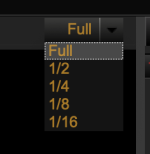
You are playing the clips in FULL. Can I see a screenshot of your debayer settings?
You likely have the debayer set at 1/4 or 1/2...this means you are playing it at quarter or half the resolution. Switch the debayer settings g to FULL and see what happens.
 

Attachments

  • Screen Shot 2019-01-04 at 6.31.25 PM.png
    Screen Shot 2019-01-04 at 6.31.25 PM.png
    17.8 KB · Views: 0
You are playing the clips in FULL. Can I see a screenshot of your debayer settings?
You likely have the debayer set at 1/4 or 1/2...this means you are playing it at quarter or half the resolution. Switch the debayer settings g to FULL and see what happens.

Yep, full res premium at the color tab and we are not the only ones.

https://www.pugetsystems.com/labs/articles/DaVinci-Resolve-15-NVIDIA-GeForce-RTX-2070-Performance-1264/

It looks like you still have some tweaks to do, because your system should be able to do the same (and maybe even better).
 
Yep, full res premium at the color tab and we are not the only ones.

https://www.pugetsystems.com/labs/articles/DaVinci-Resolve-15-NVIDIA-GeForce-RTX-2070-Performance-1264/

It looks like you still have some tweaks to do, because your system should be able to do the same (and maybe even better).

My test was a simultaneous Maya Render with all the cores at 100% and at the same time I played 8K Monstro Footage at Full Debayer...this gave me about 20fps playback...but the processor was fully maxed out with the Maya render. But again, I wasn't testing playback, only stress testing the cooler.

I'll test playback only next week, I dont think we will have any issues with all other processes stopped.

The beta im referring to is the Nvida GPU tuned beta of RCX...its windows or mac
http://www.reduser.net/forum/showthread.php?172922-NVIDIA-CUDA-RCX-Public(ish)-Build
 
my shopping cart is only missing the MoBo; Which MoBo do you recommend;

...
4) RAM, 128GB DDR4 4133, Corsair (8 x 16GB sticks)
...

thank you !
Eddie
I noticed on these builds, almost everyone goes with 8 sims vs 4, is this motherboard dependent or is the approach always to always use all the memory slots on the mother board?

[edits ....]
hmmm ... found this https://www.youtube.com/watch?v=-D8fhsXqq4o

note also ... from the motherboard guide : https://dlcdnets.asus.com/pub/ASUS/...81.1267496867.1546812660-137192817.1546812660

it's kind of confusing and it references another document QVL. But if there is 8 sims, then it says the ram might need to be cooled ? (with fans?) . For the asus x299 deluxe 4 sims seems a bit easier to me and appears to still be 4 channel.

here's the QVL : https://dlcdnets.asus.com/pub/ASUS/...13.1267496867.1546812660-137192817.1546812660
 
Last edited:
Back
Top