Welcome to our community

Be a part of something great, join today!

  • Hey all, just changed over the backend after 15 years I figured time to give it a bit of an update, its probably gonna be a bit weird for most of you and i am sure there is a few bugs to work out but it should kinda work the same as before... hopefully :)

Very Green images off Epic-W

Nino Tamburri

Well-known member
Joined
Jul 31, 2008
Messages
81
Reaction score
0
Points
0
Location
Sydney, Australia
Website
www.ninotamburri.com.au
Can anyone shed some light on why the images of this Helium Sensor are so Green? No matter whether im in Dragon Colour 4 or the RWGRGB/L3G10 colour spaces i always need to to add 5 to 10 points of Magenta to make a white object white and not have a skintone looking sea sick.
I know its a minor metadata adjustment, but SURELY with a generation 2 camera and colour science this shouldn't be a thing?
 
I can't speak on Helium, but on Dragon with STH OLPF, I always needed to adjust the Tint value to take out the green. And with LLO, I always adjust the Temperature to take out the orange.

Have you tried different OLPFs on Helium?
 
This is something that has been around on some RED color science for a bit. From the looks of it, Graeme and the team are working on helping fix that on IPP2. For now, I go into my video gain and just pull down the green a tiny bit and everything looks great to me.
 
While I'm sure there's still just a tad bit of tweaking to go in IPP2, I did want to mention a few things.

First, remember that sensors typically have twice as many green pixels as red and blue. This can always lean the footage a certain tint (as I found most of my RED cameras to drift this way). Also, both the coating on your lens and the lighting still have an effect on the image. For example, my old Rokinons always had a bit of green to them - same with my Tiffen Variable ND filter. LED lighting can sometimes shift either way, and we all know how modern fluorescent lights look even when they're white balanced.

If you're only running the latest stable build, you probably aren't getting any of the fixes made in the newest betas. I've also seen a good number of people find bugs in auto calibration / black shade - mentioning it produces green images over the Manual Calibration (sometime I know Graeme was looking into for the final v7 release). I can only imagine what things will be like once IPP2 is finalized.

Do you have any stills?
 
Did you shoot a test chart and white balance it? Chances are the color of the lights you are using are not the same color as those used by Red when they tune the sensor. Typically companies have a white balance box with a reference light source. White balance is part of the debayer process, I believe, and is necessary to get an accurate starting point.

Anthony Berenato Jr said:
First, remember that sensors typically have twice as many green pixels as red and blue. This can always lean the footage a certain tint
Yes, that have 2x the green pixels, that is true, but this should not have any impact on the color/tint of the image. Stranger things have happened though. :)

I have three ARRI LED lights (S30-C, L5-C and L7-C) and none of them match each other on the same color/tint setting. What is more interesting is that none of them match the color/tint setting when measured with a spectroradiometer.

With my lights, I need to set tint to around -8 to -10 on the Dragon sensor.
 
Can anyone shed some light on why the images of this Helium Sensor are so Green? No matter whether im in Dragon Colour 4 or the RWGRGB/L3G10 colour spaces i always need to to add 5 to 10 points of Magenta to make a white object white and not have a skintone looking sea sick.
I know its a minor metadata adjustment, but SURELY with a generation 2 camera and colour science this shouldn't be a thing?

I couldn't agree more with Anthony here.

Auto Black-Shading gives a very awefull green cast. I never used it
If you are using it...Try manual black shading and you should have a lot less of green.

Despite that, i notice that Helium sensor picks a lot more of greens cast than Dragon sensor did. At least in my own experience.
 
https://drive.google.com/drive/folders/0B279VLnxMShtT3hGYlZ4cHBEdmM?usp=sharing


heres some R3D's one is zeroed and the corrected one is eye-dropped on the white patch of the colour chart. There is no artificial lighting, just cloudy daylight coming through a door. The room paint is a bit warm but shouldnt effect the chart.
This Green cast is quite typical in most of the images off this sensor. As stated a pretty easy fix but weird that is exists in the first place. Ps i did a manual blackshade at operating temperature as well.
 
https://drive.google.com/drive/folders/0B279VLnxMShtT3hGYlZ4cHBEdmM?usp=sharing


heres some R3D's one is zeroed and the corrected one is eye-dropped on the white patch of the colour chart. There is no artificial lighting, just cloudy daylight coming through a door. The room paint is a bit warm but shouldnt effect the chart.
This Green cast is quite typical in most of the images off this sensor. As stated a pretty easy fix but weird that is exists in the first place. Ps i did a manual blackshade at operating temperature as well.

In my experience, is not that easy as correcting it with tint. Since it's not a green cast like the one you get from NDs, polarizer, etc.

As you can see in that .R3D , there's a lot more green cast from the midtones to the blacks than from the midtones to the whites
So, if you try to correct it with Tint you usually get magenta in the whites before you get rid of the greens on the shadows.

I normally use curves or a LOG correction in DaVinci to fix it. You can target more accurately just the midtones to the blacks
 
Yeah, I really hope the green tint from Helium is calibrated out. The color characteristics are amazing once you work everything out in Resolve with more complex grading but I just wish that could be solved downright from the r3ds and the way the sensor information is interpreted. The Finnish Society of Cinematographers and MediaTrade (Finnish Red dealer) held a two day test with Epic-Ws and Weapon Heliums using Master Primes, Master Anamorphics and Zeiss LWZ 21-100mm, with different light sources including natural light. We had the presence of two consultants from Red Europe who came from London to oversee the tests and talk about the sensor, and their recommended starting point for the cameras was 5600k w/ -10 tint. I guess that suggests that they are aware of this color tendency and I hope they are looking into it. As it has been stated in this thread, it's more complicated than just WB tint adjustment. For example, in the underexposed clips from the test, all of the images went irremediably green. We used Standard and Skintone OLPFs for the tests. In my own testing and experience, manual or auto blackshading throw different results but none of them is neutral enough. In all the tests that I have seen online, Helium has had green tinted shadows and that's very noticeable when comparing to Dragon which is so much more neutral.
 
I have had two EpicW sent back to Red due to this matter. No matter which Olpf or firmware I used, both Release build and Beta, always green hue. I had to dial between -8 to sometimes -20 tint, depending on the scene and lighting. Red is currently looking into this. I hope they can fix soon.
For the moment, good starting point is to white balance your scene accordingly, then dial -10 tint and adjust from there.

However, image from EpicW with IPP2 is superb once you correct it properly in camera or post, no doubt.
 
I'll post some stuff after the 4th of July weekend, out of town at the moment.
 
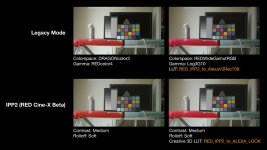
I can provide some examples as well (if there are specific shots you'd like to see, let me know). Here's a quick comparison using the R3D posted earlier in the thread.

Everything is left at their default settings (5600k WB, 0 Tint, 800 ISO). Click for a larger image:
RED_Alexa_LUT_Example_01.jpg

There's also an online demo of the LUT where you can try it out on some of your own images (it's lower quality though):
http://truecolor.us/products/red-to-alexa-lut-demo/
 
I can provide some examples as well (if there are specific shots you'd like to see, let me know). Here's a quick comparison using the R3D posted earlier in the thread.

Everything is left at their default settings (5600k WB, 0 Tint, 800 ISO). Click for a larger image:
View attachment 99606

There's also an online demo of the LUT where you can try it out on some of your own images (it's lower quality though):
http://truecolor.us/products/red-to-alexa-lut-demo/

Thanks John. Was this shot on Helium? I don't see very green hue. Footage out of my EpicW is way way more greenish.
 
Thanks John. Was this shot on Helium? I don't see very green hue. Footage out of my EpicW is way way more greenish.

Yes, the R3D metadata says it’s the Epic-W Helium 8K S35 sensor with Standard OLPF. You can find the R3D here: http://www.reduser.net/forum/showthread.php?159188-Very-Green-images-off-Epic-W&p=1740768&viewfull=1#post1740768

I’ve also noticed a greener cast from Helium as well (compared to Dragon) - maybe it’s stronger with other lighting scenarios (like tungsten)?
 
Yes, the R3D metadata says it’s the Epic-W Helium 8K S35 sensor with Standard OLPF. You can find the R3D here: http://www.reduser.net/forum/showthread.php?159188-Very-Green-images-off-Epic-W&p=1740768&viewfull=1#post1740768

I’ve also noticed a greener cast from Helium as well (compared to Dragon) - maybe it’s stronger with other lighting scenarios (like tungsten)?

According to Red engineers there are variations in Helium sensor. Some are more greenish than others.
Mine is definitey on the greener side. Sometimes -20 Tint to compensate. Not sure your Lut would be much help though.
 
Which OLPF is one the camera and is the camera set to that OLPF in camera?

David
 
Back
Top