There must be some plugin out there to make better cookie cutter effects. I have also noticed the shitty feathering. If the power masks were better ie would let you draw a customized shape, then PC owners would basically have the power of Apple Color with Vegas + MB Looks + ColorLab. Otherwise it looks like after effects may be the best solution for finishing, which would be a drag for efficiency (Vegas is so close!)

Navigation
Install the app
How to install the app on iOS
Follow along with the video below to see how to install our site as a web app on your home screen.

Note: this_feature_currently_requires_accessing_site_using_safari
More options
Welcome to our community
Be a part of something great, join today!
You are using an out of date browser. It may not display this or other websites correctly.
You should upgrade or use an alternative browser.
You should upgrade or use an alternative browser.
Vegas R3D color grading
- Thread starter Miguel "Macgregor" De Olaso
- Start date

Brian Kaz
Well-known member
- Joined
- Dec 28, 2006
- Messages
- 280
- Reaction score
- 0
- Points
- 16
- Location
- New Orleans
- Website
- www.sowilofilms.com
Wait, I am not talking about keyed footage. And what is HSL? I never used those.
I am trying to get the edges for Masks, in the Pan/Crop window.
I'm pretty sure there's no way around the masked edge issue you describe as long as you're using coloring plugins applied. But to my knowledge, that's the ONLY time it happens when feathering. William's idea may work on this too, seeing as Chroma key edge "blur" will produce that same issue as well.
HSL= Hue, Saturation, Luminence.
donatello b
Well-known member
- Joined
- Dec 28, 2006
- Messages
- 1,559
- Reaction score
- 0
- Points
- 0
CC using mask ( pan/crop) as power window ...
1) when you draw your mask make it little larger then the object ..
2) feathering Type .. try BOTH
3) feather it a little more then you think ..i find i'm usually in the 20-30 range
1) when you draw your mask make it little larger then the object ..
2) feathering Type .. try BOTH
3) feather it a little more then you think ..i find i'm usually in the 20-30 range
donatello b
Well-known member
- Joined
- Dec 28, 2006
- Messages
- 1,559
- Reaction score
- 0
- Points
- 0

Roberto Lequeux
Well-known member
Thanks Kaz.
Donatello, I have tried feathering both ways to no avail. I wish your samples were bigger as it is impossible to judge at that size, but your transition does seem to be far better than anything I've gotten. I should try to cut it bigger, but I doubt it will deal with my issue which was a dark shadow that went only along the line( which makes no sense at all to me, I don't get it)...
I 100% agree that if I could do proper masks I wouldn't even think twice about doing my whole movie in Vegas once I tested the output to a Pro Plasma and found it to be accurate. Though bigger color wheels and curve graphs together with bigger dials would also add a big chunk of awesomeness to Vegas.
About Magic Bullet... why does everyone prefer using it when Vegas does the same with it's own tools? Is it because of a "je ne sais quoi" quality to the MB grades? I thought this was only due to the higher bit-depth processing but now with 32-bit floating in V9 isn't that a mute point?
Donatello, I have tried feathering both ways to no avail. I wish your samples were bigger as it is impossible to judge at that size, but your transition does seem to be far better than anything I've gotten. I should try to cut it bigger, but I doubt it will deal with my issue which was a dark shadow that went only along the line( which makes no sense at all to me, I don't get it)...
I 100% agree that if I could do proper masks I wouldn't even think twice about doing my whole movie in Vegas once I tested the output to a Pro Plasma and found it to be accurate. Though bigger color wheels and curve graphs together with bigger dials would also add a big chunk of awesomeness to Vegas.
About Magic Bullet... why does everyone prefer using it when Vegas does the same with it's own tools? Is it because of a "je ne sais quoi" quality to the MB grades? I thought this was only due to the higher bit-depth processing but now with 32-bit floating in V9 isn't that a mute point?
donatello b
Well-known member
- Joined
- Dec 28, 2006
- Messages
- 1,559
- Reaction score
- 0
- Points
- 0
keep a eye on the scopes (view the 4 scopes ) ...
keep the bottom black the same on both layers ... you can't have one layer with black at 0 and the other layer with black at 16 ...
be very careful using the "offset" in the CC plug in =very easy to cause black line ( - direction) and white line (+ direction ) ..if using Color Curves to set black level -again be very careful setting the bottom end ( black) ... the blacker the black you create the more feathering you need ...
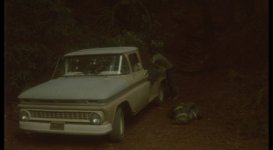
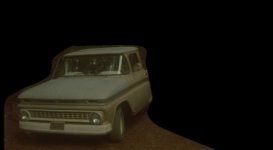
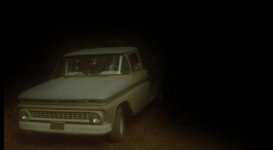
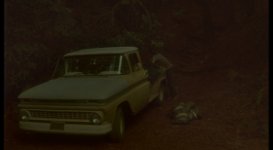
i usally do not use mask (pan crop) for CC power windows ... when i did CC that shot i used the Cookie cutter (triangle shape), usually feathering in the .50- 1.50 range ( you have to keep making the size LARGER as you apply feather ) .. i project to 9ft screen ...final out to blu ray ...
from sitting in on CC session using DaVinci etc .. they use a square, circle, oval for power windows ... i think that's all magic bullet can do too...
what CC plugins are you using on your clips ?
keep the bottom black the same on both layers ... you can't have one layer with black at 0 and the other layer with black at 16 ...
be very careful using the "offset" in the CC plug in =very easy to cause black line ( - direction) and white line (+ direction ) ..if using Color Curves to set black level -again be very careful setting the bottom end ( black) ... the blacker the black you create the more feathering you need ...
i usally do not use mask (pan crop) for CC power windows ... when i did CC that shot i used the Cookie cutter (triangle shape), usually feathering in the .50- 1.50 range ( you have to keep making the size LARGER as you apply feather ) .. i project to 9ft screen ...final out to blu ray ...
from sitting in on CC session using DaVinci etc .. they use a square, circle, oval for power windows ... i think that's all magic bullet can do too...
what CC plugins are you using on your clips ?
Last edited:
Roberto Lequeux
Well-known member
I can't remember but I had Color Balance, Curves and Brightness and Contrast for sure. So I most likely messed up the blacks and didn't have them lining up. However I played a lot with it trying to get it to match...
...but now that you put it that way it makes much more sense and I know what to look for. I should try again and see what I get. It might do the trick.
...but now that you put it that way it makes much more sense and I know what to look for. I should try again and see what I get. It might do the trick.
donatello b
Well-known member
- Joined
- Dec 28, 2006
- Messages
- 1,559
- Reaction score
- 0
- Points
- 0
your missing the most powerful plugin ...
use the Color corrrector ( 3 color wheels ) ,
to fine tune a face, object or specific color use 2ndary CC ..
color curves is excellent plugin...
IMO you won't use color balance or brightness/contrast after your learn the color wheel plug in ..
in the CC ( 3 color wheels) you also have gain, offset, gamma ..
to learn each ..
the saturation in color wheels is different then the HSL & saturation plug in .. sometimes one works better then the other -all depends on the clip & look you want ...
the CC 2ndary takes a little practice to get a good solid mask ...
use the Color corrrector ( 3 color wheels ) ,
to fine tune a face, object or specific color use 2ndary CC ..
color curves is excellent plugin...
IMO you won't use color balance or brightness/contrast after your learn the color wheel plug in ..
in the CC ( 3 color wheels) you also have gain, offset, gamma ..
to learn each ..
the saturation in color wheels is different then the HSL & saturation plug in .. sometimes one works better then the other -all depends on the clip & look you want ...
the CC 2ndary takes a little practice to get a good solid mask ...
Roberto Lequeux
Well-known member
I use Color Corrector but the small wheels piss me off very rapidly, eventhough I have a mous that let's me lower the sensitivity with the press of a button. I also use secondary color corrector all the time and masks with Red Code are extremely useful! Far better than DVCpro HD! Love it... love Red...
I was only talking about what I remembered I had on that one shot with the failed mask. I know them all very well and find that three color balances each set to a different sector (low/med/high) can be very powerful... I wish you could use a single one and simply toggle between your values as opposed to needing three though...
I so my saturation and gain on the Color Corrector but I don't use gamma or offset much as I do that with brightness and contrast with much more control. Offset can be useful for what you were describing regarding matching the blacks for the feather to disappear. I'll check it out and see if I get better results but something tells me I already thought of that and still couldn't get it to go away. It was a while back so I don't remember. The feathering options on AE are far superior so I thought it was hopeless and gave up.
I always use the scopes. Personally I like to use the histogram Vectorscope and waveform. Here I wish the RGB histogram had different layout so I end up using the single one... also it should have much more detail on the graph itself... it is too blocky
I should use the HSL, which I suppose would replace much of the use I have for the Color Corrector.
Again, all of these tweaks are minor, and with them Vegas could kick ASS... bigger wheels, curve graphs, longer dials, graphical representation of the curves for R3D's, fix the feathering in the Pan/Crop to make it useful... it is al ready to go minus the feather!!! I love how it is animated between your keyframes... all it needs is a good transition from one layer to the other with an actual feather! just make us able to dissolve the top layer inward, out, both... it is all there but for some f'ING reason it doesn't simply dissolve... it darkens!!! or something... ??!!??!! I don't want to have to work on FCP... especially if Intel releases their dual socket i7 Motherboard! In 64-bit Windows it would destroy FCP... DESTROY it... 16 threads at 3.8Ghz! And 24GB or 1600Mhz 7-7-7-21 DDR3!!! Vegas could finally become an equal once we showed the rest of the world how fast and comprehensive it were... if they just fixed these little tiny bumps on the carpet...
I was only talking about what I remembered I had on that one shot with the failed mask. I know them all very well and find that three color balances each set to a different sector (low/med/high) can be very powerful... I wish you could use a single one and simply toggle between your values as opposed to needing three though...
I so my saturation and gain on the Color Corrector but I don't use gamma or offset much as I do that with brightness and contrast with much more control. Offset can be useful for what you were describing regarding matching the blacks for the feather to disappear. I'll check it out and see if I get better results but something tells me I already thought of that and still couldn't get it to go away. It was a while back so I don't remember. The feathering options on AE are far superior so I thought it was hopeless and gave up.
I always use the scopes. Personally I like to use the histogram Vectorscope and waveform. Here I wish the RGB histogram had different layout so I end up using the single one... also it should have much more detail on the graph itself... it is too blocky
I should use the HSL, which I suppose would replace much of the use I have for the Color Corrector.
Again, all of these tweaks are minor, and with them Vegas could kick ASS... bigger wheels, curve graphs, longer dials, graphical representation of the curves for R3D's, fix the feathering in the Pan/Crop to make it useful... it is al ready to go minus the feather!!! I love how it is animated between your keyframes... all it needs is a good transition from one layer to the other with an actual feather! just make us able to dissolve the top layer inward, out, both... it is all there but for some f'ING reason it doesn't simply dissolve... it darkens!!! or something... ??!!??!! I don't want to have to work on FCP... especially if Intel releases their dual socket i7 Motherboard! In 64-bit Windows it would destroy FCP... DESTROY it... 16 threads at 3.8Ghz! And 24GB or 1600Mhz 7-7-7-21 DDR3!!! Vegas could finally become an equal once we showed the rest of the world how fast and comprehensive it were... if they just fixed these little tiny bumps on the carpet...
William Barber
Active member
Wait, I am not talking about keyed footage. And what is HSL? I never used those.
I am trying to get the edges for Masks, in the Pan/Crop window.
I know you're not, that was just a random example of the window I was talking about that I found in google images. For some reason you have to hit a triangle or two in the event fx window to make your pan/crop mask edges work right.
Roberto Lequeux
Well-known member
I am so lost... please explain further. You mean the little triangles to the left of the effect name in the keyframe timeline? What do you gain by reversing them? And what does it do to the effect?
William Barber
Active member
I am so lost... please explain further. You mean the little triangles to the left of the effect name in the keyframe timeline? What do you gain by reversing them? And what does it do to the effect?
Yes, those triangles. If you click them, they reverse their direction. I'm not sure exactly what this does, but a few years ago when I had the same problem, someone told me to click on one or two until the feathered mask edges weren't dark lines anymore.
Roberto Lequeux
Well-known member
WHAT?Q?!!?
Hahaha... that is so f'ing random, but I love it. Hahah... I'll have to give it a try and let you know if it fixed it.
Hahaha... that is so f'ing random, but I love it. Hahah... I'll have to give it a try and let you know if it fixed it.
donatello b
Well-known member
- Joined
- Dec 28, 2006
- Messages
- 1,559
- Reaction score
- 0
- Points
- 0
those little triangle tell the plugins if they should be processed either before or after pan/crop & compositing ... Vegas defaults to process pan-crop/compositing 1st then process plugins ... if you reverse the triangle ( to point left) it will process that plugin 1st then process pan-crop/compositing, and then do the remaining FX plugins ....
from what i recall in 8 bit there's a difference in quality when you have several plug ins depending on your process order ..most of that changed with 32bit float processing ... there still could be a slight difference on heavy compositing ..somebody who does heavy FX work will know what order does what etc ..
there might be a preference to process reduce grain/noise before applying the chroma key fx (uses compositing)
from what i recall in 8 bit there's a difference in quality when you have several plug ins depending on your process order ..most of that changed with 32bit float processing ... there still could be a slight difference on heavy compositing ..somebody who does heavy FX work will know what order does what etc ..
there might be a preference to process reduce grain/noise before applying the chroma key fx (uses compositing)
William Barber
Active member
Thanks for the explanation. Makes sense now.
Roberto Lequeux
Well-known member
Oh, ok, so if you first cropped then performed some sort of diffusion it would bleed out? Is that why? Either way it sounds like it will do the trick. I wish I had it here so I could check it. Thanks for the explanation.

Michael Schatz
Member
I am so happy to see some Vegas love here as I have been using Vegas since 2004. I have tried other systems due to some class assignments I was given and nothing clicked like Vegas have. So I just want to get this straight, correct me if I am wrong here. When I get my Scarlet and record on to a CF card I will be able to click and drag the files into my Vegas workflow and start editing? AND the colors look great? This is too good to be true!
Eki Halkka
Well-known member
- Joined
- Sep 24, 2008
- Messages
- 515
- Reaction score
- 0
- Points
- 0
- Age
- 58
- Location
- Helsinki, Finland
- Website
- www.kolumbus.fi
Thanks for the explanation. Makes sense now.
Damn, i've used Vegas since it was audio only... and never noticed those arrows: i just thought the masks suck for Cc, and i'd have to live with it / do stuff that required them in AE or similar.
So, thanks from me too ;-)

Scott Roberts
Well-known member
I tend to think my images have too much blue...Even the factory defaults are a little too purply for me. But I treat it as a new grade and don't reference REDCINE at all. I also like the fact that you can go as low as 50 ISO and there are more intervals of ISO to choose from. What does suck is the fact that you can't save presets...that for me is quite an obvious stuff up. I have 5 takes that need the same grading but now i have to write it on pen an paper....kills me.
Are you talking about saving presets in Vegas? You can save presets in Vegas, and in RedCine as well.
Nicholas Costaras
Member
Are you talking about saving presets in Vegas? You can save presets in Vegas, and in RedCine as well.
I'm talking about the RED File Properties in Vegas. You can't unfortunately.