Welcome to our community

Be a part of something great, join today!

  • Hey all, just changed over the backend after 15 years I figured time to give it a bit of an update, its probably gonna be a bit weird for most of you and i am sure there is a few bugs to work out but it should kinda work the same as before... hopefully :)

V-Raptor X: Green Highlights Problem

JudgeNick

Active member
Joined
Jan 26, 2024
Messages
31
Reaction score
13
Points
8
Hi everyone,
I'm experiencing a problem with my V-Raptor X and I wonder if anyone here has seen it or can help diagnose. I've also reached out to RED, but haven't heard back yet.

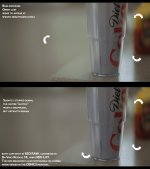
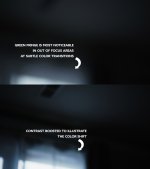
It appears that the camera wants to pour a very weird green cast, just at specific brightness levels. I've experienced this with different lenses, with and without ND, indoors and outdoors, in both RAW and ProRes, even after sensor calibrations, and at average temperatures. I am at my wit's end here. I think I've ruled out everything I can think of (lenses, formats, calibration, conditions, IR pollution, etc). Hopefully the images demonstrate what's going on, but I'm happy to explain further if needed.

Any ideas?

Nick
 

Attachments

  • raptor-problem.jpg
    raptor-problem.jpg
    632.3 KB · Views: 77
  • raptor-problem-2.jpg
    raptor-problem-2.jpg
    769.5 KB · Views: 68
I'll say what I think is happening in the meantime, at least in Resolve, ensure you have Tetrahedral LUT Interpolation selected in your Color Management Settings.
 
Hi Phil, yes I'm already on tetrahedral interpolation. It's not that. As for Mark's suggestion, as mentioned I just did a sensor calibration, so it's not black shading.
 
Also, I can see the green banding in REDCINE-X as well, so definitely nothing to do with Resolve.
 
Very interesting and not something I have seen off of Raptor X yet.

I'd send these exact frames to RED, with a log file off the caemra. I'll second the question about the last time Sensor Calibration was run. I thought it's a uniformity issue, but this wouldn't manifest in this way and there is an interesting noise profile surrounding the green artifact.

Give them as much info as possible. What media was being used and what power source/battery brand. I don't think that would be the issue here either, but power is often a creator of insanity across all cameras sometimes.
 
I did send the R3D snaps to RED. I don't have a log file - I ran a hard restore as per RED's online troubleshooting recommendations.
Also as mentioned above, this can't be a calibration problem. I had just run a sensor calibration. It was performed maybe 10 minutes before those problematic images above were taken. And again, please remember I can SEE this banding issue live on the DSMC3 monitor. So it's impossible for it to be a media issue.

I will keep troubleshooting with RED.
 
You would have to create the log file via the camera. I agree it's likely not media nor power related, but....

Various brands of Media and Power are often culprits of strange happenings in all modern cameras. I own a lot of them and have seen some of the worst possibilities. It's a rarely discussed thing, but not every battery nor media card is built to spec. There have been media cards that will crash a camera once being written to for instance. Power fluctuations can also cause a system to behave strangely, this is often just due to too many accessories being attached, but also could be the batteries themselves.

If it's an "always" artifact, it could be a few things. If it's sporadic, it could be a few other things more or less.

Either way. RED Support will get to the bottom of it.
 
If it were me I'd see if I could consistently replicate the anomaly under controlled lighting and maybe narrow down some circumstances under which it appears.

If you power the camera by AC to eliminate DC power issues and don't load up any media so as to let the camera run without media limitations, you can set up a greyscale chart or light a surface to read both under and overxposed at either end (using a monochromatic featureless surface or a coloured, highly-detailed one to push the sensor more), then monitor the image live to look for where the green cast and banding appear.

You could also then use framerate, compression and resolution combinations to go from absolute minimum data rates to maximum data rates just to check if it's related to data throughput or quality settings.

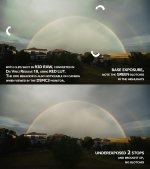
I did notice you were using the LQ compression setting on the rainbow clip. Maybe you've just found an image-quality limit or bug there.

Hopefully it's not a matter of the full range of the sensor itself partially failing, or something going wrong with the hardware processing of the data after it comes from the sensor.
 
Last edited:
I did send the R3D snaps to RED. I don't have a log file - I ran a hard restore as per RED's online troubleshooting recommendations.
Also as mentioned above, this can't be a calibration problem. I had just run a sensor calibration. It was performed maybe 10 minutes before those problematic images above were taken. And again, please remember I can SEE this banding issue live on the DSMC3 monitor. So it's impossible for it to be a media issue.

I will keep troubleshooting with RED.


Please keep us updated.
 
Just by way of update:
  • My mistake on the log file. I extracted it and sent it to RED.
  • This issue is not media or power related. I can power it via mains, and remove media entirely, and still see this issue live on the DSMC3 monitor.
  • This issue is not related to file format or compression. Again, remember that I can see this issue live on screen, whose feed is irrespective of file format. Also, I've done the actual tests and the issue appears in all formats I've tested, including HQ raw.
  • The issue persists after a hard reset. It's not always easy to create, but when it happens it is maddening. Attached is the latest example I created after the hard reset. It's always this green fringe, usually near bright values.
  • Originally I thought perhaps it could be related to a VND that I'm using (cross-polarization issues, etc). But it isn't. The attached examples were taken with a bare lens, without any filtration at all.
  • RED is being responsive, and wants me to send the camera in. However, they're asking for a signed credit card authorization without any specified dollar amount. That part bothers me. They have no reason to believe I've done anything wrong. The camera has always been cared for properly and is in near-new condition as far as I can tell. And even if RED inspects the camera and believes I'm liable for something, that should be a discussion at that time. I don't like the idea that I should need to sign a blank check to get my product warrantied.
I'll keep updating you here as I learn more.
 

Attachments

  • footage_01_43_11_13.jpg
    footage_01_43_11_13.jpg
    622.1 KB · Views: 23
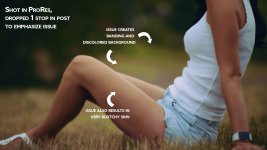
And ... lest you think I'm just being super picky and this isn't a practical problem ... the first time I noticed the issue was during this shoot, where it ruined the skin tones of my subject. I kept looking from my monitor to the live subject, where the blotchiness was NOT physically present or visible in real life.
 

Attachments

  • footage_01_10_35_12.jpg
    footage_01_10_35_12.jpg
    987.3 KB · Views: 47
They will check if it's covered under warranty first. If not, you'll be given the option to pay for repair. If you decline it will be sent back to you.

Don't worry.
 
Looks pretty bad.

Sorry to hear you haven't found a solution.

With your having already checked all the possible end-user causes and fixes (power, media, peripherals etc.) and with RED asking you to send the camera in to be fixed or replaced, seems like the camera's just developed a fault, as such things sometimes do. Which sucks, but it happens.

Hopefully you get it it all sorted out without any ongoing hassles or inconvenience.
 
They will check if it's covered under warranty first. If not, you'll be given the option to pay for repair. If you decline it will be sent back to you.

Don't worry.
I don't have a problem that they want to evaluate it. I have a problem that they want me to sign over a blank credit card authorization BEFORE that evaluation.
 
I don't have a problem that they want to evaluate it. I have a problem that they want me to sign over a blank credit card authorization BEFORE that evaluation.
i've had a credit card linked to my account forever so that might be what they are asking for in lieu of already having your CC on file.
 
There’s already a credit card linked to my account. And I pointed that out to them. They still demanded the signed authorization before they’d give me the RMA. It’s unsettling but I have no other choice. They’re at least relatively fast at responding, but that CC thing bothers me.
 
Back
Top