Welcome to our community

Be a part of something great, join today!

  • Hey all, just changed over the backend after 15 years I figured time to give it a bit of an update, its probably gonna be a bit weird for most of you and i am sure there is a few bugs to work out but it should kinda work the same as before... hopefully :)

usb 3.0, the future with drives. What are your plans?

IMHO usb 3 is not a proper replacement for esata, and offers little benefits other than you may have usb 3 integrated in your system and don't need a card to go esata route. spinning drives only read and write so fast, usb theoretical speeds are right up there with 6gb/sec esata, a touch slower. but the issue of usb protocol still remains. sustained read and write. esata is just the external for of basic sata on your motherboard designed for sustained performance. usb has never been like that, and i'm still hard pressed to this day to believe USB is a adequate connection for heavy data flow. I actually wish they'd up the standard on firewire, but it looks like usb 3 is gonna be the only other faster alternative to esata at the moment. and i'm sure new connections will crop up over time, but right now it's a, if it ain't broke don't fix it situation. until there are normal external hard drives that's not past a 2 drive striped raid, no other connection really makes a difference. it's gotta be something SSD based, a magical new super spinning disk, or large raid striped or protected to go with a faster connection. thunderbolt, sas, and future technologies, and producers are hard pressed to get big raids because of initial pricing for large raids like g tech es pro's and would rather deal with slower speeds and cheaper drives. not to mention a good portion of edit houses barely use any of these newer connections.

Most post houses I deal with on the spec sheet mandate the drive needs fw800, because that is what they are STILL using to edit with or transfer to their san. so I'm glad esata is back, and life can go on :)
 
Just add another comment into this mix. I have several drives floating around that I use to deliver material to different clients and houses on. I prefer using USB 3.0 because it provides a common connection that pretty much everybody has. PC and Mac friendly. Even if they are bound to USB 2.0 ports they can still hook up the drives. I don't really use them to work from, but I do use them for delivery and backup.
 
Multiple interfaces for sure. I also don't use drives supplied by the production -- I quit working that way long ago. When I serve as DIT, which is pretty rare anymore, but still on occasion... I supply any and all drives that will go back to the production. Only took me getting burned once or twice in the past for me to adopt that policy. Nothing worse than having a producer breathing down your neck because he wants to go home and you're still copying data to his shitty USB2.0 drive. You try to explain to him that he supplied a slow drive and he's being a cockbag, but if he had a clue, this situation wouldn't be happening. Second time (and the last time) that happened to me, a production gave me a couple drives with FW400 and USB2 connections. They bought them that morning at Best Buy, just a couple miles down the road, I requested that they send someone to swap for something else, but producer and director refused. Then they got all mad at me when I cracked them open to interface the drives directly so I could actually copy at a decent pace. Hehe... The couple minutes each for drive assembly was well worth getting nearly 60% faster transfer rates.

I'm not supplying anything special to productions these days. Just decent 1, 2 or 3 TB HDDs in a reasonably decent enclosure from Rosewill, Vantec, etc.. Vantec makes a decent one that's USB3.0 + eSATA in a 2.5" and that works great for SSD's or 750GB or 1TB drives, bus-powered via USB. It's like $25 at NewEgg or other dealers. On location for actual offloads, building checksums, etc.. I only use my own RAID storage. The external drives are just for handing over data at the end to the production. I invoice them for the drives and they get the majority of that cost back if they return them -- or they can keep them if they'd like. Most the time they keep.
 
Most post houses I deal with on the spec sheet mandate the drive needs fw800, because that is what they are STILL using to edit with or transfer to their san. so I'm glad esata is back, and life can go on :)
This is unfortunately the reality I deal with as well. A couple of regular clients have eSATA capability, but many are still stuck in FW800 land - which puts me in an awkward position when recommending drives. I would love to go the bare drive route, either handing them over at the end of the day or including some enclosures - but even when I explain to producers that it won't actually work any different for them than buying a complete external solution, it's deemed as "too techy."

And then I'm given a WD MyBook from 2007.

One time I was even given a single FW400 drive with two partitions for backup.
 
Rosewill makes an excellent enclosure for 3.5" HDDs that has USB2.0, eSATA and FW800. They were supposed to have the USB3.0 update to this enclosure available about 4 months ago, and they did make good on that, but they dropped FW800 support and the new one is just eSATA 6gbps w/ USB3.0. But this leads to the most common issue or complaint I'm hearing these days from clients is a lot of them would like to have USB3 and FW800 interfaces on the same drive. Nobody seems to make such a beast. I personally don't see a need for an item like that myself, but a lot of people still like to use the same system and software (FCP7 in most cases) that they have been using for years.
 
Rosewill makes an excellent enclosure for 3.5" HDDs that has USB2.0, eSATA and FW800. They were supposed to have the USB3.0 update to this enclosure available about 4 months ago, and they did make good on that, but they dropped FW800 support and the new one is just eSATA 6gbps w/ USB3.0. But this leads to the most common issue or complaint I'm hearing these days from clients is a lot of them would like to have USB3 and FW800 interfaces on the same drive. Nobody seems to make such a beast. I personally don't see a need for an item like that myself, but a lot of people still like to use the same system and software (FCP7 in most cases) that they have been using for years.


Hi Jeff, I've been using this one for a while. It's not bad. But I only use to backup. Haven't tried stressing it, like everyone seems to do.

http://eshop.macsales.com/shop/firewire/usb/raid_1/Gmax

USB 3.0 and firewire 800, and esata...
 
Yeah, never used one of those. There are a few units out there like this in the small RAID category that have FW800 along with USB3.0 and/ or eSATA. When I was saying nobody seems to make a unit with USB3 and FW800, I was mostly speaking of off the shelf enclosures and especially pertaining to single-HDD units. I would be curious to know how well that unit you have does perform under stress. Via eSATA and USB3. Theoretically, the eSATA interface should offer much better performance under stress, but it all comes down to their implementation.
 
Yeah, never used one of those. There are a few units out there like this in the small RAID category that have FW800 along with USB3.0 and/ or eSATA. When I was saying nobody seems to make a unit with USB3 and FW800, I was mostly speaking of off the shelf enclosures and especially pertaining to single-HDD units. I would be curious to know how well that unit you have does perform under stress. Via eSATA and USB3. Theoretically, the eSATA interface should offer much better performance under stress, but it all comes down to their implementation.

Using a G-Drive Mini with USB3 and FW800. Not bad read/write speeds on a rMBP, 145mbps.
 
Stumbled on this thread, another day on set with G Tech USB 3.0 drives. Did G Tech ever reincorporate esata into any of their drives? Is it too late at this point?

I'm getting real tired of having the G Tech USB 3.0 drives go to sleep on their own, even though I have the "put drives to sleep when possible" box unchecked. Is anyone else running into this issue? Running Mavericks on a new MBP Retina.
 
Saw this old thread pop back up. Little has changed in the past year, Thunderbolt has become more prominent and USB3.0 devices have improved by a very small margin.

For the sake of convenience and of supplying clients with drives these days, my two favorites are the G-Drive mobile USB3.0 + Thunderbolt and the Buffalo mini-station also with USB3.0 and Thunderbolt. Both are bus-powered from either interface, no power adapters to wrestle with and should connect to any computer. Both come in 500GB and 1000GB capacities. The G-Tech one uses a 7200rpm HDD and is about 10% faster than the Buffalo, but is often a lot more expensive. I usually stock up on a few of either one when they go on sale.

For faster performing external drives, I'm liking the newer Thunderbolt options that take 2 to 4 drives. Or larger enclosures/ RAIDs via Thunderbolt or SAS. eSATA seems like it's all but dead.
 
Unfortunately 3.1 doesn't fix any of the issues with 3.0, it just packs in yet another signal layer for DDR (double data rate) modification on top of 3.0. In other words, it's going to suck balls. I'm all for open specs and preserving compatibility with legacy devices, but these USB guys are doing it wrong.

Also don't forget that we have USB 3.5 and "SuperWatt" or 100W USB proposals on the table too.
 
I don't see how USB3 sucks. It's used for it's purpose which is predominantly external storage and it does the job it's suppose to for the price tag it was designed for. Lightpeak is designed for more and will provide what USB3 doesn't but at a more expensive cost.

Eric
ADK
 
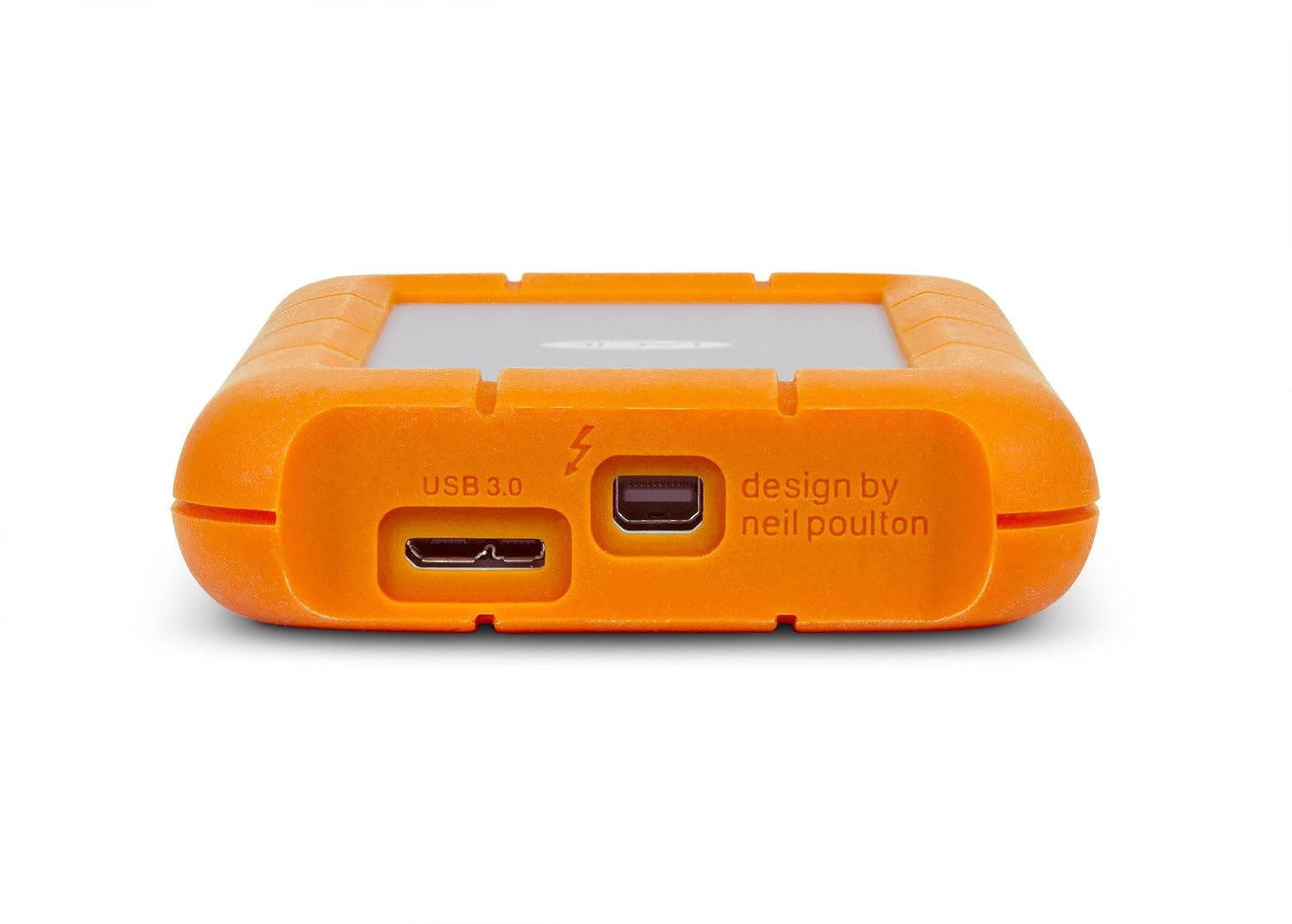
I use the Lacie rugged thunderbolt/usb 3.0 drives for client transfer.

They work very well.

http://www.amazon.com/LaCie-Rugged-Thunderbolt-External-9000294/dp/B009GXI3QU/ref=sr_1_1?ie=UTF8&qid=1388770597&sr=8-1&keywords=lacie+thunderbolt+usb+3.0+drive

71APNkyL6yL._SL1500_.jpg
 
I don't see how USB3 sucks. It's used for it's purpose which is predominantly external storage and it does the job it's suppose to for the price tag it was designed for. Lightpeak is designed for more and will provide what USB3 doesn't but at a more expensive cost.

Eric
ADK


I agree with the above sentiment. Although USB3.0 sucks because it fails to properly enforce compliance of the standard and the standard itself is a weakly designed band-aid over the top of USB2.0. IMO, USB3.0 is more about marketing than the consistency of performance or reliability. I have yet to see any USB3.0 device that can fully reach the full 4.8Gbps "SuperSpeed" bandwidth, let alone sustain a connection at that rate. The first 3 years the spec was on the market, compatibility issues ran rampant and the situation was dire enough that Intel kept pushing back the inclusion of USB3.0 into their chipsets until late 2011, as they felt it was "not mature enough."

OTOH, Thunderbolt seeks to address most of those issues and has suffered for it. Thunderbolt is an open spec and practically free to license, yet there is a huge amount of industry FUD surrounding the licensing and approval processes. Intel is the sole controller of licensing and product approval so they can guarantee a certain level of performance. Many peripheral makers have been turned off by this, they don't even want to attempt the process, and doubly so with strict requirements for device compatibility and performance that requires testing for approval.

With USB3.0, the only requirements are that the device must be compatible with USB2.0 and that it must attempt a USB3.0 "handshake" and sync at one of the higher data rate offerings, does not need to support the full 4.8Gbps. In fact, having 4.8Gbps support is yet another tier of licensing within the USB3.0 program. But it's a matter of filing paperwork and buying the right to put your desired badge on your product. That badge means nothing in terms of widespread compatibility or any guaranty of reliability or performance. It just means it has a standard USB port and will [should] work on some level if you plug it in to the right port.

Thunderbolt host and device chipsets are relatively cheap. They're roughly 5X the price of their USB3.0 counterparts, but we're still talking only a couple $ each when purchased in bulk. Intel is no longer the sole manufacturer as they have approved one, possibly two more now. Prices should continue to drop as adoption and manufacturing partners increase. The higher premium paid for Thunderbolt peripherals at this time mostly has more to do with the smaller potential market vs. USB and they demand a higher level of QC on the manufacturing end due to the tighter demands of the specification. USB3.0 is consumer oriented. Thunderbolt is prosumer/ pro oriented. I don't feel either one should replace the other. I do think Thunderbolt is still largely misunderstood.
 
I absolutely agree that TB is misunderstood and allot of that is the marketing behind it that has really overblown expectations. However I don't see how they can reduce the price tag down to USB levels even with complete market adoption and using copper. Optical is just going to increase the overall cost of engineering and production while also splitting the production numbers with Copper limiting cost reductions. Really HDMI, Displayport, Madi, and ADAT are good example indicators of how these technologies have diminishing returns in cost reduction and reductions stop sooner than technologies like USB and Ethernet. SAS is another example. If the cables themselves are more expensive then the tech itself is more expensive.
 
Thanks guys, if production ever actually talks to me prior to purchasing drives I'll push for the dual interface Rugged Drives. I just wish USB 3.0 could handle 2 streams of data without choking itself to death, but it's still a huge improvement over the Firewire 800 drives that are still making it onto set.
 
Back
Top