Welcome to our community

Be a part of something great, join today!

  • Hey all, just changed over the backend after 15 years I figured time to give it a bit of an update, its probably gonna be a bit weird for most of you and i am sure there is a few bugs to work out but it should kinda work the same as before... hopefully :)

TP2…FCP XML to REDCINE-X

I uploaded TP2 ver0.8.

Ver 0.8
Added
* All Clips to Timeline (merged)
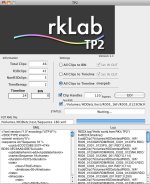
* Help menu (png)
* Progress Bar

Thanks.
Great. It works perfectly.:thumbsup:
 
a have a problem with the last version, my edit and the cut in FCP and redcine-x have not the same duration
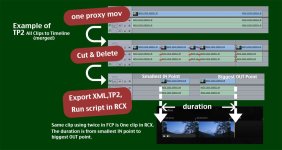
If you use "All clips to timeline (merged)" is normal as it puts in the timeline the whole clip of the duplicated subclips, after you reconform with clipfinder everything should be fine in fcp.
Ryota, I noticed when I open a new xml created in clipfnder in fcp if all the clips had the same resolution everything works fine but if I have clips with different resolutions in fcp I have some clips offline.
For example: 4 clips at 4k 16:9 and 1 clip at 4.5K, I export from fcp, then conform with TP2, import lua in RX and export the clips to 720p. All the clips are exported fine and clipfinder reconform flawlessly but when I import the new xml into FCP I have this XML error "Mer, 24 mar 2010, 9:19 - Errors Found Importing skytest_tp2_08.xml
<file>: Unable to attach specified media file to new clip."
As I said all the clips are 720p now but the one with different resolution at the beginning(4.5K) is not recognized.
 
I uploaded TP2 ver0.8.

Ver 0.8
Added
* All Clips to Timeline (merged)
* Help menu (png)
* Progress Bar

Thanks.


Ryota,

I just downloaded the 0.8, and under the Preferences, it is asking for a Registration Key.

Since I already paid, where can I get mine? You can send it to me via e-mail or PM.

Thanks!
 
Ryota,

I just downloaded the 0.8, and under the Preferences, it is asking for a Registration Key.

Since I already paid, where can I get mine? You can send it to me via e-mail or PM.

Thanks!
PM sent. Please check.

a have a problem with the last version, my edit and the cut in FCP and redcine-x have not the same duration

My explanation wasn't specific enough.
Please look attached jpg.

Thanks.
 

Attachments

  • forexam.jpg
    forexam.jpg
    82.2 KB · Views: 0
you need Clipfinder 2.2 that is free but I highly suggest to buy the full version (Clipfinder 2.5) and the new amazing little peace of software TP2 version 0.8 http://reduser.net/forum/showthread.php?t=42464 that costs 27$.

1 Export an XML from FCP
2 In TP2 check "All cips to timeline(merged)"
3 Choose GO and select the XML exported from FCP
4 Choose a name and save the lua file
5 Start RedcineX choose File>Run script>choose the lua file created with TP2
RX will import all the clips in the TIMELINE in the RIGHT order with correct In and Out for every clip except the duplicated clips with the smallest In and biggest Out.
6 Grade the clips in the timeline
7 In RedcineX>Window>export tool, click on the plus, in the export settings choose a name, choose a format, resolution and debayer settings (i.e. quicktime prores 4444 1920x1080 full), in output location choose "output with Clip filename to selected folder", click on "select an output folder" and choose a destination folder or make a new one on your system, hit ok, choose "Timeline (selected clips)", click on RX timeline, you have two options:
Press "command-A" (select all) and in the export tool hit export.
RX will start the render and it will put the files in the destination folder.
You can see the render progress going to RedcineX>Window>batch list.
8 When RX finished the render open Clipfinder>Tools>Run conform on FCP XML file
10 In the conform settings window in the XML input put the path to the XML previously exported from FCP, in the output XML choose a name and file path. Check "use only 9 or 16 characters of filename in input xml", check adjust sequence width and insert the timeline resolution you need (i.e. 1920x1080), in clip directories put the path to the destination folder containing RX renders. Hit run conform.
9 Open or Import the new XML (output XML generated by Clipfinder) in FCP. Check the sequence settings. Check the timeline: all the clips should be in the right order with the right length.
10 Enjoy.
 
OK.
I uploaded TP209.zip.
TP2 is ver 0.8, but I made ReLinkTool.

Please try it.
ONLY for TP2 AllClipstoTimeline(merged).
ONLY for QuickTime.MOV.

Audio clips have the same IN OUT as .mov Clips, maybe OK.
If they have different IN OUT from .mov, cause problem.

Usage
1 open FCP XML file.
2 select rendered .mov folder.
3 Push GO!
4 save new xml file.
5 Import xml in FCP.
6 Open new Sequence.
7 menu---Sequence---Settings---select your purpose size.
Thanks.
 
Last edited:
OK.
I uploaded TP209.zip.
TP2 is ver 0.8, but I made ReLinkTool.

Please try it.
ONLY for TP2 AllClipstoTimeline(merged).
ONLY for QuickTime.MOV.

Audio clips have the same IN OUT as .mov Clips, maybe OK.
If they have different IN OUT from .mov, cause problem.

Usege
1 open FCP XML file.
2 select rendered .mov folder.
3 Push GO!
4 save new xml file.
5 Import xml in FCP.
6 Open new Sequence.
7 menu---Sequence---Settings---select your purpose size.
Thanks.
Very nice Ryota but now a new version of redcinex is out and it doesn't overwrite the files. Ckeck it out.
 
I uploaded TP0.9 & ReLinkTool 0.9.

Ver 0.9 Added
*Time remap clips (reverse and motion speed **%) problem was fixed.
*Dissolve clips problem was fixed.
(Time remap clip is changed into whole clip.)

I think if you don't need to back to FCP, No check the checkboxes.
It is All clips to Timeline (don't merge).
If you want to back to FCP, check All Clips to Timeline (merged).
And use ReLinkTool.

Thanks.
 
I have a problem. I maked 3 different projects en LUA CODE only do:

"REDX.log("Hello world,from RK's TP2")
tl=REDX.timeline()
tlw=REDX.timeline_win();
tlw:setTimeLine(tl)
tl=nil"

and It is not relink .R3D... O_o

total clips: 2
nonR3Dclips: 2

i work with M proxyes....
 
I have a problem. I maked 3 different projects en LUA CODE only do:

"REDX.log("Hello world,from RK's TP2")
tl=REDX.timeline()
tlw=REDX.timeline_win();
tlw:setTimeLine(tl)
tl=nil"

and It is not relink .R3D... O_o

total clips: 2
nonR3Dclips: 2

i work with M proxyes....

It seems that TP2 judged clips are not R3D.
Would you send XML to me by E-mail?
What are your clips name?

My address is r_k at mac dot com.
Thank you for giving me a information.
 
I uploaded TP2 ver0.95 & ReLinkTool 0.95.

Ver 0.95 Changed
*R3D filename checking process
From Final Cut Pro 7 Help
You can rename items within Final*Cut*Pro. Renaming clips does not change the names of media files on your disk.
TP2 deals with it.
 
Hi, Does this software work for edits using ProRes files instead of proxies (if the file names match)?

Yes, but currently ProRes files need to be in same folder as R3D.
My next step is file search system.

And TP2 ver 1.00 uploaded.
I need a few days to make ReLinkTool ver1.00.

Ver 1.00 Added
* Clip Handle
Ver 1.00 Changed
* Setting mode…It is very simple now.
*registration method
some bug fixed.
 
Hi Ryota,

I´ve tried this little nice programm but it didn´t work for me. I don´t get it can you help me.

I don´t have proxie files just Apple ProRes 422 for editing. I have one folder with all the R3D folders/files and one foldet with all the ProRes files I used for editing. But when I create an lua file and import it in RCX nothing happens. So I´ve copied the R3D Files in the same folder like the ProRes files but it still won´t work. I know I do some great mistakes but can you tell me which?

Cheers,
Ben
 
Hi Ryota,

I´ve tried this little nice programm but it didn´t work for me. I don´t get it can you help me.

I don´t have proxie files just Apple ProRes 422 for editing. I have one folder with all the R3D folders/files and one foldet with all the ProRes files I used for editing. But when I create an lua file and import it in RCX nothing happens. So I´ve copied the R3D Files in the same folder like the ProRes files but it still won´t work. I know I do some great mistakes but can you tell me which?

Cheers,
Ben

Hi Ben,
I'm sorry for my late reply...
I thought I could make search function quickly.

So,
Ver1.1 uploaded.
Added
* File search
You can use ProRes.mov for offline.
* clip handle of same clips,bug fixed.

Thank you.
 

Attachments

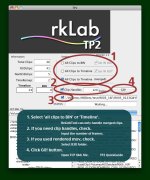
  • TP211w.jpg
    TP211w.jpg
    93.8 KB · Views: 0
Back
Top