Welcome to our community

Be a part of something great, join today!

  • Hey all, just changed over the backend after 15 years I figured time to give it a bit of an update, its probably gonna be a bit weird for most of you and i am sure there is a few bugs to work out but it should kinda work the same as before... hopefully :)

Top Handle vs. 5" Touchscreen

My top handle is the wrong way round as well. i will take it in to Red Europe tomorrow and get them to sort it out.
 
You could have simply mounted the top handle and used a wrench on the flattened parts of the rosette part, or attached a dog bone to the rosette and turned it like a handle.
I can't get it to come off no matter what I do. Granted, I don't have a vice here, but simply mounting it doesn't work.

FWIW, my handle is backward too. I'd rather not completely wreck the rubber just to fix it.
 
Hey Haakon. Try mounting a SWAT rail to a Cheese plate or Red Dovetail Mounting plate. Now mount that to a sturdy tripod. Now slide the Handle onto the SWAT rail. Lock everything off tight.

Ta da... instant vice.

Next, DO USE a strong wrench and thick towel on the Rossette block. It will come.

But, DO NOT USE a wrench on the rubber grip. DO use your hands, both of them. It will come.

Finally, make sure to unscrew counter-clockwise.
 
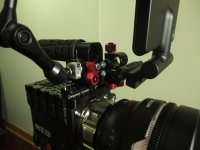
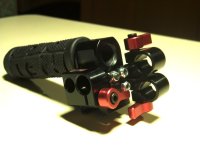
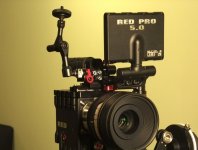
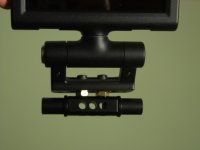
Here (see pictures below) is my solution for adding quick releases to the Red touch LCD, an EVF and AC's monitor.

It is based on the Zacuto 15mm quick release system, made up of Zuds and Z-locks and Zicromounts and Zdapters... Z-etc. Z-etc.

Many thanks to Evin Grant for his posts on the Zacuto stuff last month.

My goal was a tool-less solution to quickly mount an EVF and two LCDs, plus be able to interchange them. When my bomb EVF ships I will buy the wooden camera EVF mount which also uses a 15mm rod to secure to the Epic. I will omit the Wooden Camera 15mm mount and use the top/front Zacuto Z-lock seen in these pics below. Also, I will soon be buying a smallHD D6 to use as the AC's monitor.

As you can see I've mounted everything onto the RED sliding top handle, lost the Rosette block and flipped the rubber handle around. The result is a small but very functional package.

The only problem with this system is that the Z-lock & Zdapter backplate appear to use 10-32 screws, which do not match the 1/4 20 mounting holes in the Red sliding handle. I used 10-32 screws and bolts to secure it to the handle, which looks and smells bad but it is actually very secure.

Here is a list of all the items used

Quick Release Handle:

RED Sliding top handle:
http://www.red.com/store/rail-components/product/sliding-top-handlen

1 x Zacuto ZicroMount
http://www.filmtools.com/zacuto-zicromount-z-zc.html

2 x Zacuto Zdapter - 15mm Z-locks
http://www.filmtools.com/zacuto-zdapter--15mm-z-lock-zl-15.html

1 x Zacuto Zdapter - Backplate (takes 10-32 screws... not included in purchase)
http://www.filmtools.com/zacuto-zdapter--backplate-zl-bp.html

1 x Zacuto Zud 1/4 20 Male
http://www.filmtools.com/zacuto-zud-1-4-20-m-zud1-4-20-m.html


RED Touch LCD mounting solution:

1x RED Dogbone block
http://www.red.com/store/rail-components/product/dogbone-block

2 x Berkley System 15mm Flat Top Mount (3/4" long) = Same as a Zacuto Zud, but much cheeper & black.
http://www.berkeysystem.com/store/15-mm-series/flat-top-mount/

2 x Filmtools Allen Key Set Screw 3/4" x 1/4 -20 (for use on Berkley Flat Top Mount above)
http://www.filmtools.com/filmtools-allen-key-set-screw-stainless-3-4-x-1-4-20.html

2 x 1/4 20 Hex Nut (you will need something like this to add clearance to the Dogbone / LCD combo.)
http://www.amazon.com/4-28-Finished-Hex-Nut-pieces/dp/B003PKFQLK/ref=pd_sbs_indust_4
 

Attachments

  • DSCF7433.jpg
    DSCF7433.jpg
    76.7 KB · Views: 0
  • DSCF7442.jpg
    DSCF7442.jpg
    76.4 KB · Views: 0
  • DSCF7430crop.jpg
    DSCF7430crop.jpg
    82.4 KB · Views: 0
  • DSCF7437.jpg
    DSCF7437.jpg
    59.2 KB · Views: 0
I've been looking through these but can't seem to find a solution that I'd be happy with. Just put in an order for the Epic-x and am worried about mounting the Touchscreen with my current rig. Is it possible to add the Touchscreen to a Noga arm? It'd be great if someone can post a photo of what the bottom mount of the touchscreen is.
 
I'm glad someone else is agonizing over this and resurrected the thread. Can the monitor be mounted to the 1/4 20 holes in the top of the module adapter (assuming one is using the dual or quad battery module)? It seems like you can hang a lot of weight off the back of that thing, so a 5" monitor shouldn't be a problem. Hopefully there is clearance for the full length of the top handle?
 
I have the Touch mounted directly onto the Top sliding handle. It comes of the brain as one piece and I have a direct foam cut in my case to put the LCD in with the handle...:

Scarlet_Hero_4736.jpg


Soe details:

LCDmount_angle_4744.jpg


LCDmount_side_4750.jpg


LCDmount_front_4748.jpg


Scarlet_RearLeft_4730.jpg
 
Looks good, how did you remove the front rosette part of the top handle? Can you just unscrew it?
 
Here it is guys. Works just as well on the 5." All credit to Ketch Rossi on this one. Remember to pick up some half "non threaded" screws to get it secure.

Thread begins at page 110. http://www.reduser.net/forum/showthread.php?58043-KETCH-ROSSi/page110

201194_165337426937825_173614425_o.jpg


Here is the bit on the screws. http://www.reduser.net/forum/showthread.php?58043-KETCH-ROSSi/page114

It puts the monitor in the same exact position as my solution - only an inch more forward (which actually might interfere with some lens setups). And You need to buy more parts... Not sure if I see any benefit...

Peter
 
Ok thanks, i tried with all my power to turn it, is not going to work out, i'll go somewhere where they can lock in in a bench :), How did you remove the rubber part to relocate it to the other side, without damaging the rubber?
 
Ok thanks, i tried with all my power to turn it, is not going to work out, i'll go somewhere where they can lock in in a bench :), How did you remove the rubber part to relocate it to the other side, without damaging the rubber?

The same way. Next time we meet ask me to shake your hand - you will understand... :reddevil:
 
Peter,

Your solution is pretty much the same but sloppier. The rosette can also rotated, yours is fixed. Yes, it will cost another $160 bucks. I like the 1" space to wrap my index finger around the handle for more balanced to the center carrying support.


It puts the monitor in the same exact position as my solution - only an inch more forward (which actually might interfere with some lens setups). And You need to buy more parts... Not sure if I see any benefit...

Peter

 
A P&C magic arm will work well - screw it into the side holes on the handle, move the LCD to where you want. About $40.
 
Back
Top