Welcome to our community

Be a part of something great, join today!

  • Hey all, just changed over the backend after 15 years I figured time to give it a bit of an update, its probably gonna be a bit weird for most of you and i am sure there is a few bugs to work out but it should kinda work the same as before... hopefully :)

TOIA - RED MX Latitude test 2 - HI CONTRAST

amazing
 
Hey Mark you mentioned the tests you have done which you demonstrate. Would you be willing to share these? or did you already?
Thanks a lot for that nice before and after demo!
 
Oh and btw didn't you need to separately grade/ mask the footage because of the contrast?
 
Amazing Mark. Thanks for sharing. It's not often we get to see examples like this. As I am based in Brisbane, I work on mostly small budget work where and the money is seldom there for an optimum lighting rig. So I have often encountered this sort of contrast problem. It's good to see real example of how the mx sensor can save a shot like this. Very inspiring. Thanks.
 
Oh and btw didn't you need to separately grade/ mask the footage because of the contrast?

Yes Mark, That's what I'm having trouble figuring it out. Usually when I try and dial in this wide a range of contrast, I don't wind up with as great a result. Perhaps because I am not using RedLog? How much does colorspace etc. effect your ablity to dial in extremes like this? Thanks in advance.
 
REDLOGFILM is the bomb, mixed in with Camera RGD or REDGAMMA2. (Red prefer REDGAMMA2)

I'm a film man, shot 35mm for 20years, loved it.... When I use to go to the telecine suites the colourist would bring all the neg back to the flattest LOG possible and start grading from there, we new then what we had as information.
You can see everything in log, even more working from the NEG directly. (I'm not big on film scans)

So we start from there, So my thinking was to do the same and get out of RED LAND as quick as possible and get back to my FILM work flow. That was getting all my images back to log.
FILM NEG is the same as your R3D's, both are the same. GO back to the R3Ds to grade the same way you would film. Simple as that.
Grading in LOGSPACE is were it's all at. Dig into that neg and you will find it all.

I don't grade in REDCINE X hardly at all, I just do onset testing to see if I have what I need from the neg... ooops R3D. Bit like this test I posted you. Some days I get impressed and need to share.

I grade in our Resolve if I want to get serious, or in FCP using 3 way color corrector, but using REDFILMLOG - CAMERA RGB 4444 PRORES FILES. If I cannot get what I want from these files, Ill go into REDCINE X or Resolve and pull the detail out that I need and re-insert back into the edit.

so yes.. use REDLOG or REDLOG FILM and never look back.

Secret is to keep it simple.
 
REDLOGFILM is the bomb, mixed in with Camera RGD or REDGAMMA2. (Red prefer REDGAMMA2)

I'm a film man, shot 35mm for 20years, loved it.... When I use to go to the telecine suites the colourist would bring all the neg back to the flattest LOG possible and start grading from there, we new then what we had as information.
You can see everything in log, even more working from the NEG directly. (I'm not big on film scans)

So we start from there, So my thinking was to do the same and get out of RED LAND as quick as possible and get back to my FILM work flow. That was getting all my images back to log.
FILM NEG is the same as your R3D's, both are the same. GO back to the R3Ds to grade the same way you would film. Simple as that.
Grading in LOGSPACE is were it's all at. Dig into that neg and you will find it all.

I don't grade in REDCINE X hardly at all, I just do onset testing to see if I have what I need from the neg... ooops R3D. Bit like this test I posted you. Some days I get impressed and need to share.

I grade in our Resolve if I want to get serious, or in FCP using 3 way color corrector, but using REDFILMLOG - CAMERA RGB 4444 PRORES FILES. If I cannot get what I want from these files, Ill go into REDCINE X or Resolve and pull the detail out that I need and re-insert back into the edit.

so yes.. use REDLOG or REDLOG FILM and never look back.

Secret is to keep it simple.
Mark, just so there is no confusion, it's actually Redcolor2 as the color space and REDLOGFILM for the gamma space.

Nice work on those images.
 
can someone tell me how to grade in redcinex with redlog and redgamma2 as Mark is talking about? I have no clue what these terms even mean yet. I only grade and edit in CS5.5 Premier Pro so far...please explain someone? Thanks
 
can someone tell me how to grade in redcinex with redlog and redgamma2 as Mark is talking about? I have no clue what these terms even mean yet. I only grade and edit in CS5.5 Premier Pro so far...please explain someone? Thanks

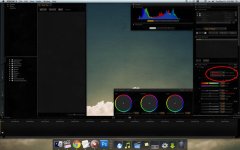
In the image I uploaded, the area circled in red is where you change these options.
 

Attachments

  • coloring.jpg
    coloring.jpg
    96.4 KB · Views: 0
can someone tell me how to grade in redcinex with redlog and redgamma2 as Mark is talking about? I have no clue what these terms even mean yet. I only grade and edit in CS5.5 Premier Pro so far...please explain someone? Thanks

In CS5.5 Premiere you are able to adjust the color and gamma matrix. When you import the footage, right click on it in the project panel and go to 'Source Settings". This is where you can find all the color matrix and gamma settings that you would find in RC-X.
 
Mark was kind enough to share the process... pretty great stuff.

1306351654.jpg


1306289121.jpg


1306344434.jpg
 
Mark was kind enough to share the process... pretty great stuff.

1306351654.jpg


1306289121.jpg


1306344434.jpg

Yes, screenshots! That's one hell of a curve you applied, Mark. I figured it had to look something like that. Great work, once again.

Thanks Jarred for posting.
 
Very nice work Mark, and a good story, thank you for sharing. This thread has been very informative. I notice you didn't use the FLUT control in your grade. I've been using it a bit lately. I'm not quite sure how it works, but the results look good. It seems like sort of a smart rubber band.
 
REDLOGFILM is the bomb, mixed in with Camera RGD or REDGAMMA2. (Red prefer REDGAMMA2)

I'm a film man, shot 35mm for 20years, loved it.... When I use to go to the telecine suites the colourist would bring all the neg back to the flattest LOG possible and start grading from there, we new then what we had as information.
You can see everything in log, even more working from the NEG directly. (I'm not big on film scans)

So we start from there, So my thinking was to do the same and get out of RED LAND as quick as possible and get back to my FILM work flow. That was getting all my images back to log.
FILM NEG is the same as your R3D's, both are the same. GO back to the R3Ds to grade the same way you would film. Simple as that.
Grading in LOGSPACE is were it's all at. Dig into that neg and you will find it all.

I don't grade in REDCINE X hardly at all, I just do onset testing to see if I have what I need from the neg... ooops R3D. Bit like this test I posted you. Some days I get impressed and need to share.

I grade in our Resolve if I want to get serious, or in FCP using 3 way color corrector, but using REDFILMLOG - CAMERA RGB 4444 PRORES FILES. If I cannot get what I want from these files, Ill go into REDCINE X or Resolve and pull the detail out that I need and re-insert back into the edit.

so yes.. use REDLOG or REDLOG FILM and never look back.

Secret is to keep it simple.

I 100 percent agree in everything the Mark is saying. I also shoot at 320 ISO for everything and convert everything in REDCINE X to AVID DNX-185X or AVID 1:1 RGB in Camera RGB and REDLOGFILM.

In the avid it is a simple curve adjustment for media composer to make everything look great. I finish on AVID Symphony so I have a lot more control of the grade.

The RED workflow is very simple and easy to get a great result. Just treat RED like a 35mm camera when you light and you will always get a great result.

In the old days of film you would shoot at 500 ASA, light with a big soft key and put a set of Cookes on the front of an Arri BL and when you looked at the neg everything just sparkled.

You would always run off a low contrast print to grade off and thats exactly what REDLOG FILM is.

Mark has been very generous in showing people his techniques and the London Big Ben shot is a classic example. Then only thing I may have done differently is add an Ultracon in front of the lens as I shoot a lot of music videos where time is of the essence and I don't have the budget for an Arri MAX.

I have just shot a music video for SPARKADIA new song MARY. I will post as soon as I am allowed as we just finished the clip this week, and we filmed down at BOMBO, Kiama, NSW.
This place looks like a moon scape with high rocks, valleys, mountains and even the sea. It is one of the most high contrast locations you could imagine and if it wasn't for RED and REDLOG FILM I would have been F&#KED as the monitor just looked like mud, Everything was shot at 320iso and we pushed a lot of shots in post to 800-1200 ISO without any noticeable noise. If anything the noise made the video more filmic.

Thank you Mark for sharing your time. I think the helicopter spot you made recently also demonstrated how powerful REDLOG film is, because shooting in the snow is one of the hardest locations also to film in.

Obviously you are a very experienced DOP and that is the main reason you come back with great looking footage.

Remember guys that REDLOG FILM and RED may be awesome, but you still need to expose correctly for this to work.
 
I thought 800 ISO is what we should be aiming for with MX. Why are all you guys shooting at 320 ISO I thought that was bad for the highlights ?
 
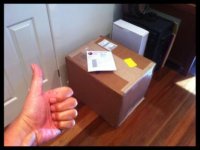
I'm home back in Australia!!!!!! Finally. Home sweet home, One thing about being some hi flying director.. is the relentless travel and being away from the family so much.

Anyway, nice surprise waiting for me in the corner of my office. Been sitting there for a couple of weeks.
 

Attachments

  • Picture 3.jpg
    Picture 3.jpg
    14 KB · Views: 0
It isn't optimal but Mark can do whatever he wants... :-)

All the same info here applies.

Jim

I thought 800 ISO is what we should be aiming for with MX. Why are all you guys shooting at 320 ISO I thought that was bad for the highlights ?
 
Back
Top