Welcome to our community

Be a part of something great, join today!

  • Hey all, just changed over the backend after 15 years I figured time to give it a bit of an update, its probably gonna be a bit weird for most of you and i am sure there is a few bugs to work out but it should kinda work the same as before... hopefully :)

Tips for smoother playback in Resolve

Joined
Jul 7, 2021
Messages
8
Reaction score
0
Points
0
Hi ! New RED Komodo user here.

I shot a project in 6K 17:9 R3D MQ 24FPS. My timeline in Davinci Resolve Studio 17.4 is in UHD. I followed a tutorial from RED website to setup the project color wise.

I don't know why, but I can't get smooth playback at all. Even in 1/8 resolution. I get around 2-3fps. To see my edit I need to export it very often which is terrible.

I have a AMD Threadripper 2950x (16-core), RTX 3080, 64Gb of RAM, everything is installed on M.2 SSD and my files are on Western Digital Entreprise Gold 7200rpm internal drives.

Is there something from RED I need to install or anything in Resolve I need to change ? It's driving me crazy !

Thanks a lot for your help :)
 
Are you running any SFX, noise reduction or Dehancer? These plugins will slow your playback to a crawl. The only solution is to render a proxy file or node cache.
 
No VFX, nor denoising or anything. Ungraded footage only. I really thought I wouldn't need to bother with proxies with R3D files with my computer specs. I used to edit heavy ProRes files before and everything was smooth. The thing I noticed is that Resolve tells me I'm playing the timeline 24FPS with a little green light. But everything is super laggy and clips aren't played properly or even skipped. Thanks !
 
No VFX, nor denoising or anything. Ungraded footage only. I really thought I wouldn't need to bother with proxies with R3D files with my computer specs. I used to edit heavy ProRes files before and everything was smooth. The thing I noticed is that Resolve tells me I'm playing the timeline 24FPS with a little green light. But everything is super laggy and clips aren't played properly or even skipped. Thanks !

Try double checking that your clip framerates (found by right clicking the clip and selecting "clip attributes") are matching your project and timeline framerates. Also maybe try a 4K timeline, rather than the full 6K, just to test.
 
Etienne,

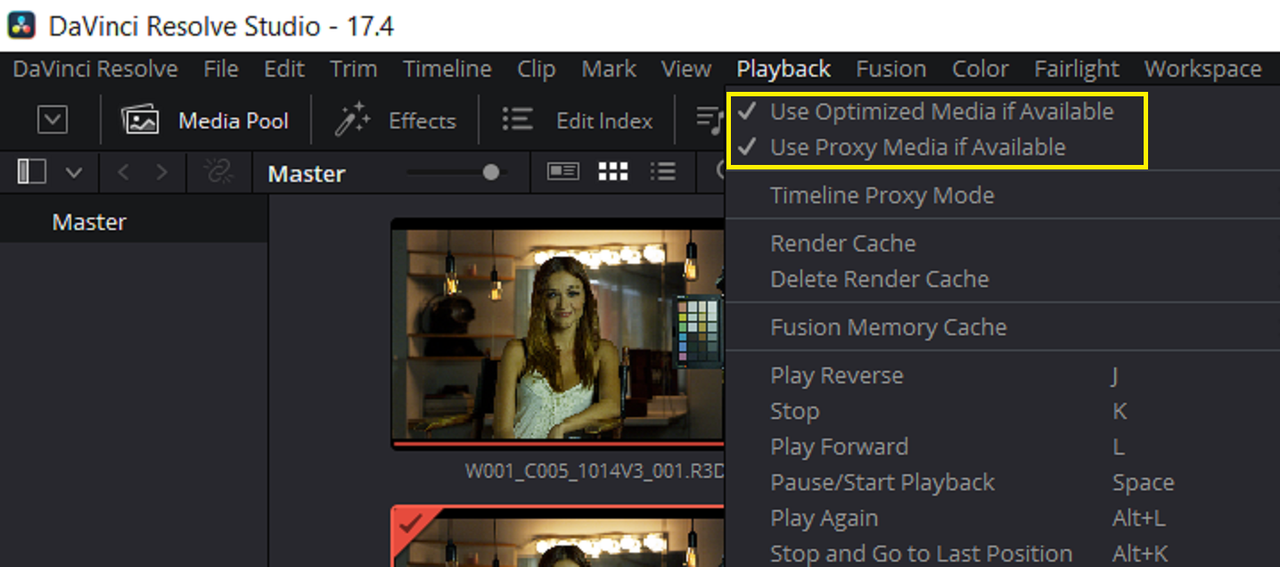
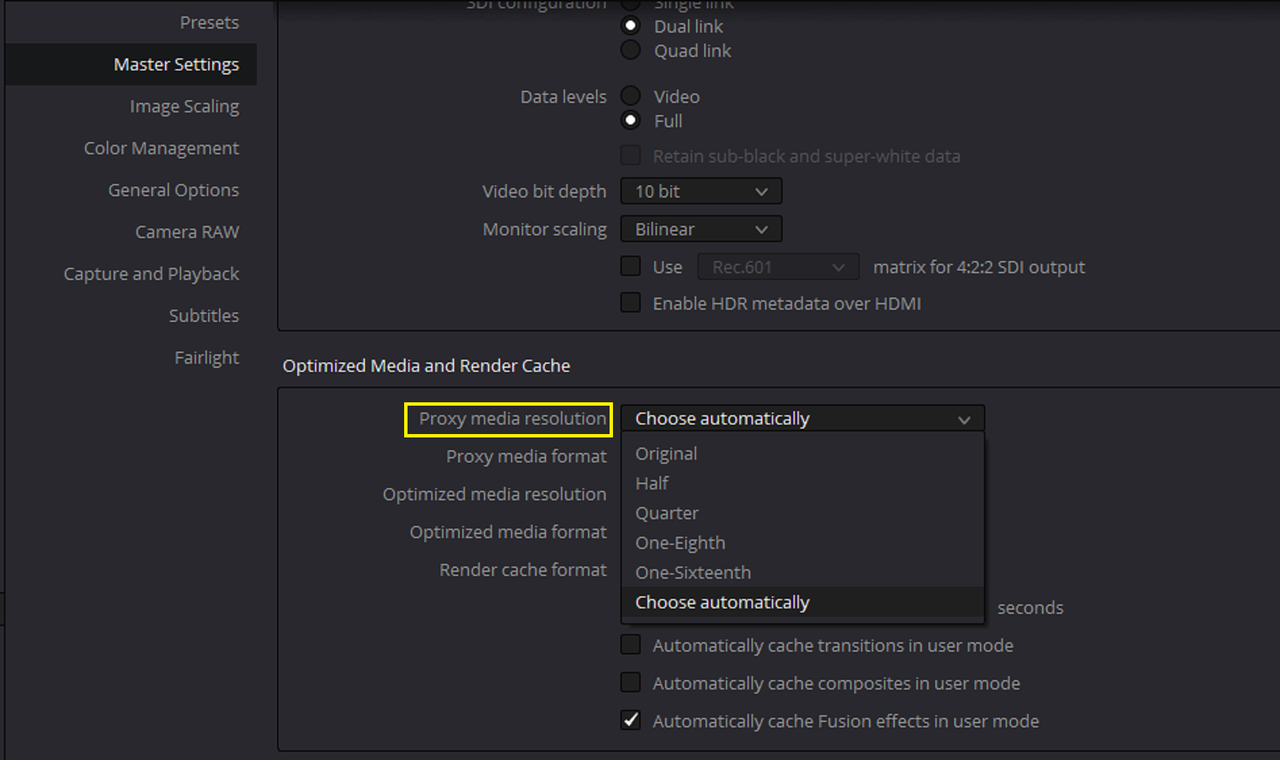
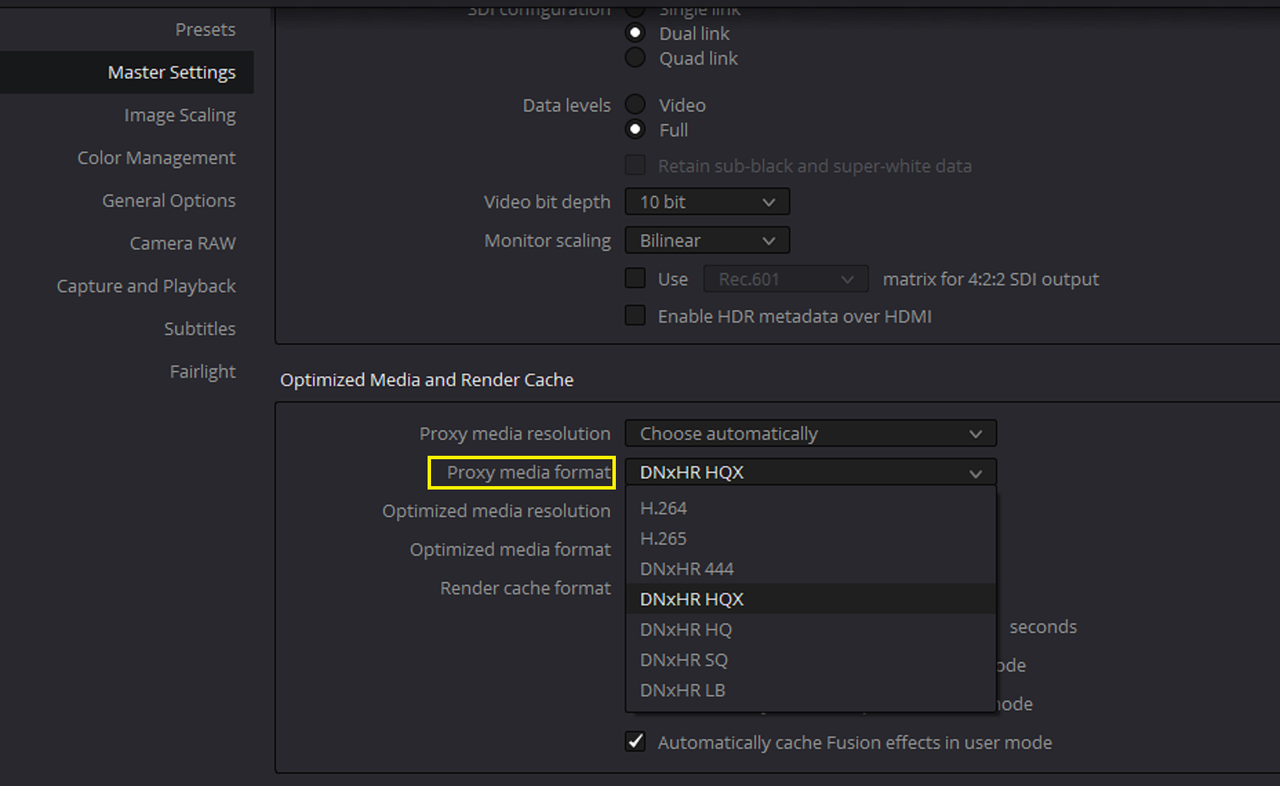
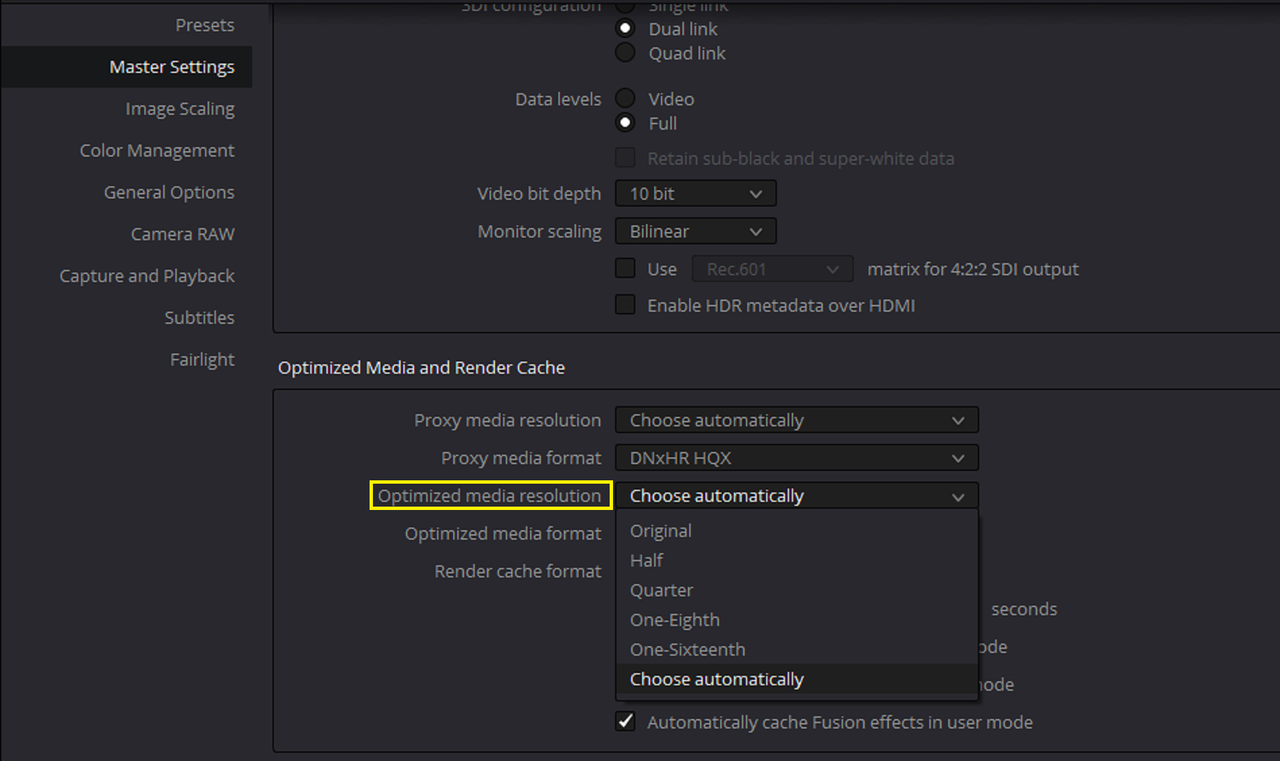
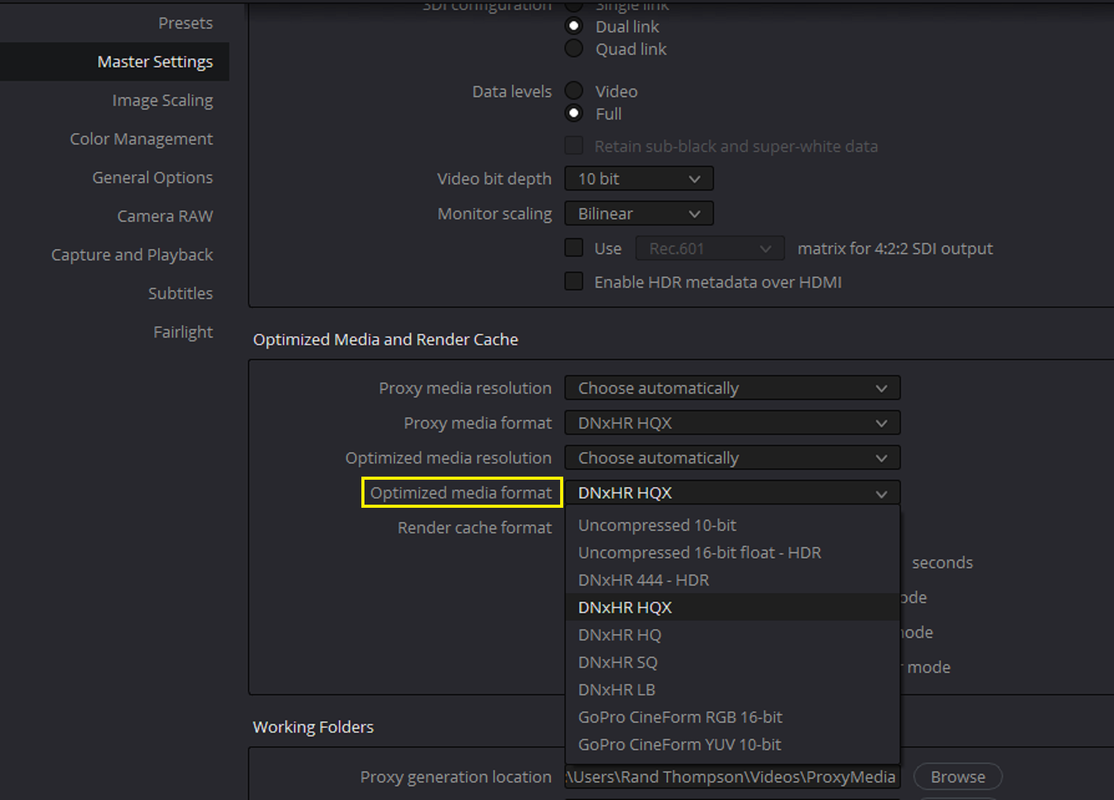
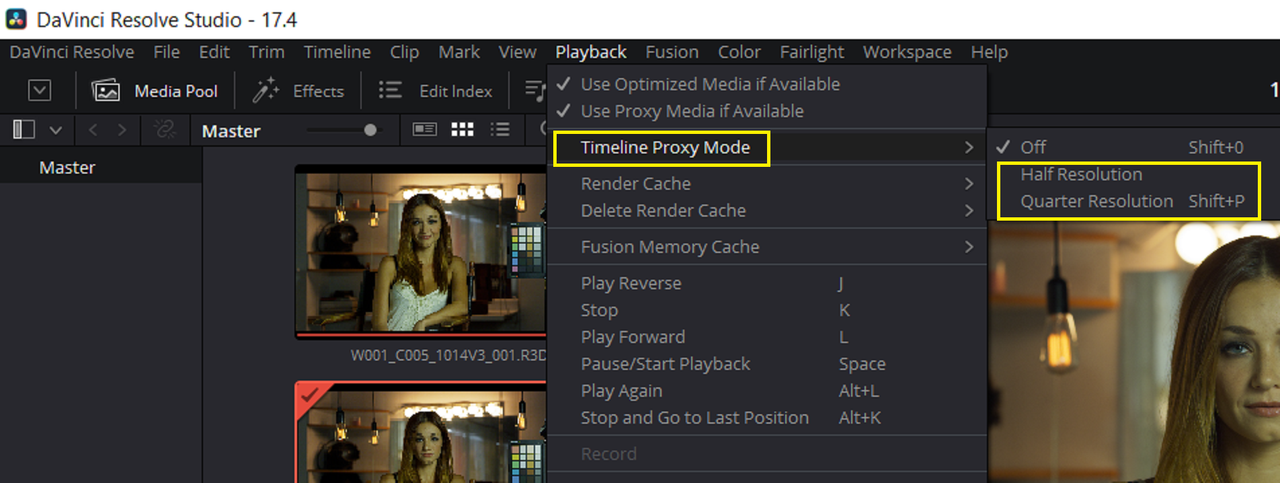
There are a few things you can try alone or in combination with other methods.


Proxy Media and Optimized Media

Screenshot-3129.png

Screenshot-3123.png

Screenshot-3124.png

Screenshot-3125.png

Screenshot-3126.png


Timeline Proxy Mode
Screenshot-3127.png


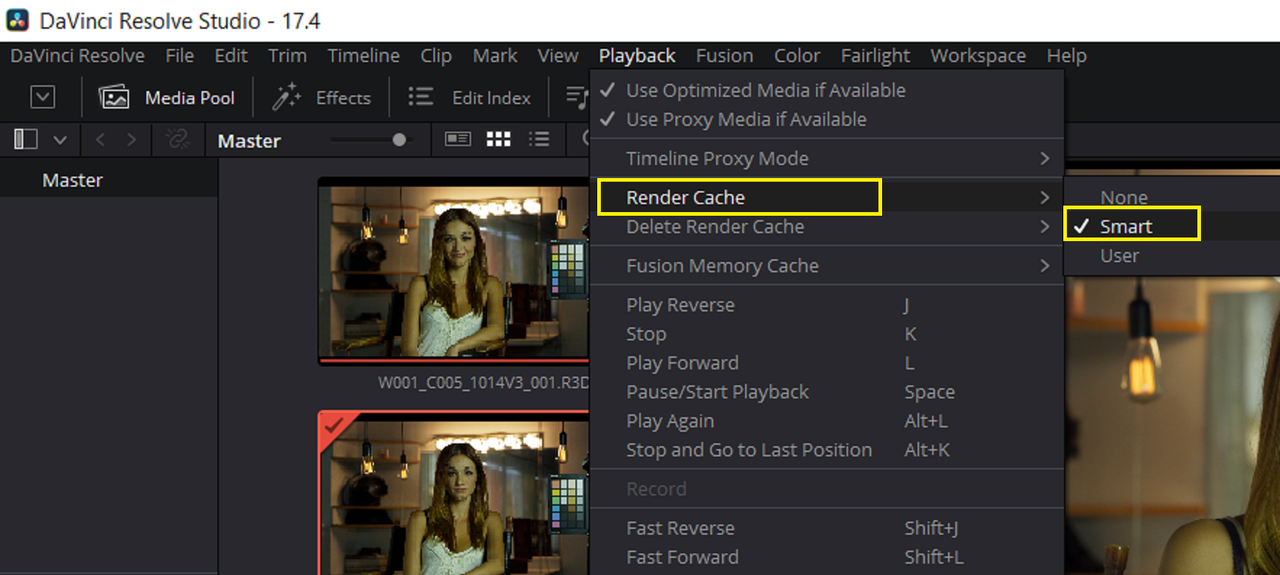
Smart Render
Screenshot-3128.png
 
Thanks guys, I hoped I wouldn't have to use proxies but if it's the only way, so be it ! If anyone uses the Komodo with the new M1 chips on Macs, how's your experience ? With the newly announced M1 Pro and M1 Max, I kinda want to go back to Apple !
 
Etienne,

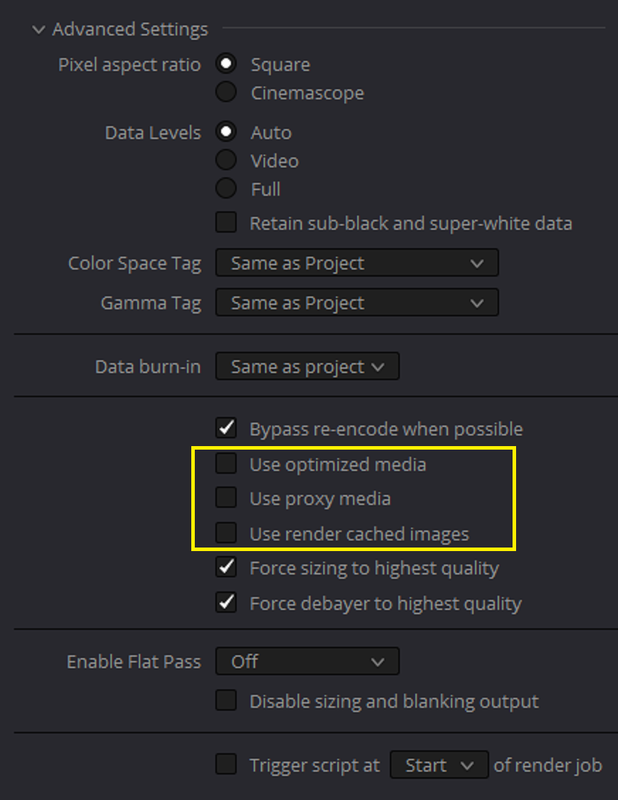
You can simply choose not to use the Proxy/Optimized Media Files or Render Cache at the time of Delivery/Export. It will use your original R3D files instead.

Screenshot-3130.png
 
Two things to improve.

Resolve really likes two GPUs.

If you are using spinning disks that aren't in a RAID 0 configuration or otherwise you are very likely bottlenecked both by data rate and access times.

For Komodo make sure your read/write on your drives gets to 300MB/s true. Ideally higher even. A single SATA SSD will do better than a single SATA spinning disk drive.

I'm an all Intel house, but I would need to look closer at that AMD CPU and general system build to see if anything is tied to issues, I mention this as it's been a common culprit as well in regards to thermals and such.
 
Hey thanks Phil ! I will try to put my project folder on one of my M.2 to see if access time improves performance. And about AMD, I wouldn't be surprised if it was part of the problem since even After Effects became slower when I switched from Intel to AMD. I will wait for benchmarks on the new M1 Max chip for R3D files playback and I'll consider switching entirely to Apple if necessary. Thanks !
 
Komodo footage at HQ is heavier than other red cameras.

to improve playback I have some notes based on my experience:

* the SSD is really important, make sure the speed doesn't run out because of cache effect. just use samsung ssds except the QVO to be sure.
* make sure you don't have any letterboxes on your footage for some reason resolve doesn't like it.
* if you're using cache select smart. it improves the performance in playback for a reason I didn't figure out why.

I'm getting 25 fps playback with zero nodes added at half-res good, in a 2048x1536 timeline. on my 3900x+64GB+1080ti machine.
I think there is a room to improve the software for better playback as I used to get smooth playback of Helium 8K footage at full-res good in a 4K DCI timeline on the same setup.
on your setup maybe the 8GB ram of the 3080 is the bottleneck. This one is not sure though!
 
If anyone uses the Komodo with the new M1 chips on Macs, how's your experience ? With the newly announced M1 Pro and M1 Max, I kinda want to go back to Apple !

Hey Etienne, I recently got the new M1 Max MacBook Pro with 64GB and 8TB SSD. With it, I can edit in real-time… with full color grade. Dehancer Pro use to bring my late 2018 MBP to a standstill. The new one can play in real-time with this plugin. One caveat… uncheck film grain and halation. There is a built in halation effect in Resolve that also has a grain option and looks just as good while being extremely efficient so you can continue to enjoy “real-time“ performance.

The new MBP is the single best purchase I made this year. It’s absolutely awesome!
 
Hey there, Han. . .

What are you using for media storage? Just loading onto your 8TB internal? (I have an identical M1 Max with just 4TB on the way. . . couldn't afford the extra 4TB!) Can't wait for it to arrive!

Thanks!

Stephen
 
When I setup decompression and debayer on GPU for R3D files on a M1 Max 32core 64ram I get choppy playback on graded clips. If I chose only debayer it goes smooth. Files on internal ssd, 2K timeline.
 
This is interesting! I don't have a need for a laptop, but Apple will surely announce a new Mac Pro using the M1 Max or even a dual M1 Max or something like that. This should help a lot for a smoother playback ! Thanks !
 
Hey there, Han. . .

What are you using for media storage? Just loading onto your 8TB internal? (I have an identical M1 Max with just 4TB on the way. . . couldn't afford the extra 4TB!) Can't wait for it to arrive!

Thanks!

Stephen

I just load everything onto the 8TB internal drive. I started to dislike carrying an external drive with me.
Btw: congratulations on the new laptop. It’s going to be an eye opener for you.
 
Back
Top