Welcome to our community

Be a part of something great, join today!

  • Hey all, just changed over the backend after 15 years I figured time to give it a bit of an update, its probably gonna be a bit weird for most of you and i am sure there is a few bugs to work out but it should kinda work the same as before... hopefully :)

The new DaVinci color match feature

Christoffer Glans

Well-known member
Joined
Jun 11, 2007
Messages
4,993
Reaction score
36
Points
48
Age
42
Location
Stockholm, Sweden
I bought a X-rite color passport to use this feature, but I'm not sure about how to do it. What should be the starting point when shooting with the Epic-MX? I tried using RedColor3 and rec709 as color spaces to accurately match (because the color match feature doesn't have redlogfilm).

I'm not sure the result is any good though? :/
 
Does it support p3 color space? That might be better option
 
Does it support p3 color space? That might be better option


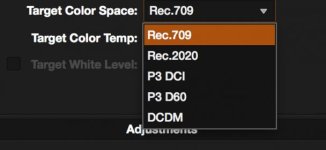
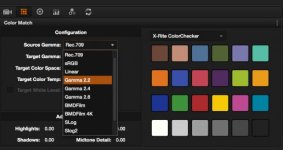
These are the options (images)

It supports P3 as a target color space, but I'm refering to the source gamma, which means I need some kind of source for it to be able to match. I can choose auto, but when matching I get percentage to each color and those percentages seem to refer to how close a match they are. They aren't really 100% at all, which is strange because it's supposed to match automatically. Either way, if they would to match at 100% it shouldn't matter what color space. P3 and rec709 is only values on the color depth so they should be the same value of color but P3 with more depth.

My feeling is that the colors get a little too strange, not so neutral. I will post some samples later.
 

Attachments

  • Skärmavbild 2014-08-08 kl. 23.20.58.jpg
    Skärmavbild 2014-08-08 kl. 23.20.58.jpg
    20.6 KB · Views: 0
  • Skärmavbild 2014-08-08 kl. 23.21.30.jpg
    Skärmavbild 2014-08-08 kl. 23.21.30.jpg
    16.6 KB · Views: 0
But if you choose s-log on the source gamma, what gamma are you choosing on your RAW-settings?
 
So if I understand correctly, I set the RAW file to RedLogFilm and then source gamma at S-Log? What's the difference between the three S-Logs?
 
So if I understand correctly, I set the RAW file to RedLogFilm and then source gamma at S-Log? What's the difference between the three S-Logs?

They are basically different curves. Same concept as Redlog and Redlogfilm.
 
Seems though that S-Log 3 get closest in matching the colors. It's bit strange though that the percentage seem to measure the percentage of difference instead of how close to a match it is.

It's a nice tool, but if I were to use the film convert plugin, can I match a film stock and then do this color match but with different matching settings? What would it be in that case (when gamma and color space match let's say a Kodak vision3)?
 
I was just about to open a Thread like this, because I do exactly have the same problems right now. We shot on an FS7 in Slog2 and a RED Epic Dragon in Redlogfilm working with the X-Rite Color Checker. Importing it in Davinci I noticed that I wasn't able to choose Redlogfilm as a Source Gamma... I hope the guys at Davinci are going to change this in the near future.
 
Back
Top