Welcome to our community

Be a part of something great, join today!

  • Hey all, just changed over the backend after 15 years I figured time to give it a bit of an update, its probably gonna be a bit weird for most of you and i am sure there is a few bugs to work out but it should kinda work the same as before... hopefully :)

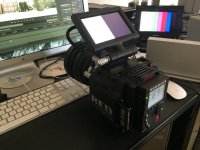
The dreaded black and white startup screen.

Bobby Farokhzad

Well-known member
Joined
Feb 27, 2012
Messages
576
Reaction score
0
Points
16
I love Red. I have said it many times before, I think it is one of the best companies I ever had to deal with. Being a Red owner for three years now, this is something I really have to get off my chest.
Fifty percent of the time when we boot up the camera we see the half white half black screen from hell. Every time a new firmware upgrade comes along I say to myself "here we go... they are finally
going to fix this". When I received My Dragon (which I love and adore) I was sure that this would definitely be the the end, but much to my surprise the problem was still there. The latest release build
solved many problems and addressed the needs of many people here but this one tiny problem still remains. WHY???
I know that unplugging the monitor cable and plugging it back is a very simple thing to do but it should never come to that.
Dear Red, can we please take care of this?
 

Attachments

  • IMG_1134.jpg
    IMG_1134.jpg
    90.5 KB · Views: 0
Do you mean that the screen is stuck on that until you unplug the cable and plug it back? I see that b&w screen for a second or two when I switch on my camera but that's all.
 
Do you mean that the screen is stuck on that until you unplug the cable and plug it back? I see that b&w screen for a second or two when I switch on my camera but that's all.

Yeah, that happened on my Scarlet as well. Haven't seen it on our Dragon yet. But it has never been stuck like that!
 
My camera had the same problem. When shot at-25c when turning on the camera hang on a B/W screen and had to move the cable back and forth , so that the image appears . When the camera returned home this problem we decided blackshading . But I have another question sometimes when loading screen is completely white, it happens more often after the updates are installed , then a couple of inclusions everything is stable again B/W two seconds and everything works. Who can explain what the screen at all ??? I somewhere saw a post about that , with different settings blackshading black half of the screen changes . What do you say??
 
Dumb question but have you guys tried different cables? Just thought I'd put it out there. I've personally never seen that happen, sorry it's happening. I can definitely understand the frustration.
 
The only way the half white half black screen goes away is if we unplug the monitor cable and plug it back, it does not go away by itself. We tried different cables and we also tried different refresh rates from the monitor settings menu but none of that helps.
 
Never seen that. It does seem like certain bodies have more issues than others for sure
 
Almost every camera I have ever used does this. It is annoying.

Nick

Weird, because every Red One and Epic camera I've used has never had this issue. When I've had an issue with the output it was the cable, or in one case it was the EVF itself, which Red fixed when I sent it it. I myself haven't see the Black and White screen, just shifts in color (all green) or rasterization - again cable issues or EVF.
 
Maybe it's an issue with older touch screens? I've never had an EVF do it, just the 5" touches. Come to think of it, I don't think I've eve seen it on any of the big monitors either.

Nick
 
This issue does not happen on external monitors, it is unique to the touchscreen. I never owned the 7 or 9 inch screens and I also never owned the EVF so I can't attest to that, but what I can say for sure is that this has been happening on my 5 inch touchscreen since I got my Epic. There are times when this does not happen upon starting the camera but for every time it doesn't happen... there is one time that this does happen.
 
It's gotta be a 5" touch issue then. Never seen this on the 9" or the new 7". Anyone seen it on any monitor other than the 5" touch. Would be good to narrow it down to a specific monitor.
 
Like Mark, I also get it sometimes. Pulling the cable and reseating always seems to take care of it. Kinda an amateur-hour solution for a high end bit of kit, but so it goes.
 
I don't have a touch (just a regular R1 5.6" monitor and Bomb EVF) but maybe this is a similar issue -- sometimes my camera boot-loops (blank screen, orange power LED), and all I have to do is push the power-button on the monitor for it to boot up (though the physical monitor buttons don't function until I disconnect/reconnect the cable).

I do think it's weird that there are half-a-dozen+ people in this thread with the same problem over multiple cameras, that have just been dealing with it for literally the last 3-4 years (since DSMC released) over multiple firmwares and camera iterations (MX and now Dragon)... that's haggard. No c300 or F3-5 or Alexa (or *cough* DSLR *cough*) I've used has exhibited such idiosyncratic behaviour, and it's things like these that likely give RED it's less-than-perfectly-reliable reputation, long after the R1's initial few months.
 
Last edited:
Always had it - on my ex Scarlet and now on my Epic. Using 5.0 touchscreen.
 
The conductors at the edge of LCD panels can sometimes be less than ideal. I have a camera monitor on the SI2K. It is a rebadged OEM out of Taiwan. It goes white, sometimes flickering, sometimes not. A sharp tap to the edge of the monitor casework usually makes it come good.

I took it apart and added some foam packing within the casework to force suspect parts to maintain contact. The cure worked for a while but the issue came back, probably because the foam eventually reformed and positive pressure on the joint disappeared.

The plastic cases on many monitors are not as robust as they could be. They may flex through being moved and adjusted on arms. The case will twist.

The metal substrate under and around the LCD panel itself is more rigid but can also twist. The enclosed panels and ribbon conductors may then draw laterally relative to each other albeit maybe only in micron movements. Over time one can expect conductive joints may break down in these highly complex components.

Giving your monitor a sharp light rap with a finger on the edge of the screen frame from the side, not the front, may provoke a change in the faultyscreen display. The screen should not be directly mounted to the camera body to try this or the disturbance may agitate a fault within the camera itself. If there is a change in the screen display, then the camera itself is not at fault.

Be aware that any such violence however light, will void your warranty or make the problem permanent. Listen to the better advice of others who contribute to this discussion.
 
Last edited:
Back
Top