Welcome to our community

Be a part of something great, join today!

  • Hey all, just changed over the backend after 15 years I figured time to give it a bit of an update, its probably gonna be a bit weird for most of you and i am sure there is a few bugs to work out but it should kinda work the same as before... hopefully :)

The challenge of exposing the Helium sensor

Kenneth C Merrill

Well-known member
Joined
Aug 9, 2015
Messages
506
Reaction score
0
Points
0
Location
Los Angeles
I've only shot with my Helium a few times so far, but each time I have tried to rate it at about 1280 or 1600 to get better highlight rolloff. However, according to Phil Holland's test, if you really want to take advantage of all the dynamic range the sensor has to offer, it seems that you really need to rate it at 3200 ISO. But there's a problem.

Besides the worry of noise in the shadowy parts of the image at that ISO, there is also the problem of green shadows/blacks that seems to affect the Helium in an ungodly way.

Here is a test I saw a few days ago online that matched the Helium against an F55 and a Dragon. For the most part, it performed pretty well. But the underexposure tests revealed this horrifying result (it's something I've always felt in the shadows of my image, but never really saw it jump out like this):


Here is the Dragon, for reference:


Compared to the Dragon, the blacks and shadows are horrifically green. This also makes me wonder about even rating the sensor at 1600 ISO, since that is essentially pushing the shadows by one stop (from 800) automatically, not to mention any further pushing you have to do in post.

I would love to hear people's thoughts on this. To be honest, the color in the Dragon is looking a lot better than the Helium right now because of this issue. To me, it's very serious, and I would love to hear if there is a fix in the plan.

Kenneth
 
FYI - The images are not showing up for me.

Which OLPF are you using?

I edited the image links. Let me know if they don't work again! At any rate, here is the link to the test: https://www.youtube.com/watch?v=b56CVMUvrng&t=500s

I use the Standard OLPF on mine because I dislike the IR pollution of the Low Light filter, and I don't care for the slight green cast of the Skin Tone filter. Standard is a nice medium--though I am eager to try out a Kipper Tie Carbon 1!
 
I'm curious if you manual black shade instead of auto, does it help at all?

Doing this greatly greatly improved the green shadows on my camera.

If you were rating 1280 with standard olpf I think kipper tie puts you around 500.
 
I've only shot with my Helium a few times so far, but each time I have tried to rate it at about 1280 or 1600 to get better highlight rolloff. However, according to Phil Holland's test, if you really want to take advantage of all the dynamic range the sensor has to offer, it seems that you really need to rate it at 3200 ISO.
Kenneth

If you really want to take advantage of the Helium sensor - you want to rate about 1 stop above how you rated Dragon. I'm a Helium is 1280 guy (and Dragon at 640). For many reasons. But the whole ISO confusion makes me insane - because you need to talk about EXPOSURE METHOD - not just the ISO setting. The ISO setting will obviously effect your exposure method.

You can set ISO at 3200 and use one exposure method that gives you the same aperture as another exposure method does with the camera set at 800 or whatever.

And when someone posts an image of "-4 stops" - I'm always like ... -4 stops FROM WHAT??? Baseline exposure? Okay, what was the exposure method you used to choose the aperture on your "baseline exposure"?

One guy rates at ISO 320 - but his EXPOSURE METHOD has him choose the same aperture as someone who rates at 800 but uses a different exposure method.

So ... FUCK ISO.

You need to discuss ISO + EXPOSURE METHOD (how do you choose your exposure setting based on a given ISO setting in camera, what tool(s), what logic/process)
 
I edited the image links. Let me know if they don't work again! At any rate, here is the link to the test: https://www.youtube.com/watch?v=b56CVMUvrng&t=500s

I use the Standard OLPF on mine because I dislike the IR pollution of the Low Light filter, and I don't care for the slight green cast of the Skin Tone filter. Standard is a nice medium--though I am eager to try out a Kipper Tie Carbon 1!
Images work now, thank you. I also use the STD filter.
 
If you really want to take advantage of the Helium sensor - you want to rate about 1 stop above how you rated Dragon. I'm a Helium is 1280 guy (and Dragon at 640). For many reasons. But the whole ISO confusion makes me insane - because you need to talk about EXPOSURE METHOD - not just the ISO setting. The ISO setting will obviously effect your exposure method.

You can set ISO at 3200 and use one exposure method that gives you the same aperture as another exposure method does with the camera set at 800 or whatever.

And when someone posts an image of "-4 stops" - I'm always like ... -4 stops FROM WHAT??? Baseline exposure? Okay, what was the exposure method you used to choose the aperture on your "baseline exposure"?

One guy rates at ISO 320 - but his EXPOSURE METHOD has him choose the same aperture as someone who rates at 800 but uses a different exposure method.

So ... FUCK ISO.

You need to discuss ISO + EXPOSURE METHOD (how do you choose your exposure setting based on a given ISO setting in camera, what tool(s), what logic/process)

This is very true. In these studio tests, it's very common to rate the sensor at an ISO (probably 800 in this case, I'm guessing), and then expose by setting a light meter to that sensitivity and setting your aperture by incident readings. Not 100% sure if that method was followed exactly in the test I posted, but either way, all the cameras were exposed with a similar "exposure method," and the Helium is the only one with crazy green shifts in the shadows/blacks. So I think it's safe to say there's an issue.

Would love to hear some words of comfort on this front.
 
So ... FUCK ISO.

+1
Borrowing a standard from a chemical industrial process has been a failure...when electronic cameras have been using a standardised measurement of S/N and "gain" to relate image sensitivity and noise.

ISO does not relate noise at all, it's all accelerator and no brakes.

Mike Brennan


Histogram, zebras are your light meter and they factor sensor sensitivity.
Don't need T stops marked on lenses either!
 
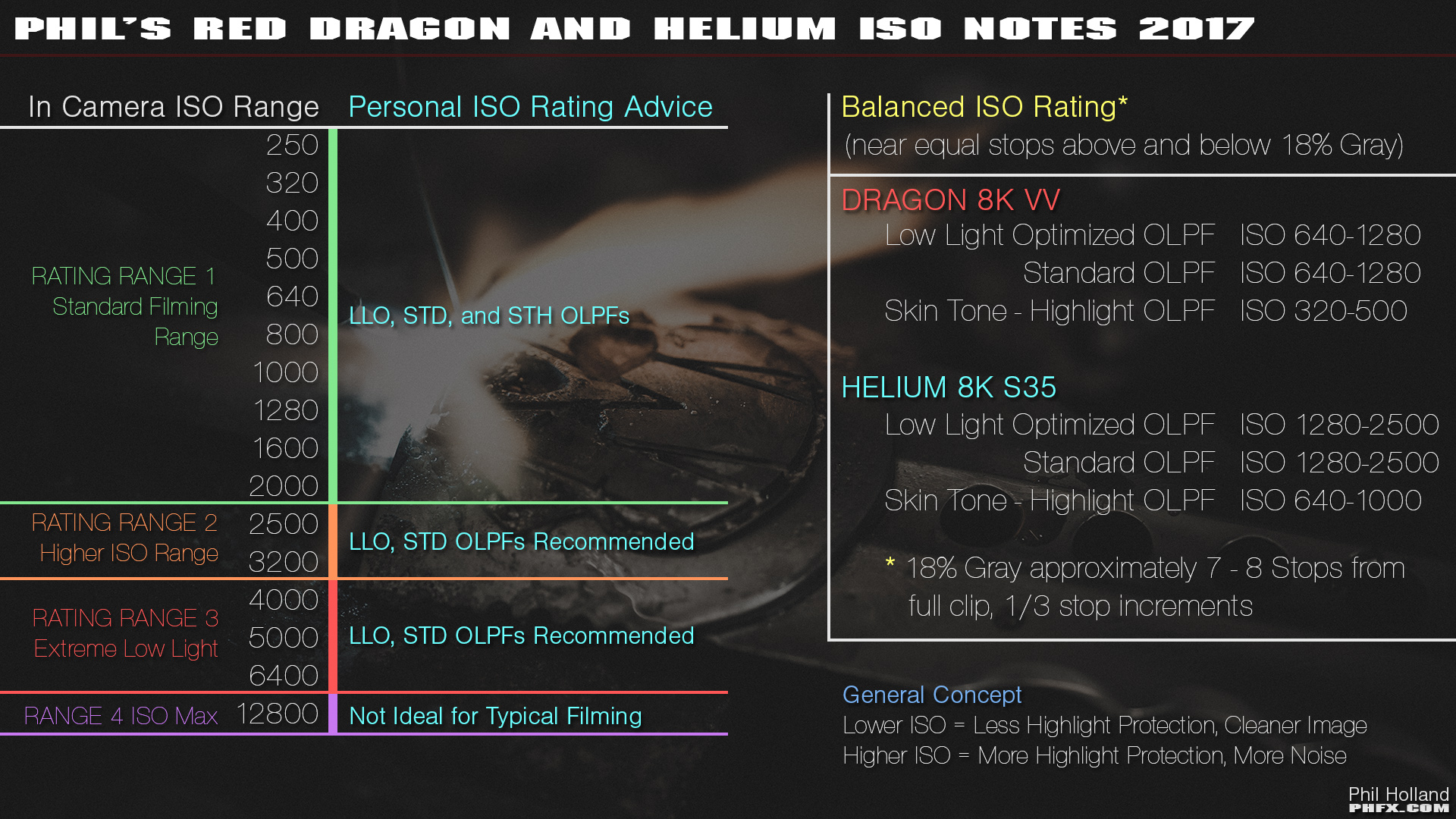
Putting this here as this is what I'd typically recommend:

phfx_2017_RED8KSensorTest_REDHeliumDragon_ISONotes.jpg
 
Are you on the latest firmware running IPP2? If not, update it, if so, make sure you're actually using it properly which gets you much more accurate color.

Try something out...set your Gamma and Color settings to REDWIDEGAMUT and LG310. Then, apply one of the latest IPP2 LUTS...I particularly like Low Con Rolloff 4. Does amazing things for skin tone.

Also...try and auto black shade once your camera is up to operating temp (HUGE DEAL). Takes about 45 minutes, but well worth it and you only need to do it once really unless you have huge ambient temp changes.
 
I've only shot with my Helium a few times so far, but each time I have tried to rate it at about 1280 or 1600 to get better highlight rolloff. However, according to Phil Holland's test, if you really want to take advantage of all the dynamic range the sensor has to offer, it seems that you really need to rate it at 3200 ISO. But there's a problem.

Besides the worry of noise in the shadowy parts of the image at that ISO, there is also the problem of green shadows/blacks that seems to affect the Helium in an ungodly way.

Here is a test I saw a few days ago online that matched the Helium against an F55 and a Dragon. For the most part, it performed pretty well. But the underexposure tests revealed this horrifying result (it's something I've always felt in the shadows of my image, but never really saw it jump out like this):


Here is the Dragon, for reference:


- 4 stops ?


Solving the challenge:

Proper exposure, black shading & WB.


Compared to the Dragon, the blacks and shadows are horrifically green. This also makes me wonder about even rating the sensor at 1600 ISO, since that is essentially pushing the shadows by one stop (from 800) automatically, not to mention any further pushing you have to do in post.


1kfqlh.jpg
 
From what I gather RED ISO is not the same as everyones elses ISO.
Isn't Red 1 stop higher than everybody else?
Like Red 800 is ARRI (and others) 400?
I think that's where a lot of confusion is coming from...
 
wow is that true
I don't know- that's what I gathered from reading the recent ARRI/Helium comparison thread. But I could be mistaken- they mentioned there to treat Red ISO differently from others...
 
First off, the prominent green shift in the shadows of the OP's reference image is not endemic to the Helium sensor. I have seen some green contamination at the bottom of the scale in some footy, but never more than a tinge.

SOP: latest camera firmware, run a couple of black calibration passes, double check that the OLPF actually in camera matches the one selected in the menu, make sure your color temp/white balance has zero tint adjustment, use daylight or high CRI instruments for testing - many LEDs and fluorescents have a serious green spike which is even more obvious at low exposures

Basic exposure notes:

Be aware of signal to noise ratio - IMO, with digital acquisition tools, it's more meaningful that ISO

Clipping is rarely a good idea

Don't expose key parts of the image (skin tone for example) near the extremes without careful consideration

Be aware that chroma (color) saturation reproduction has a relationship with exposure. In simple terms; bright colors lose saturation in the highlights, subtle colors get lost in the shadows.

Disclaimer: the notes above do not take into account numerous factors that are beyond the scope of this discussion.

Cheers - #19
 
While this info about ISO was posted previously by RED in re: the MX and Dragon sensor, does it also apply to the Helium sensor (and is that info still considered accurate for Weapon Dragon?)
 
Last edited:
Is there actually a difference in black shade quality between auto and manual? (Given correct operating temps, ect.) I haven't noticed much but haven't had time to shoot charts to test. Is this something that's been tested on the latest firmware and ipp2 version?
 
wow is that true

Yes compared to Alexa at same iso and t-stop and fps/shutter, red appears about a stop darker at default red settings, so 1250-1600 on red looks like 800 Alexa on the monitor
 
Back
Top