Welcome to our community

Be a part of something great, join today!

  • Hey all, just changed over the backend after 15 years I figured time to give it a bit of an update, its probably gonna be a bit weird for most of you and i am sure there is a few bugs to work out but it should kinda work the same as before... hopefully :)

Support for DCI-P3 (SMPTE-431-2) Color/Gamma Space

JonathanF

Well-known member
Joined
Nov 29, 2008
Messages
286
Reaction score
0
Points
0
Location
Working in LA, NY, London or Vancouver
Website
www.veritefeatures.com
Jim, Graham, et al.,

Currently in both the camera and redline we have support for Color/Gamma Space Settings which include:

  • lin
  • rec709
  • sRGB
  • REDlog
  • PDLog985
  • PDLog685
  • PDLogCustom
  • REDspace
An odd omission from this list is the Digital Cinema Initiative reference gamut informally known as DCI-P3, also SMPTE-431-2.
Is there a reason we cannot currently output to this Color/Gamma space?

Specific technical details are available here.

Even if we were to have "Interop." or "Transitional 3" compliance in the SDK and Redline it would be very handy.

J
 
Jim, Graham, et al.,

Currently in both the camera and redline we have support for Color/Gamma Space Settings which include:

  • lin
  • rec709
  • sRGB
  • REDlog
  • PDLog985
  • PDLog685
  • PDLogCustom
  • REDspace
An odd omission from this list is the Digital Cinema Initiative reference gamut informally known as DCI-P3, also SMPTE-431-2.
Is there a reason we cannot currently output to this Color/Gamma space?

Specific technical details are available here.

Even if we were to have "Interop." or "Transitional 3" compliance in the SDK and Redline it would be very handy.

J

Yes, P3 in RocketCine-X please.
 
Jonathan -

How are you seeing P3 used right now? Are you seeing this as a deliverable? Are you seeing folks actually DI (grade) in P3?

As best as I can tell ... P3 is a DLP projector profile within the XYZ DCI color space.
 
Jonathan -

How are you seeing P3 used right now? Are you seeing this as a deliverable? Are you seeing folks actually DI (grade) in P3?

As best as I can tell ... P3 is a DLP projector profile within the XYZ DCI color space.

Mark,

Bingo... if you're monitoring on a DCI projector (or projecting on one) this is what you want. I'd like to grade in this space and then apply 3D luts to output to various other formats as it's the widest of the potential output gamuts and 709 and the various log formats all fall within it.

We have both monitors and projectors that can be calibrated accordingly so it's the logical choice.

How about you? What are your thoughts on this for OffHollywood? I'll assume you're thinking along similar lines.

J
 
P3 can be manually dialed into any thing that has RGB XYZ color control. We have done a few DI's in P3 and often get SR tapes in P3 for projection. I guess it would be cool to have that as a preset on the camera.

If your monitor or projector does not have a P3 preset just type these numbers in to change the white point to P3.

P3
W - .333, .334
R - .680, .320
G - .265, .690
B - .140, .070

John
 
Mark,

Bingo... if you're monitoring on a DCI projector (or projecting on one) this is what you want. I'd like to grade in this space and then apply 3D luts to output to various other formats as it's the widest of the potential output gamuts and 709 and the various log formats all fall within it.

We have both monitors and projectors that can be calibrated accordingly so it's the logical choice.

How about you? What are your thoughts on this for OffHollywood? I'll assume you're thinking along similar lines.

J

Jonathan -

I'm very interested in this.

We use the Barco D-Cine Post Production Communicator software in our new Di theatre and have set up P3 presets as we were told to expect screeners from one particular studio in P3.

So ... where I am slightly confused is why wouldn't you just DI in XYZ, why add the P3 profile?

I assume, what you are thinking (or already doing) is to use P3 as your viewing profile - so you are color grading (within the DI system) in 32-bit float RBG - but looking at, and making grading choices on P3 projectors and displays.

I would then assume, you could render and/or output RGB WITHOUT the transform - lay it off to SR tape and if that tape is viewed with a P3 profile - all is well.

I would then assume - you ADD various 3D LUTS for your Rec. 709 output, etc.

Question off the top of my head is ... if you know you are going for FILM + DIGITAL delivery - would you ADD the 3D film stock/lab LUT and grade while looking at a P3 profile - then render 10-bit LOG without the 3D film stock/lab LUT for record-out? Or do you do a trim-pass after the fact? Curious what approach you like best.

Why wouldn't you just use XYZ for projector setting? I guess that's my biggest point of confusion here.

You can also email me directly - mark (at) offhollywoodny.com

Thanks in advance for all your insights and thoughts.
 
Jonathan -
So ... where I am slightly confused is why wouldn't you just DI in XYZ, why add the P3 profile?

I guess I was thinking that because our grading monitors and projector both have calibrations for DCI-P3 (SMPTE-431-2) that this would be the simplest route. In that case I could even use this on set in the camera as a viewing lut when we have a Dreamcolor with us.

I assume, what you are thinking (or already doing) is to use P3 as your viewing profile - so you are color grading (within the DI system) in 32-bit float RBG - but looking at, and making grading choices on P3 projectors and displays.

I would then assume, you could render and/or output RGB WITHOUT the transform - lay it off to SR tape and if that tape is viewed with a P3 profile - all is well.

I'll have to think about that. I had not considered that as an option. I thought we'd simply grade to DCI and then we could apply the DCI-rec709 (or whatever) transforms when outputting to alternate deliverables.

I would then assume - you ADD various 3D LUTS for your Rec. 709 output, etc.

Question off the top of my head is ... if you know you are going for FILM + DIGITAL delivery - would you ADD the 3D film stock/lab LUT and grade while looking at a P3 profile - then render 10-bit LOG without the 3D film stock/lab LUT for record-out? Or do you do a trim-pass after the fact? Curious what approach you like best.

Why wouldn't you just use XYZ for projector setting? I guess that's my biggest point of confusion here.

You can also email me directly - mark (at) offhollywoodny.com

Thanks in advance for all your insights and thoughts.

It's all interesting, we're just getting the projector spec'd now and the displays on the DI system are Dreamcolors so we have the DCI P3 preset on them presently. I'd like to get someone like Josh Pines in on this discussin and get his take on all this.

J
 
This is an interesting topic. I hope that Jonathan and Mark keep us all in the loop going forward. One of the theoretical advantages of working with the RedOne's RAW color information off the sensor block is the ability to fill more of the the XYZ and P3 color gamuts than any SDI rec709 limited format. Variants like s-log and pana-log preserve more code values but the prisms used in some 3 chip cameras limit gamut.

Anyone know what percentage of the P3 color space the F35 can represent?

Trim passes vs canned transforms is a time and cost issue. I like the idea of the P3 gamut DCDM serving as the primary master for all other deliverables, but like a lot of things, it may not be that simple.

Paging Mike Most to the white courtesy phone...

Cheers - #19
 
I assume, what you are thinking (or already doing) is to use P3 as your viewing profile - so you are color grading (within the DI system) in 32-bit float RBG - but looking at, and making grading choices on P3 projectors and displays.

I would then assume, you could render and/or output RGB WITHOUT the transform - lay it off to SR tape and if that tape is viewed with a P3 profile - all is well.

I would then assume - you ADD various 3D LUTS for your Rec. 709 output, etc.

All correct, with the note that I have never heard of anyone asking for an SR tape in P3 color space. That doesn't mean it's never happened, but I've never heard of it. SR tape is, well, SR tape. It's generally assumed to be Rec709 color space with SMPTE scaling. But as I said, that doesn't mean there aren't exceptions.

Question off the top of my head is ... if you know you are going for FILM + DIGITAL delivery - would you ADD the 3D film stock/lab LUT and grade while looking at a P3 profile - then render 10-bit LOG without the 3D film stock/lab LUT for record-out? Or do you do a trim-pass after the fact? Curious what approach you like best.

I assume you're talking about a "typical" film targeted DI, working from elements that are presumed to be in a log format, preferably Cineon specs (regardless of their actual origination). In that case, you would use a viewing LUT that is created using a P3 monitor and your particular film target. Removing the LUT yields your film files. Baking in the LUT yields a Digital Cinema version, or more specifically, a source for creating the DCDM (I usually render that as a 16 bit Tiff sequence, keeping it in 2.6 gamma encoded space). Applying a P3 to Rec709 conversion LUT on the Digital Cinema version yields the HD version.

Why wouldn't you just use XYZ for projector setting? I guess that's my biggest point of confusion here.

I don't quite understand the question. XYZ is not something you want to look at directly, nor is it something you'd use for color correction. RGB is the only format that will make sense to both your eyes and the color corrector. You would use an XYZ projector setup file when it's being fed from an XYZ encoded source, as would be the case with a digital cinema server. It's not something you would use for color correction unless you were using it to check the digital cinema elements. Or are you referring to using no projector setup file (i.e., the "raw" settings of the projector, with no internal LUT) in combination with an external LUT box for calibration (not an uncommon scenario, by the way)?
 
This is an interesting topic. I hope that Jonathan and Mark keep us all in the loop going forward.

I like the idea of the P3 gamut DCDM serving as the primary master for all other deliverables.

Blair,

I will do my best to keep you in the loop on this stuff. I've been dealing with this sort of thing for quite a number of years and I am starting to finally put my head down on the XYZ colorspace issues. I know from the data I have now that 709 does fall fully within DCI so that should make doing DCI to 709 deliverables straightforward.

PM me your email and phone and I'll make a point of passing along any and all notes that come out of this. I'll be happy to pass it all along, and I'd love to have your input as well.

Mike's post (above) echos my thoughts on SR tapes, but digital delivery will soon become a real possibility for a lot of us and I don't see many more films I work on delivering on film (sniffle). With that in mind we're working to establish DCI as our mastering gamut.

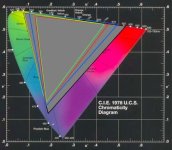
Here's a chart showing the various gamuts. Blue is DCI, red is rec709, green is SMPTE-C.

J
 

Attachments

  • CSDiag.JPG
    CSDiag.JPG
    81.6 KB · Views: 0
Mike's post (above) echos my thoughts on SR tapes, but digital delivery will soon become a real possibility for a lot of us and I don't see many more films I work on delivering on film (sniffle). With that in mind we're working to establish DCI as our mastering gamut.

Any picture that gets theatrical distribution just about anywhere in the world ultimately needs a film deliverable. That can be accomplished using different approaches, but if you're working on pictures that have real distribution, film is still required for that, and will be for some time. If the projects you are working on don't deliver a film element, they are probably independent productions that are either festival only, direct to DVD, or web projects. Now, that is not to say that running a digital cinema-centric pipeline for DI is a bad thing, in fact, it is exactly how I set up the DI operation at the facility I was with in Florida, and it is exactly how I've helped to set up one here since I've been back (in L.A.).
 
Okay .. I got my specific answer on P3 vs. XYZ.

If you viewed in XYZ - you would waste alot of values for out of gamut stuff that you can't see on todays projectors. Since the projectors are pretty much around P3, that yields the most efficient grade for the values in the file.
 
Okay .. I got my specific answer on P3 vs. XYZ.

If you viewed in XYZ - you would waste alot of values for out of gamut stuff that you can't see on todays projectors. Since the projectors are pretty much around P3, that yields the most efficient grade for the values in the file.

P3 is based on the characteristics of the TI DLP Cinema system. The description of the Reference Projector in the DCI specification is directly based on the TI specs. It should, however, also be pointed out that the primary reason for describing the color space as XYZ values was to be able to migrate the spec to deal with future display systems that might encompass a wider color gamut. The notion of future compatibility is pervasive throughout the spec, which is why everything in it is based on open standards, rather than any proprietary technology. As an example, the essence wrapper is MXF (an open standard) rather than, say, Quicktime (a proprietary Apple owned technology), encryption is based on FIPS 140-2, and things like Composition Playlists and Packing Lists are XML documents.
 
P3 is based on the characteristics of the TI DLP Cinema system. The description of the Reference Projector in the DCI specification is directly based on the TI specs. It should, however, also be pointed out that the primary reason for describing the color space as XYZ values was to be able to migrate the spec to deal with future display systems that might encompass a wider color gamut. The notion of future compatibility is pervasive throughout the spec, which is why everything in it is based on open standards, rather than any proprietary technology. As an example, the essence wrapper is MXF (an open standard) rather than, say, Quicktime (a proprietary Apple owned technology), encryption is based on FIPS 140-2, and things like Composition Playlists and Packing Lists are XML documents.

That brings up an interesting question. Without any current monitor or projector technology capable of displaying XYZ, what is the widest practical gamut to grade to presently? I might suggest P3 as the logical answer to that question, however I would be guessing.

Your thoughts?

J
 
That brings up an interesting question. Without any current monitor or projector technology capable of displaying XYZ, what is the widest practical gamut to grade to presently? I might suggest P3 as the logical answer to that question, however I would be guessing.

Your thoughts?

I would agree, simply because it's the widest gamut that's currently available that has actual display support. All other current display device gamuts are enclosed within it, as Mark pointed out. Going to a digital cinema centric pipeline doesn't completely absolve you of the need to understand that you might be creating some colors that are out of gamut for film output, however, although there are ways to check this.
 
I would agree, simply because it's the widest gamut that's currently available that has actual display support. All other current display device gamuts are enclosed within it, as Mark pointed out. Going to a digital cinema centric pipeline doesn't completely absolve you of the need to understand that you might be creating some colors that are out of gamut for film output, however, although there are ways to check this.

Yup, and most of that we have already from previous projects, just need to adapt it to P3.

All this is moot though if we can't get the setting in the camera/sdk.

Graeme? Deanan?
 
Oh... some of my favorite people, having an honest, real, informative, useful discussion about shit that matters. Thank's Jon, I like you a lot. ;-) You keep this up, and I might actually find myself visiting the forums more often again.
 
Back
Top