Welcome to our community

Be a part of something great, join today!

  • Hey all, just changed over the backend after 15 years I figured time to give it a bit of an update, its probably gonna be a bit weird for most of you and i am sure there is a few bugs to work out but it should kinda work the same as before... hopefully :)

Summer Blockbuster Colour Grading Tutorial - Shot on Epic

Thanks for the feedback. Glad you guys like it.

Zakeree - Yeah this look isn't everyone's cup of tea. It's quite heavy and stylised, not appropriate for a lot of projects. I'll look at putting something together thats bit more natural.

Matt - Great suggestions. I've already had another suggestion for There Ill Be Blood. I can only really match something that I can get on Blu-ray or online in the form of a trailer. The problem then becomes which version to match. There's sometimes a really big difference between the two. Compare the trailer of There Will be Blood to the Blu-ray. The trailer grade looks like something I could dissect and show how its done, the Blu-ray doesn't really have much of a look beyond the format it was shot on, IMHO. Judging by those screenshots anyway...

Casino Royal looked great. Definitely a look that stood out for me as well. Same with skyfall. I've already got a close match of the Skyfall look... Any feature thats shot digitally is far easier to match!

I'll see what I can do...
 
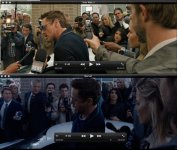
Here's another instance of this look from Iron Man 3, although the skin tones aren't quite as warm as the traditional Orange/Teal look, you can see the trailer "neutral" look as apposed to the "Tony Calls out the Mandarin" or closer to final look they went for in the final film. Little before and after but if you watch the clip located below, you can spot the key happening. Always look in the whites of the eyes, and you'll notice when going for this extreme look usually the whites of the eyes and the shadows in the corner of the eyes etc have a hint of that cool blue/teal in them.
http://trailers.apple.com/trailers/marvel/ironman3/
 

Attachments

  • 1.jpg
    1.jpg
    86.5 KB · Views: 0
Thanks for the feedback. Glad you guys like it.

Zakeree - Yeah this look isn't everyone's cup of tea. It's quite heavy and stylised, not appropriate for a lot of projects. I'll look at putting something together thats bit more natural.

Matt - Great suggestions. I've already had another suggestion for There Ill Be Blood. I can only really match something that I can get on Blu-ray or online in the form of a trailer. The problem then becomes which version to match. There's sometimes a really big difference between the two. Compare the trailer of There Will be Blood to the Blu-ray. The trailer grade looks like something I could dissect and show how its done, the Blu-ray doesn't really have much of a look beyond the format it was shot on, IMHO. Judging by those screenshots anyway...

Casino Royal looked great. Definitely a look that stood out for me as well. Same with skyfall. I've already got a close match of the Skyfall look... Any feature thats shot digitally is far easier to match!

I'll see what I can do...

Juan, 2 films I really liked the look was "Drive" and "In the Mood for Love" (Wong Kar Wai/Christopher Doyle). In the last case I'm sure much has to do with the lighting but would like to know your take on that film!

Once again, cheers and excellent work!
 
Fantastic tutorial!
Many thanks, Juan!!!
cheers
 
Thanks for the feedback. Glad you guys like it.

Zakeree - Yeah this look isn't everyone's cup of tea. It's quite heavy and stylised, not appropriate for a lot of projects. I'll look at putting something together thats bit more natural.

Matt - Great suggestions. I've already had another suggestion for There Ill Be Blood. I can only really match something that I can get on Blu-ray or online in the form of a trailer. The problem then becomes which version to match. There's sometimes a really big difference between the two. Compare the trailer of There Will be Blood to the Blu-ray. The trailer grade looks like something I could dissect and show how its done, the Blu-ray doesn't really have much of a look beyond the format it was shot on, IMHO. Judging by those screenshots anyway...

Casino Royal looked great. Definitely a look that stood out for me as well. Same with skyfall. I've already got a close match of the Skyfall look... Any feature thats shot digitally is far easier to match!

I'll see what I can do...

Oh yes please! A Skyfall grade tutorial would be awesome!
Yes, big daniel craig as james bond fan, guilty.
 
color1.jpg


thank you
 
Hey there Juan!

Again thanks for this great tutorial!

Also, I'm trying to get a "The Girl with the Dragon Tattoo" look with Red One footage, any tips you might have?
 
Juan, it's funny; I found your tutorial through a web search. I say that's funny, because with all the scanning of the RedUser forums that I do, you'd think I found it here first . . .

You know, a movie that I really liked the grading of? The Immortals. Not an amazing film, but light and fun enough, and I just thought the gods were beautifully golden. The golds in that film just struck me as beautiful, and I've had issues getting my golds to "pop".
 
man this is so great
THX!! Would LOVE to see more of these. Perfect

thx agin!
 
Back
Top