Welcome to our community

Be a part of something great, join today!

  • Hey all, just changed over the backend after 15 years I figured time to give it a bit of an update, its probably gonna be a bit weird for most of you and i am sure there is a few bugs to work out but it should kinda work the same as before... hopefully :)

Stabilization with Extraction - The FIncher Workflow

Jonathan Pears

Well-known member
Joined
Jan 17, 2013
Messages
590
Reaction score
5
Points
18
Location
Santa Monica, CA
Website
www.backtoawake.com
Did some searching around and couldn't find anything specific on this, i just made a jump from Arri to Red (oh, yes i did) for my personal camera, so bathing in some new approaches avaioable to me.

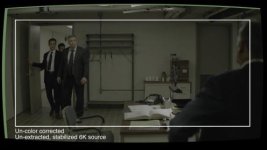
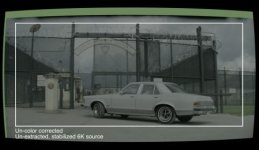
With that in mind, is anyone familiar with the steps/process of being able to extract say: A 4K frame from 5k or 6k footage, post stabilization? This is a technique i saw used heavily on mindhunter by Fincher, and i am cuirous to its stepa and what the most ideas software might be for it? I guess another way of putting it, is whats the easiest way to export the 'middle' of the frame post stabilization where the edges will change do to stabilization re-frame? Hopfully one or other of the questions will make sense.

You can see it at 16:30 here: https://vimeo.com/248235757 and you can see it in the images attached.

Thanks!
 

Attachments

  • Screenshot 2018-07-15 19.28.33.jpg
    Screenshot 2018-07-15 19.28.33.jpg
    18.4 KB · Views: 0
  • Screenshot 2018-07-15 19.29.13.jpg
    Screenshot 2018-07-15 19.29.13.jpg
    16.5 KB · Views: 0
The simplest way to do it would be to frame the shot for 5K or 4K to begin with (although not necessary for the method, just good to keep in mind), apply stabilization normally, and change the scale to your framing.

To help line it up you could create a frame guide, similar to what's shown in the photo, and either nest or composite it with the footage (depending on what program you use), so you can get your scaling lined up exact as you change the scale.
 
What you are seeing is indeed the BTS content and not the executed shot. What you are looking to achieve can all be done in After Effects and honestly most compositing applications.

Warp Stabilizer is one thing (and not always the best solution), but getting intimate with Motion Tracker/Camera Tracking is a lot of what you see.

The additional icing here is the lens distortion, which again can be achieved in most 2D compositing apps.

To the topic of frame extraction, depending on your workflow and even NLE you typically would make a sequence at the designed extracted resolution and place your clip in the vertical and horizontal orientation that works for your shot. Pretty standard workflow in Premiere Pro, Final Cut, Avid, etc.

The key thing that will help you in relationship to working with RED is to utilize a Framing Guide in camera that can then be referenced back in post production. So for instance, if you are shooting 8K FF and have a framing guide for 6.5K with a 2.2:1 aspect ratio you can set your final sequence with that pixel resolution and place your higher resolution 8K material "in there".
 
Thanks for the insight guys.

I have been using the on screen frame guide as the 'start' of the process, so now i have to dig into the post steps to see how streamlined this can be. Wasn't sure if someone had already covered this and there was a lovely Youtube link to the full workflow. I'm in the middle of learning just how much information there really is in these images. Its size is one thing, but its dynamic range and just how much fire power you have to push the images in different directions with color is something else! Fincher creations have been my first port of call for applicable examples.
 
Jonathan,

What are you using for software in the motion/camera tracking for re-framing?

The ability to PIN the camera moves to the actor is very interesting to me.
I'm trying to learn this in new Resolve 15 / Fusion.

Curtis
 
Curtis,

I will likely be trying this in resolve and fusion to begin with, but also have the adobe suite to play in too. Playing with stabilization will be the first step, seeing what different types of motion will incur what level of crop from the frame having to 'punch in' with the edges taken off. I imagine there is a balance between knwong that threshold and how you shoot, otherwise you could be way out of the ballpark with the aquisition and never get the desired result.

Let me know if you make progrsss with Davinci

Jon
 
Back
Top