Welcome to our community

Be a part of something great, join today!

  • Hey all, just changed over the backend after 15 years I figured time to give it a bit of an update, its probably gonna be a bit weird for most of you and i am sure there is a few bugs to work out but it should kinda work the same as before... hopefully :)

SpeedLooks for Speedgrade, Resolve, Scracth, Lustre, FilmLight

Matt Ryan

Well-known member
Joined
May 22, 2008
Messages
4,381
Reaction score
0
Points
36
Age
39
Location
Los Angeles, CA.
Website
pro.imdb.com
Hey everyone,

I recently took a chance after seeing a demo of SpeedLooks and made the purchase. I thought I'd write a blog post as information for anyone who is interested. If your looking for grading tools to get your digital footage to look like film, SpeedLooks is for you. It is the quickest way to take your RED footage and match the color, grain, contrast, etc. to that of film. Not only that but every correction you make color wise references that LUT and is manipulated to respond the way film does. It is also resolution independent so no matter the resolution, it works. Your no longer limited to 1080p like some film look plugins. Keep in mind this is a calibrated LUT and can be manipulated unlike other film look "plugins" available on the market. Check it out for yourselves:
http://matthayslett.com/speedlooks-for-resolve-the-ultimate-digital-to-film-look/
http://looklabs.net

I am in no way paid to promote, endorse, or spread the word about SpeedLooks. Purely a customer...
 
Hey Matt,

That looks great! Did you get a bundle or just the Clean3500, which appears to be the one to get?

So did your footage come to life like it does in the demo video? Looks pretty great.
 
Hey Matt,

That looks great! Did you get a bundle or just the Clean3500, which appears to be the one to get?

So did your footage come to life like it does in the demo video? Looks pretty great.

Hey Jim,

Yeah I played it safe and just went with the Clean3500 to start. I wasn't willing to drop $800 for the whole set if it wasn't any good. But now I will buy the whole set.

My footage did come to life. I was going to post some before and after samples of my own work but haven't had the time yet. I'll do that soon and post the results in the blog post. I've been able to get close to what people consider a "film look," but this gets it right instantly. I mean the LUT's have the stocks grain embedded, and when you increase or decrease your levels, the grain responds to those changes. It's really incredible. No more film grain plugins haha. I just like that I can drop on the LUT, then adjust to my hearts desire on other nodes (Resolve user). Yet all of those changes will act directly as a response to the LUT, so you keep the film stock characteristics!
 
Wow, sounds ideal!

Thanks for the post, really appreciate it!

Jim

No problem, I wanted to share incase anyone else was in the position I was.
 
Some of the before and afters look great, but in a lot of cases I prefer the ungraded image as it looks more cinematic and filmlike than the graded image! Creative choice I suppose?

How is the grain being handled in Resolve? It's not possible for it to be embedded into the LUT. The Resolve workflow video doesn't make this clear.
 
Some of the before and afters look great, but in a lot of cases I prefer the ungraded image as it looks more cinematic and filmlike than the graded image! Creative choice I suppose?

How is the grain being handled in Resolve? It's not possible for it to be embedded into the LUT. The Resolve workflow video doesn't make this clear.

The lut is just a stock emulation, but how you manipulate it or push and pull it, is up to you. It's the best starting point I've found in a product.

As for the grain, I asked the same question when I played with it the first time and here is the response:
"The grain you mention is part of the LUT (We can reduce it) but generally it seems to work for most cameras." - Jeff August
 
Here's a couple before and after. Literally just dropped the Clean3500 Fuji LUT on a 2nd node (1st node was set to RedlogFilm, Speedlooks RED Epic patch applied to get to logC) and grabbed the still. Obviously I could infinitely adjust these and add a million nodes but just wanted to show what kind of immediate results you get.

Before:
HerFujiBefore_1.2.1.jpg

After:
HerFujiAfter_1.2.2.jpg


Before:
BikePushBefore_1.6.2.jpg

After:
BikePushAfter_1.6.1.jpg


Before:
BikePushLitUpBefore_1.7.2.jpg

After:
BikePushLitUpAfter_1.7.1.jpg


This shoot involved a lot of flashing interactive lights so thats why the two shots of the girl on the bike have different exposure levels. See bts video below.
password: muse
 
Do they really think people operating Baselight or Lustre will use it?:shocked:

no they don't, but the LUT's are in Cube format so they are compatible. It's more of a you can use them in any program.
 
It would be helpful to see before and afters of shots with same gamma. Looking at Log vs Lin images doesn't really convey anything.

It's a log to lin stock emulation. Not sure I understand what you mean?
 
It's a log to lin stock emulation. Not sure I understand what you mean?

It would make more sense to compare images with standard Log2Lin LUT applied to the Log images in comparison with SpeedLooks LUTs applied. Then it wold be an apparent effect of Speedlooks LUTs. Right now it just looks like standard Log2Lin conversion. It's akin to many "colorists" showing "before and after" looks, splitting screen between Log and Lin images, which are meaningless...
I'm just trying to help you to highlight the SpeedLooks advantages over standard grading with Log2Lin LUT.
 
Thanks Matt for the heads up, I like it!

Thanks Matt for the heads up, I like it!

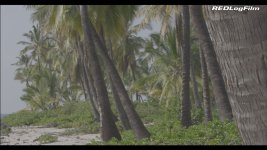
Been playing around in Resolve today with my new Speedlooks Clean 3500 set, thought I would share the result of simply applying the LUTs to this footage as a starting point for the grade.
Just one corrector node with the Speedlooks LUT applied to the original 4K R3D shot with REDColor3/REDLogfilm. For comparison I also set one up with REDColor3/REDGamma3 with no LUT applied.

A003_C018_1217EG_RLF.jpg

A003_C018_1217EG_RG3.jpg

A003_C018_1217EG_SLF.jpg

A003_C018_1217EG_SLK.jpg

A003_C018_1217EG_SLKHDR.jpg
 

Attachments

  • A003_C018_1217EG_RLF.jpg
    A003_C018_1217EG_RLF.jpg
    83.4 KB · Views: 0
  • A003_C018_1217EG_RG3.jpg
    A003_C018_1217EG_RG3.jpg
    65.2 KB · Views: 0
  • A003_C018_1217EG_SLF.jpg
    A003_C018_1217EG_SLF.jpg
    83.1 KB · Views: 0
  • A003_C018_1217EG_SLK.jpg
    A003_C018_1217EG_SLK.jpg
    76.3 KB · Views: 0
  • A003_C018_1217EG_SLKHDR.jpg
    A003_C018_1217EG_SLKHDR.jpg
    69.3 KB · Views: 0
Jeff, try setting your ISO to 320 in Resolve and then add the LUT. Then you can use levels to get the best exposure for the given shot. It will keep the LUT'S from clipping the image. I love how well they work quickly out of the box.

I love the HDR LUT for exteriors! Great stuff.
 
Jeff, try setting your ISO to 320 in Resolve and then add the LUT. Then you can use levels to get the best exposure for the given shot. It will keep the LUT'S from clipping the image. I love how well they work quickly out of the box.

I love the HDR LUT for exteriors! Great stuff.

Ha ha, right you are, thatʻs exactly what I was just doing! I was trending towards ISO 500 then tweak the levels, but since you asked hereʻs some at 320.
Cheers, Jeff

A003_C018_1217EG_RG3_320.jpg

A003_C018_1217EG_RLF320.jpg

A003_C018_1217EG_SLF320.jpg

A003_C018_1217EG_SLK320.jpg

A003_C018_1217EG_SLKHDR320.jpg
 
Back
Top