Welcome to our community

Be a part of something great, join today!

  • Hey all, just changed over the backend after 15 years I figured time to give it a bit of an update, its probably gonna be a bit weird for most of you and i am sure there is a few bugs to work out but it should kinda work the same as before... hopefully :)

Sound Devices PIX 240 ProRes/DNxHD Video Recorder with EPIC

Kyle That unfortunately does not happen. The clip numbers will match until you change the RED mag...You would need to put a new PIX SSD in and Format with the matching RED mag number and continue. Not the best case scenario... But not the worst either. If you do not you will end up with a continuation of the numbering established on the PIX mag...

Hi Taylor, Kyle
I'd just like to set the records straight here. The PIX drive name is irrelevant if you have selected to use the Red File Name Format. You can change or rename the RED mag as much as you want and the PIX will automatically pick up and match clip names. So you can have one large PIX drive that records files all day and it will always match the file names to the RED mags no matter how many you use. So if your mag changes from A001 to A002, PIX will automatically detect this and match. You don't need to format or name the PIX drive.

Paul
Sound Devices
 
Paul, Thanks for this news...Where do I set the PIX to use the RED File Name Format. I will dig into the manual more as well. I am a very happy customer! Another note...Are there any plans for the monitor on the PIX to have features such as blue only and false color exposure etc.? Thanks in advance.
 
Hi Taylor, Kyle
I'd just like to set the records straight here. The PIX drive name is irrelevant if you have selected to use the Red File Name Format. You can change or rename the RED mag as much as you want and the PIX will automatically pick up and match clip names. So you can have one large PIX drive that records files all day and it will always match the file names to the RED mags no matter how many you use. So if your mag changes from A001 to A002, PIX will automatically detect this and match. You don't need to format or name the PIX drive.

Paul
Sound Devices

Paul, this sounds great.

We are planning for an Pix 240 to pair with Epic to create proxies on the fly. Trusty KataData tells me that if we went ProRes 422HQ 1080p we'd get roughly 200 minutes on a 256GB SSD. Is this roughly correct? Inclusive of audio track?
 
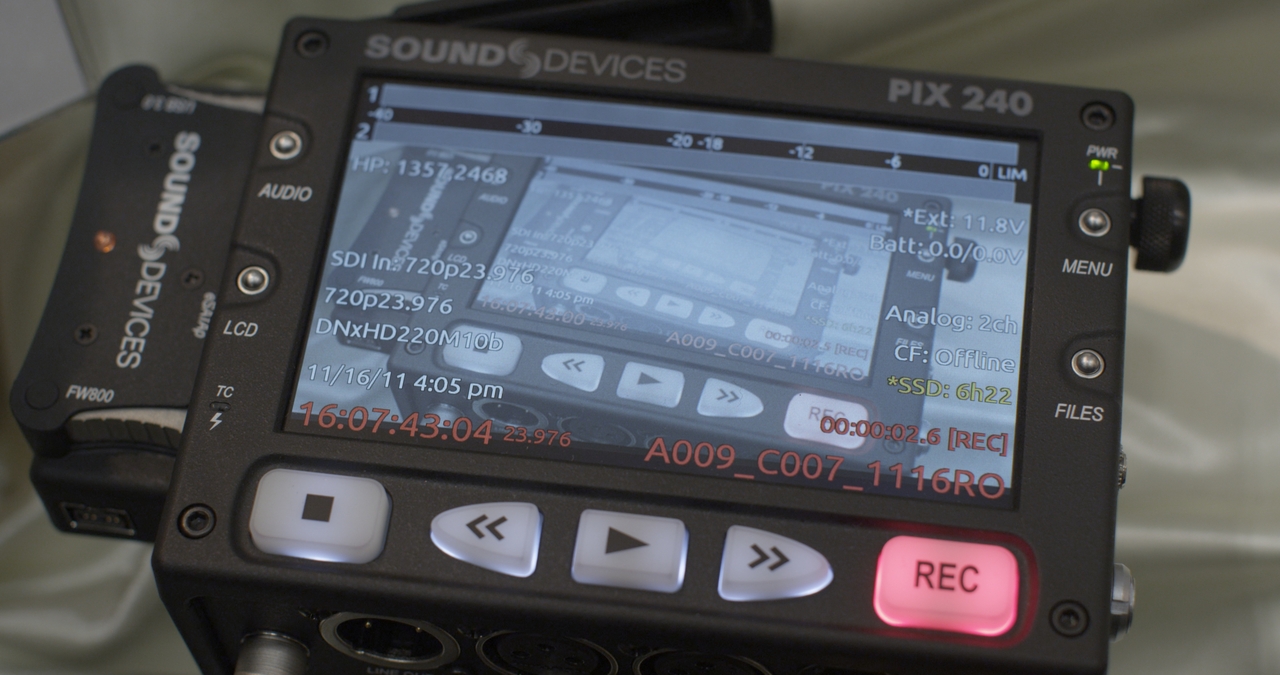
Worked great for me when I tested it with my Epic at the recent InterBEE show here in Tokyo, as seen from this meta frame grab from the Epic clip I shot of the PIX 240:

A009_C007_1116RO.0000104s.jpg


Set it to the recommended settings from this video and it worked perfectly.

Seemed to be a much more useful and reliable tool than the Ki Pro Mini, which tends to drop frames all the time!

HTH

Cheers from Tokyo,

Paul :)
 
The device worked really well on set.

I heard there's a couple of lines missing top and bottom from the full raster generated off the Red-MX camera,
in my scenario. Not sure if this compromises the footage in any meaningful way technically and whether it applies
to Epic output.
 
Worked great for me when I tested it with my Epic at the recent InterBEE show here in Tokyo, as seen from this meta frame grab from the Epic clip I shot of the PIX 240:

A009_C007_1116RO.0000104s.jpg


Set it to the recommended settings from this video and it worked perfectly.

Seemed to be a much more useful and reliable tool than the Ki Pro Mini, which tends to drop frames all the time!

HTH

Cheers from Tokyo,

Paul :)

Hi Paul-
thanks for taking the time! BUT: still seeing the CROP on top and bottom of the monitor. So presume image is still not scaled to full 1080 frame?

Stu Aull
Alaska
 
Sorry Stu, didn't mean to imply the aspect ratio was full screen. More to say that I tested the device and was happy with how it operated.

That said, my personal preference on non 16:9 aspect ratios would be to have the black lines, so I can see the entire recorded image. But I guess in terms of what you are wanting, that would be best handled on the camera side, by specifying a full 16:9 output from the HD-SDI or HDMI, based on the 16:9 frame guides for example. That way the camera handles the scaling natively and can give the best 1920x1080 or 1280x720 clean output to whatever recorder or monitor is attached.

Cheers from Tokyo,

Paul :)
 
No worries Paul - did not take any implications :) Glad to hear its functioning as Sound Devices claims. Just a lot of us awaiting a solution to cropped image. Every one seems to believe this is only solvable by RED. Would be great if any of the RED TEAM good let us know if this is in the works?!

Stu Aull
Alaska
 
We're waiting for our PIX240. Has someone tried to back-up the SSD drive with the 2,5" RED Station, does it works?
 
I've been using a PIX240 with my Epic on a feature, and we've been getting a lot of recording errors (green and magenta partial/intermittent corrupt frames)...

I've tried to figure out where the problem is coming from...originally thought it might be bad BNC, but I've tried multiple cables, different batteries, two different SSD drives and two PIX caddys...there never seems to be a consistent reason.

Some points of consideration:

we've used right angle connectors for SDI coming out of the Epic, as well as going directly from camera to PIX (no connectors)
powered from Sony L batteries, also d-tap to hirose connector
mostly held by the director or an assistant...have built a handle so that nobody is holding the pix directly or handling the caddy portion (I was hoping maybe it was due to an intermittent connection from caddy to pix, but alas, the problem persists). can it be bad drives? bad caddy's? RFI? handling? almost everything seems to have been ruled out from corruptions occurring under so many different variables (different cables, different drives, different pix caddy's, being handled or sitting untouched).

Our camera/PIX settings:

5K 2:1, 23.98, clean SDI feed, build 1.6.46

Pix recording same resolution as camera feed (1080p, 23.98), recording off SDI flag, using red filename structure, prores 422, firmware 1.03
recording to samsung 470 series 256gb drives

Has everybody who's been using this with Epic (flawlessly) been genlocking to camera? are there any other settings i'm overlooking? This problem is really killing our workflow, as we don't have a redrocket or the man/machine power to handle transcoding/syncing for post (very small film), and we thought the PIX would be our way to handle the edit efficiently...now it seems as though it's just adding to our work, as we now have to go through and double check what takes are corrupt and then organize/transcode certain clips.

Any insight is very welcome...very unhappy to have a device that should be an integral part of workflow that is not performing as needed or expected. It's disappointing, as it seems to otherwise be a very well-engineered device...I really can't wait until these problems are solved once and for all.

Best,
Clint Litton

clintlitton AT gmail DOT com
 
Do you see the corrupt frames when playing back on the pix or only after offloading?
 
Thanks for posting Clinton!
Presume you have contacted Sound Devices too. Anxious to hear what (1) caused the problem and (2) the solution! Feedback as to their tech support would be helpful, tho my own experience has been excellent (as a Mixer owner) so far.

Very encouraging to see Deanan expressing interest too!!

Stu Aull
Alaska
 
Clint, I don't know if my situation was unique or not but after I upgraded firmware on my PIX 240 to 1.03 I had a lot of trouble recording off of my Epic. Went through a bit of testing with the great support at SD and although have not identified the problem for sure yet, holidays and all, they were able to give me a link to Version 1.02 which works flawlessly on my Epic. I would give the support people at Sound Devices a call on Monday morning. They have been great for trying to get to the bottom of this for me. It must be a difficult task staying on top of each new firmware build for each camera to make sure everything works as it should. I am sure they will want to hear about your difficulty as well. Good luck
 
Thank Clinton,

I wanted to buy 2 pix 240, so keep us informed please with this issue !


Olivier
 
Thanks for replies...

Deanan...I'm using the samsung 470 series SSD's (256gb, recommended by SD). I have two of them, with two pix caddys...

Taylor...I was using 1.02 and was having this same issue...intermittent, some takes are completely fine. I have heard back from Sound Devices, who gave me some ideas of what to try in terms of testing, which included the suggested firmware update to 1.03. They also suggested trying to genlock the pix to the camera, which I haven't yet been able to do, but I also wonder if this is something that should be necessary. It seems that this isn't part of the explained setup when recording the Epic feed, and I'm not ecstatic about having any more wires tethered to camera.

How are people handling the Pix? Is it mounted to the camera? Or are people holding onto it and using it as a hand held monitor? Just trying to figure out how I can remove as many probable causes as possible...
 
What would be nice is a cradle with a locking screw to match the 240's thread and an ability to lock onto the Epic/Scarlet by some means. Not sure if I would trust something the size and weight of the 240 on an arm screw hanging out there.
 
Didn't mean to hijack the thread hear. Really want to be able to provide clients with an alternative to working through the R3D files. I am hoping that a solid mounting option for the 240 appears. If I can locate a rock solid mount that would eliminate one possible cause for the dropped frames.
 
My pix 240 is on the epic and works without any problem, time code via sdi, run stop via sdi

Regards

Mark de Blok
 
My pix 240 is on the epic and works without any problem, time code via sdi, run stop via sdi

Regards

Mark de Blok

Are you able to playback slow-mo footage on Epic and cap that to the Pix? 120 fps?
 
Back
Top