Welcome to our community

Be a part of something great, join today!

  • Hey all, just changed over the backend after 15 years I figured time to give it a bit of an update, its probably gonna be a bit weird for most of you and i am sure there is a few bugs to work out but it should kinda work the same as before... hopefully :)

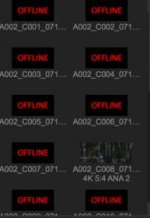
Some of my clients Dragon files shows as "offline" in rcxp 30.1

Björn Benckert

Well-known member
Joined
Dec 5, 2007
Messages
7,423
Reaction score
74
Points
48
Age
52
Website
www.syndicate.se
Problem most of the shot files shows as offline in rcxp..

Both when looking at the card and at the copied files.. however he assured me that the files played back fine after each take in camera.

He been shoothing 4k ana with pre record set to 10 seconds.

I do not know what firmware but its the new olpf so im guessing im on the latest epic dragon firmware.
Both me and my client have quite limited Internet access here so i have not been able to search the forum at any depth regarding this issue.

But if you have any insight please share. he used all four mags but has not overwright any thing just yet but he needs to continue shooting tomorrow morning...

Im thinking redundead would be a good procedure but i forgot how to do it so step by step link on read undead would be great again very limited surf performance here so i was not able to find that eather.


Best would be to hear from red that rcxp 30.1 has issues with certain ana clips or such or some sort of confirmation that tge shots are fine...

tokd him to download and check in resolve... he is onto that but also beeded to go to sleep to catcb a few hours nap before the second shooting day...

any way any kind of advice or help is much appreciated.
 
... bug like the footage is not showing in red cine, or the files are corrupt?
 
I bern shooting quite a lot with the camera and it has been in daily use for the last weeks. And i shot ana with it no problem same firmware... But the client, that is away shooting on location as we speak, gets most of his clips showing as "offline" in red cine.... So do you know if the bug is rcxp or camera?

or more important, are the files ok.

I just sent him. a screen dump on jeff killgroe's readundead step by step and a link to the software download... but that does not feel so good as he got 3 more days of shooting starting in about 6 hours.
 
I have had the same problem with pre-record on my Epic MX. I have had offline clips and error messages from my pre-record shots. I think it's from hitting the record button on and off to quickly. I think you almost have to let the camera record for at least 10seconds before you hit the stop record button. I'm pretty sure the clips still worked in Red Player.

The reason I think this is because I have pre-record as one of my hot keys on my side handle. Sometimes I press it by accident and just out of habit I press stop really quickly. These are the pre-record clips I have noticed it on. Other than that I use pre-record all the time and it works great.

Hope this helps.
 
I would recommend the following. Get the media off the cards using redundead and make sure they play back on the backup.

The next time he inserts a card tell him to use the secure format instead of the regular option. This should be done once a month anyway to eliminate fragmentation, etc.

have him roll three or four shots and back up a card without reviewing any shots in camera to see if playback is causing the issue.

Record for more than 10 seconds if he is in 10 second pre record.

battistella
 
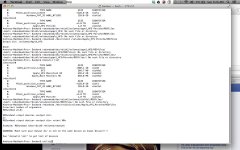
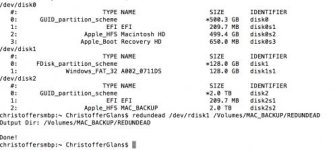
I'm also involved in supporting the cinematographer on location. Whenever he tries to do the redundead batch, it says that you can't write to the same drive. Is there anything in the command that isn't correct? Also, is redundead compatible with Dragon?

Here's an image of the terminal view when trying to do the redundead command...
 

Attachments

  • 10538468_10152219653813342_1470906630_n.jpg
    10538468_10152219653813342_1470906630_n.jpg
    69.2 KB · Views: 0
Thanks for the info.
Just tested in redplayer without luck... also now show in resolve...

So next would be a rescue mission with redundead.
The client got some new mags now so he can continue shooting and he tested the camera without prerecord and had no issues so basically prerecord does not work for us in 4k ana atleast.

Maybe thats something red should adress...
Also maybe red should make redundead part of redcinexpro so that stressed people on set does not have to poke around with comand lines in terminals...

For me this is the second time I had firmware issues that does not allow clips to be copied from the cards and last time was on a different camera and different firmware.... playing in camera fine, on the computer no show, or as last time on an mx there where a few seconds of freeze frame in just about every clip when playing on the computer but on camera they played fine...

that tine we wger unlucky to have the cards in rotation before we recognized the error and last several takes. This time we where lucky to still have all the mags from the first shooting day so im sure we can recover it even if it might mean that we have to play out the clips as hdsdi from the camera. But i think redundead will do the trick.


So big alert there is something fishy with pre record on the last build.... and if clips plyback fine in camera does not mean that you got them saved when copied to a computer...

Any way this shit scares me and give me no sleep so please RED, make sure to have it fixed and confirmed. until then our dragon will be a paper weight :(
 
I'm also involved in supporting the cinematographer on location. Whenever he tries to do the redundead batch, it says that you can't write to the same drive. Is there anything in the command that isn't correct? Also, is redundead compatible with Dragon?

Here's an image of the terminal view when trying to do the redundead command...

hello christoffer :)
try set it to write to the desktop or other drive.
call me.
+46702332847
 
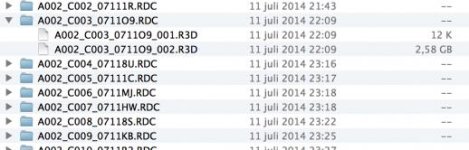
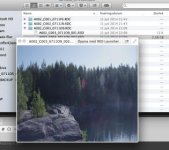
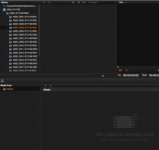
Here's an update to the problem. This is what it looks like in finder and Redcine-X 30.1

If I preview with the spacebar you can see the preview image of the video, but I cannot see it in Redcine. Some files are fine, but only two three for each card.
This is 4K ANA on the Dragon.

We need assistance in this matter right away if possible.

I also can't see anything in Resolve 11

Also, redundead doesn't do anything.

I can PM anyone who want to take a look at one of the R3D files that won't show up.
 

Attachments

  • Skärmavbild 2014-07-14 kl. 15.34.16.jpg
    Skärmavbild 2014-07-14 kl. 15.34.16.jpg
    8.5 KB · Views: 0
  • Skärmavbild 2014-07-14 kl. 15.34.58.jpg
    Skärmavbild 2014-07-14 kl. 15.34.58.jpg
    22.4 KB · Views: 0
  • Skärmavbild 2014-07-14 kl. 15.36.52.jpg
    Skärmavbild 2014-07-14 kl. 15.36.52.jpg
    15.6 KB · Views: 0
  • Skärmavbild 2014-07-14 kl. 15.41.14.jpg
    Skärmavbild 2014-07-14 kl. 15.41.14.jpg
    7.3 KB · Views: 0
  • Skärmavbild 2014-07-14 kl. 15.58.41.jpg
    Skärmavbild 2014-07-14 kl. 15.58.41.jpg
    21.8 KB · Views: 0
This problem has now been solved. If you look at the image of the file structure, look at the 12K r3d-file. Delete it and now it will work.
This problem seems to occur when using pre-record, mainly pre-record together with ANA, but that's not confirmed. Will do my own test on my MX when it arrives.
 
Ok big allert on this one....
The solution to this prerecord / offline file issue is simple...
Just remove the first 12kb file in each r3d folder and your clips is fine.
Phuu. We lost quite a bit of sleep over this so when i called red and they gave me the solution I was very thankfull but still I can not help thinking if they know that prerecord has this issue why do they not post it or send out a firmware update. Luckily there was no reshoot or such and all we lost was a bit of time and peace of mind but things could hsve been alot worse to say the least.

so if you use prerecord on the latest firmware and get files showing up as offline files on your computer then just remove the 12kb files and you are fine.... :)

edit as christoffer says. :)
 
I think it is really great that you guys took the time to report back the issue and posted what solved the problem. SO few people seem to do that.

It's great to know that this can happen and that there is a fix.

David
 
I think it is really great that you guys took the time to report back the issue and posted what solved the problem. SO few people seem to do that.

It's great to know that this can happen and that there is a fix.

David


+1 Thank You for sharing the solution.

You Guys Rock
 
Back
Top