Welcome to our community

Be a part of something great, join today!

  • Hey all, just changed over the backend after 15 years I figured time to give it a bit of an update, its probably gonna be a bit weird for most of you and i am sure there is a few bugs to work out but it should kinda work the same as before... hopefully :)

Some Help With RED Footage. Highlights Techniques. Resolve & FCPX.

Corey Benoit

Well-known member
Joined
Apr 6, 2015
Messages
408
Reaction score
0
Points
16
Location
NYC
I am looking at getting a Scarlet or Epic Dragon. I shot some test footage, and I just have a question. I use REDCine-X sometimes, but mainly Resolve Full, and FCPX.


How do I reduce highlights solo? - I am used to cinema DNG where I can just use the slider and reduce the highlights. Also I work a lot with S-Log2/3 and Canons C-LOG.

Thanks!
 
Corey, I have never found a comparable way of dealing with highlight control, in the rare occurrence where I need a strong control of the highlights I convert to 16bit TIFFs and use ACR in After Effects.
 
I asked Graeme about this and he said that, because it's a "spatial control" it makes it tricky with motion... But, yeah, CinemaDNG is so much easier to control/work with... Like the whole "shadow" and "black point" and "highlight" and "white point" make managing the highs, lows, and mids/contrast so easy and so robust. You can restore detail (and maintain contrast) without the image completely breaking down faster/easier than you can with .r3d.

The way I've been doing it (other than convert to TIFF as Andrew suggested... which is a decent suggestion) is to use power windows and then finely tune each aspect separately (e.g. mask/window the highs, and then tune it to taste). It's cumbersome and takes so much more time though, but it is what it is.
 
Last edited:
I asked Graeme about this and he said that, because it's a "spatial control" it makes it tricky with motion... But, yeah, CinemaDNG is so much easier to control/work with... Like the whole "shadow" and "black point" and "highlight" and "white point" make managing the highs, lows, and mids/contrast so easy and so robust. You can restore detail (and maintain contrast) without the image completely breaking down faster/easier than you can with .r3d.

The way I've been doing it (other than convert to TIFF as Andrew suggested... which is a decent suggestion) is to use power windows and then finely tune each aspect separately (e.g. mask/window the highs, and then tune it to taste). It's cumbersome and takes so much more time though, but it is what it is.

What is the best method for converting to TIFF? Would be redcine-X? This might pose a problem for me as I have a lot of moving shots and it would make no sense to mask off highlights especially if the location of the highlights are constantly moving. So that would be no good for me.

so basically I guess the only real thing I can do is shoot so that my highlights are not clipping and then in post use loom occurs to bring the shadow details up while trying not to increase the shadows and that is the only real way I can do this right?
 
You can use the qualifier in Resolve to make a node to adjust the highlights, sometimes I do this a quick and dirty way to bring the highlights down.

Is this a painted key? Because I have a lot of moving shots. What's your method on how to do this?
 
Is this a painted key? Because I have a lot of moving shots. What's your method on how to do this?

Nope, no painting. If you look at the qualifier I made, specifically the LUM, I just adjust the lows up until what's affected is only the highlights. This is a global adjustment, so it affects all the highlights in the shot.
 
Nope, no painting. If you look at the qualifier I made, specifically the LUM, I just adjust the lows up until what's affected is only the highlights. This is a global adjustment, so it affects all the highlights in the shot.

awesome! Thanks Tony. I am going to attempt to do this.
 
Sorry, yes, qualifiers for sure (more than masks/windows) and then using masks for fine tuning above and beyond the global adjustment.

It's still comparatively cumbersome, since you'd need one for each range (low, mid, high) if you wanted to maximize everything. And the chances of adjusting to the point of breaking the image is much easier (particularly in the in between regions)... Plus it'd require three qualifiers (lows, mids, highs) to be the equivalent of what happens within the first Camera Raw tab, with six simple and readily available sliders (exposure/contrast for mids, highlights/white for highs, shadows/black for lows).
 
I just attempted to do this and the method works. However the highlights can only be adjusted with the resolve highlights sliders and it turns my highlights to Greys.

i wish I could use the raw controls on each the file and qualifier node. The highlight reduction is minimal with a qualifier at best and when I boos the FLUT or ISO of the main node to increase shadows it just boosts the highlights and even with the qualifier I can't get the clipping to stop.
 
Try using Lift/Gamma/Gain sliders inside RCXp (I find that for each -0.1 to the "Gain" slider, it drops the top-end by about ~10IRE). It's not the same as "recovery" or "highlights"/"White" with DNG, but it's better than nothing. You'll also have no control over highlight contrast (which is where a window/qualifier would need to be applied.)

Also, if the highlights are blown on the .r3d, then no amount of tweaking will get them back.
 
Try using Lift/Gamma/Gain sliders inside RCXp (I find that for each -0.1 to the "Gain" slider, it drops the top-end by about ~10IRE). It's not the same as "recovery" or "highlights"/"White" with DNG, but it's better than nothing. You'll also have no control over highlight contrast (which is where a window/qualifier would need to be applied.)

Also, if the highlights are blown on the .r3d, then no amount of tweaking will get them back.

Keying and windowing won't help me If i have panning and moving shots with highlights that are needing adjustments. The workflow I am used to is basically shoot and make sure the histogram isn't clipped, as long as the highlights are not clipped (Cinema DNG & S-Log2/3) then I can try to get the scene as bright as possible. Recover over exposed highlights (not clipped or blown out) reduce those, and increase some low-mid shadows. I can get amazing results.

It seems with red footage I have to basically get the highlights with zero clipping while shooting. Then tweak lows/mids in post. This is a very trick workflow. I don't understand for the cost of the camera, and workflow why they can't integrate a better highlight recovery system.
 
It seems with red footage I have to basically get the highlights with zero clipping while shooting. Then tweak lows/mids in post. This is a very trick workflow. I don't understand for the cost of the camera, and workflow why they can't integrate a better highlight recovery system.
What cameras have you used that don't do this (other than film)? This is basically the way cinematography works: you expose for the highlights, avoid clipping out the detail, and then fill the shadows.

The methods given to you for saving highlights in Resolve are pretty much how it works in post. So much depends on lighting, though, and that's really where 75% of the real work is done.
 
What cameras have you used that don't do this (other than film)? This is basically the way cinematography works: you expose for the highlights, avoid clipping out the detail, and then fill the shadows.

The methods given to you for saving highlights in Resolve are pretty much how it works in post. So much depends on lighting, though, and that's really where 75% of the real work is done.

I am used to using Cinema DNG Cameras & S-Log cameras such as Sony F55, F5, F65, FS7, A7s. & C-Log such as Canon C300 & C500. Where as long as the highlights aren't clipped, you can use a slider or RAW setting to dial down highlights and recover any slight (not clipped) highlights without affecting any of the image as far as shadows go. I basically expose the highlights without clipping (similar to RED) then add some light to the shadows if needed and dial back some highlights.

With RED it seems I have to get the Highlights 100% right where I want them in camera, then dial all shadows back into the image. There doesnt seem to be a very effective way at making very much of a change in highlights whatsoever. Yes the methods I have tried shown in this thread, I greatly appreciate the help. They work, but only very minor effects without crushing the whites and greys.

Just a very different workflow. Very, very tricky.
 
It's not to tricky and there are tools like the histogram, stoplights, exposure, gioscope and such that would prevent you from clipping a single highlight or pixel in your from if you wish. There is nothing magical about the other cameras you are talking about compared to RED. If you understand film negative and exposing it, you understand RED. If you blow a pixel in digital and you have maxed out it's values there is no way to recover the information.

RED gives you a multitude of ways to know when that is happening.

The DSMC guide is an excellent place to start and will take a whole bunch of the "trickiness" out of the equation.
 
Keying and windowing won't help me If i have panning and moving shots with highlights that are needing adjustments. The workflow I am used to is basically shoot and make sure the histogram isn't clipped, as long as the highlights are not clipped (Cinema DNG & S-Log2/3) then I can try to get the scene as bright as possible. Recover over exposed highlights (not clipped or blown out) reduce those, and increase some low-mid shadows. I can get amazing results.

It seems with red footage I have to basically get the highlights with zero clipping while shooting. Then tweak lows/mids in post. This is a very trick workflow. I don't understand for the cost of the camera, and workflow why they can't integrate a better highlight recovery system.

Well, Resolve's tracker is awesome (I don't use that word lightly) and it can be used to animate your windows. That can become tedious though and it isn't usually the best method.

I often shoot at 500-800 ISO and process at 320 and lift to get to the level I want. It isn't quite as simple as a single slider, but it isn't terribly difficult either.

Have you tried processing at a lower ISO setting?
 
I think we are clearly into POST AN R3D territory here.

Hard to speculate unless you can provide a snapshot.
 
Like I said in my previous posts, I completely agree with you Corey (in terms of recovering highlights and highlight retention in general); other formats are easier to recover all useable highlights, especially while maintaining image consistency/contrast. Plus, from what I've been told/seen, a lot of the cameras you mentioned do a better job of maintaining equal +/- stops of DR (independent of ISO), so they're easier to create a smoother roll-off with. And again, Camera Raw tools are fantastic for making those global one-light adjustments.

That said, RED's exposure tools are some of the best in the biz, so once you've got the hang of it, it's actually not that difficult to find out what is actually blown-blown, and what is just peaking/recoverable. Also, Dragon is much better than MX is for highlight retention (so I presume you shot on MX?)

Might be worth doing as David suggests, and posting a .r3d for us to see exactly what the problem is.
 
Like I said in my previous posts, I completely agree with you Corey (in terms of recovering highlights and highlight retention in general); other formats are easier to recover all useable highlights, especially while maintaining image consistency/contrast. Plus, from what I've been told/seen, a lot of the cameras you mentioned do a better job of maintaining equal +/- stops of DR (independent of ISO), so they're easier to create a smoother roll-off with. And again, Camera Raw tools are fantastic for making those global one-light adjustments.

That said, RED's exposure tools are some of the best in the biz, so once you've got the hang of it, it's actually not that difficult to find out what is actually blown-blown, and what is just peaking/recoverable. Also, Dragon is much better than MX is for highlight retention (so I presume you shot on MX?)

Might be worth doing as David suggests, and posting a .r3d for us to see exactly what the problem is.

I was shooting at the RED store in NYC on a Dragon Epic-M. I noticed the clipping bar on the right, I take it that I have to shoot with no red in the bar whatsoever to maintain highlights? I posted the clips, lets see what you guys think and can do with them. Maybe correct them and recover the highlights and re-post them so I can see? Thanks for all the help everyone.


Here are 2 clips:

Inside RED store looking out window

Outside Street Shot
 
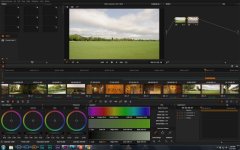
I was able to pull back the detail from the sky with the method I described, and even added a bit of contrast to make the clouds show a bit better. Quick and dirty in Resolve with no windows, just using the LUM qualifier on one node.

attachment.php
 
Back
Top