Welcome to our community

Be a part of something great, join today!

  • Hey all, just changed over the backend after 15 years I figured time to give it a bit of an update, its probably gonna be a bit weird for most of you and i am sure there is a few bugs to work out but it should kinda work the same as before... hopefully :)

Sharp 32" PN-K321

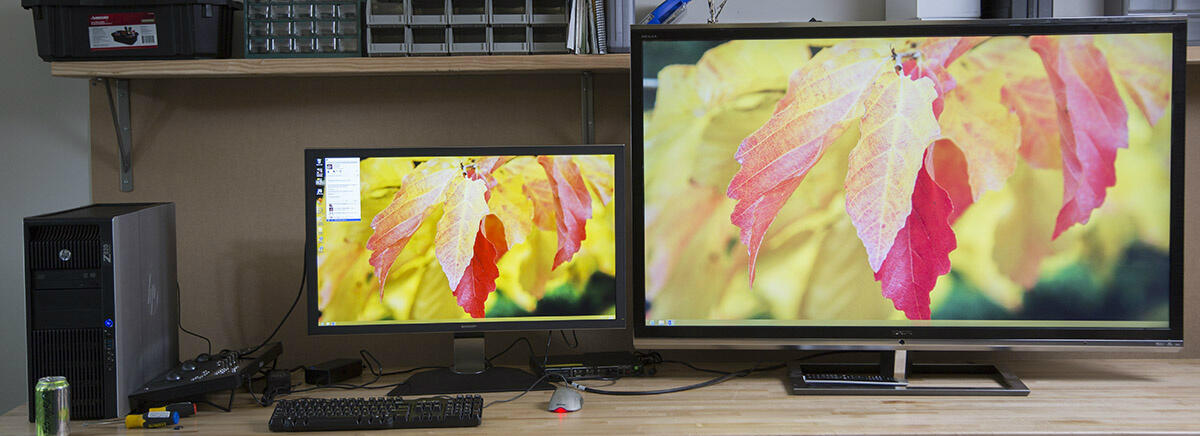
Here is the Sharp 32" and the other 55" being driven from a single 7970 at full resolution.
BGUYo9LCYAAJPRk.jpg:large
 
Sweet. Did not know the 7970 could drive 2 UHD displays. Had been planning to buy a low end card just to drive the GUI with the 7970 driving the projector. Do you know if the 2 displays can be different resolutions, or if its just splitting/mirroring?

Cheers - #19
 
Stacey, thanks for the heads up about zones - I just put an order in! I already have 3 titans in my box and look forward to playing games on it soon ^_^ (yeah, games :) )
 
Now the question is which displayport cables will support 4k. I run cables thru the walls so I don't have to see/hear the PC. ~25ft away. I ordered the Tripp-lite 1.2 25' cable and another 25' cable from StarTech. hopefully one of them will work.
 
I may have goofed up by passing on mine... It seems the initial shipment sold like gold-infused hotcackes.
 
Is in the house! Here is the manual. Photo of it after taking it out of the box. Wish it had a remote, the buttons on the side are a bit akward to use.

photo.jpg


It was hand delivered by Sharp yesterday. This is from the first production run, not one of the pre-production units that have been floating around.

I was able to drive it at 3840x2160p30 from a Dell laptop yesterday as well as 3840x2160p24 from an OPPO BDP-103 Blu-ray player. The OPPO scaler is better than the one built into the Sharp when using my new scaling test pattern. OPPO has a non-ringing scaler.

Now I need to find a laptop that can drive at 60 Hz. Jeff? I am considering the HP 8770w. It has a Kepler GPU and claims DisplayPort 1.2. Also need to find a DP 1.2 KVM. Finally I need to swap out the Quadro6000 from my SCRATCH workstation with a new GPU. I will probably go wtih the GTX Titan for now.

Anyone know if a MBP Retina can drive 3840x2160p60 over DP? The website says max is 2560x1600. I am hoping if you only output over DP that you get the full resolution.

ooooooh, i want this !!!
where to buy ?

norbert
 
Don't bother buying one unless you have a dire need for it today or can simply afford to splurge. A new HDMI revision is due in the next few months (4K @ 60hz among other things) and there should be some more/better 4K monitor offerings later this year along with graphics cards with that new HDMI interface before things take off next year with 4K TVs and displays at consumer friendly sizes and prices.
 
a sharp HDMI @ 60hz? they seems to be the only ones that aren't crazy costly. I finally ordered the monitor this morning, not from zones tho - I got it $600 cheaper than then from compsource (know idea who they are, but I could check out with amazon)
 
HDMI keeps holding on because DP doesn't make much of an attempt to gain in-roads into the home AV market. Too bad, because HDMI just sucks and needs to move over.

Looking forward to what others find out. Hopefully the Titan will drive the display at 60Hz. I'm going to pick one of these displays up after NAB if I don't see anything else ready to hit the market. Something tells me I'm probably being stupid for waiting. hehe...
 
Anyone know if a MBP Retina can drive 3840x2160p60 over DP? The website says max is 2560x1600. I am hoping if you only output over DP that you get the full resolution.

Max specs typically just go by whatever they think the maximum or 'common' monitors max resolution might be. I have driven 3840x2400 at lower refresh rates on video cards that said 1920x1200 maximum (LOL).

I have driven 3840x2400@48 Hz on my IBM T221 on my macbook retina via two DP -> dual link DVI adapters.


I guess it comes down to what is the modeline listed for that monitor? From the linux logs (I run linux on my retina macbook pro) I see:

Code:
(II) Mar 30 22:09:26 NVIDIA(0): NVIDIA GPU GeForce GT 650M (GK107) at PCI:1:0:0 (GPU-0)
(--) Mar 30 22:09:26 NVIDIA(0): Memory: 1048576 kBytes
(--) Mar 30 22:09:26 NVIDIA(0): VideoBIOS: 80.07.26.04.01
(II) Mar 30 22:09:26 NVIDIA(0): Detected PCI Express Link width: 16X
(--) Mar 30 22:09:26 NVIDIA(0): Interlaced video modes are supported on this GPU
(--) Mar 30 22:09:26 NVIDIA(0): Connected display device(s) on GeForce GT 650M at PCI:1:0:0
(--) Mar 30 22:09:26 NVIDIA(0):     DFP-4
(--) Mar 30 22:09:26 NVIDIA(0): DFP-4: 480.0 MHz maximum pixel clock
(--) Mar 30 22:09:26 NVIDIA(0): DFP-4: Internal DisplayPort
(**) Mar 30 22:09:26 NVIDIA(0): Using HorizSync/VertRefresh ranges from the EDID for display
(**) Mar 30 22:09:26 NVIDIA(0):     device DFP-4 (Using EDID frequencies has been enabled on
(**) Mar 30 22:09:26 NVIDIA(0):     all display devices.)
(II) Mar 30 22:09:26 NVIDIA(0): Mode Validation Overrides for DFP-4:
(II) Mar 30 22:09:26 NVIDIA(0):     NoMaxPClkCheck
(II) Mar 30 22:09:26 NVIDIA(0):     NoMaxSizeCheck
(II) Mar 30 22:09:26 NVIDIA(0):     NoHorizSyncCheck
(II) Mar 30 22:09:26 NVIDIA(0):     NoVertRefreshCheck
(II) Mar 30 22:09:26 NVIDIA(0):     NoEdidModes
(II) Mar 30 22:09:26 NVIDIA(0):     NoDFPNativeResolutionCheck
(II) Mar 30 22:09:26 NVIDIA(0): Assigned Display Device: DFP-4
(II) Mar 30 22:09:26 NVIDIA(0): Validated modes:
(II) Mar 30 22:09:26 NVIDIA(0):     "2560x1440"
(II) Mar 30 22:09:26 NVIDIA(0):     "1280x720"
(II) Mar 30 22:09:26 NVIDIA(0): Virtual screen size determined to be 2560 x 1440
(**) Mar 30 22:09:26 NVIDIA(0): DPI set to (75, 75); computed from "DPI" X config option
(--) Depth 24 pixmap format is 32 bpp

480 Mhz I would think would be enough for 3840x2400@60Hz with slightly reduced timings. I know I used to drive a vp2290b using matrox triple head 2 go's using this modeline (x2):

ModeLine "3840x1200" 246.000 3840 3904 3968 4160 1200 1203 1213 1235 +hsync +vsync

Two of those would be 492 Mhz for 3840x2400 but I am sure it could be reduced down to 480Mhz with somewhat reduced timings and this monitor is lower resolution (3840x2160 not 3840x2400) so I would think it is doable.

So the monitor has a scaler? That is a big disappointment for me as it means it probably has input lag =( Have you noticed any input lag? I was considering getting one of these to replace my T221.

EDIT: So i looked at the manual. It needs 594 Mhz to do 3840x2160 which seems like way more than it should actually need if it did reduced timings so maybe the macbook couldn't do it but maybe it could get close or do it with reduced timings. Depends on how picky the monitor is about signal.
 
Last edited:
sadly not with a buddy of mine and his titan :( which is scary as my monitor gets here in a few days and I have my 3 way SLI titans. Could the titans be the issue?
 
ugh.. I have bad feeling I wasted $5k :P What is trick is it using for 60hz in dual HDMI? treating the screen as 2 different monitors?
 
Last edited:
Back
Top