Welcome to our community

Be a part of something great, join today!

  • Hey all, just changed over the backend after 15 years I figured time to give it a bit of an update, its probably gonna be a bit weird for most of you and i am sure there is a few bugs to work out but it should kinda work the same as before... hopefully :)

Setting up sequence in Premire Pro

Dave King

Active member
Joined
Dec 6, 2013
Messages
31
Reaction score
0
Points
0
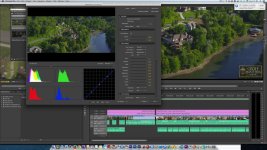
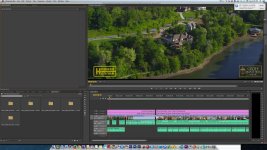
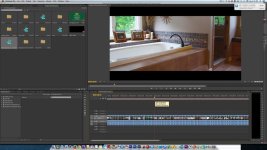
I shoot most of my Scarlet footage in 3k wide screen at 60p. I don't see how I can setup the footage other than picking something that its not and then dragging it in and have it change the settings. However, the footage just doesn't look good in the timeline on the program window. At least its no where near what the footage should look like. If I right click on any of the raw native files in my bin and select source settings the clips look crystal clear. But as soon as they are dragged into the timeline it looks stretched and pixelized to some degree. My native settings are 3072X1284 and if I just let Premiere change the settings the sequence does switch to that but Premiere changes the video preview to 1918X801 using I frame only MPEG. If I change it to 3072X1728 and the video preview to 1920X1080 it looks like the real aspect ratio of the native file and much clearer and cleaner in the timeline but its not the correct source settings.

I'm very confused.

I attached 3 pictures.
Red settings2.jpg is how my screen looks if I change the sequence settings to 3072X1728 and 1920X1080
Redsource is how the original raw file looks compared to how it looks in the time line
Red-Program 1 is also how the raw file looks in the program window.

Any thoughts?

Thanks in advance.

Dave King
 

Attachments

  • Redsettings2.jpg
    Redsettings2.jpg
    95.9 KB · Views: 0
  • REDsource.jpg
    REDsource.jpg
    98.7 KB · Views: 0
  • RED-Program1.jpg
    RED-Program1.jpg
    100.7 KB · Views: 0
Hi Dave,

Premiere has some Red Project Presets in CC. If you don't have them you can also download my Premiere Pro CC Project Presets here which includes all of the various formats you are after:
http://www.reduser.net/forum/showthread.php?118110-Adobe-Premiere-Pro-CC-2014-Red-Dragon-Sequence-Presets


The Preset you want is 3K WS. Video Preview is exactly that and isn't effecting your footage at all. It's just for previewing purposes.

You can also work in say 16x9/HD and you will have your black letter boxed effect due to the fact that the footage is widescreen. I would find out what your target delivery aspect ratio is and work from there. There's nothing stopping you from working with a WS timeline and exporting out a 16x9 final via Media Encoder.
 
Hi Phil

Thanks for the help and response. I downloaded your presets and I tried installing them on my computer but I don't see any sequence presets folder for Mac. I'm on CS6. I tried installing them under custom but it wont let you select any sequences when you do that.
 
Anyone with a Mac able to get these presets to install and work correctly?
 
Have you tried just right clicking on a clip in your bin and selecting new sequence from clip? I do this all of the time, even for standard stuff like 4khd as I've noticed that some of the presets built into premiere, even though they should match, give me red render bars, where as doing it this way I'm clear. I generally don't pay any attention to the preview files settings as I never use any preview files in my export settings. I always leave that unchecked and use render at maximum quality when making whatever final version, in my case usually a 1080p pro res file.
 
Back
Top