Welcome to our community

Be a part of something great, join today!

  • Hey all, just changed over the backend after 15 years I figured time to give it a bit of an update, its probably gonna be a bit weird for most of you and i am sure there is a few bugs to work out but it should kinda work the same as before... hopefully :)

Scarlet X green screen tracking. it's working fine !

Gwen Bertaut

Well-known member
Joined
Jan 4, 2012
Messages
114
Reaction score
0
Points
16
Location
Reunion island
Website
www.pixel-dealer.com
This is our lastest TV commercial for a assurance company based in Reunion island.

https://vimeo.com/44232161


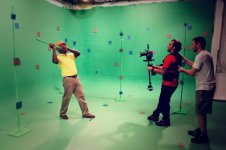
We decided to do CG background using tracking 3d technique. Results are pretty good. I didnt have to Rolling shutter the video, cause tracking errors were minimal.
I used a steadycam for the shot, tokina 11 16 for most 4/5 shot. I used a 35 mm 1.4 zeiss for the last one
Files were transcoded to DPX for tracking. Edited R3D natively on premiere cs 5.5 using a gtx 680 which handled 1/2 rez 4K playback just fine.
spend also 10 day post processing the whole thing after the shot.

Tell me what you guys think of it

i hope you will enjoy it

 

Attachments

  • Etapes-CRC-Time Freeze-Hugo.jpg
    Etapes-CRC-Time Freeze-Hugo.jpg
    39.1 KB · Views: 0
  • IMG_0421Studio _Shoot.jpg
    IMG_0421Studio _Shoot.jpg
    70 KB · Views: 0
  • IMG_0540Studio _Shoot.jpg
    IMG_0540Studio _Shoot.jpg
    74.9 KB · Views: 0
  • IMG_0547Studio _Shoot.jpg
    IMG_0547Studio _Shoot.jpg
    79.4 KB · Views: 0
  • IMG_0404Studio _Shoot.jpg
    IMG_0404Studio _Shoot.jpg
    79.2 KB · Views: 0
Looks almost stop motion with the little bit of camera wobble and flicker. I like it, excellent work!
 
Hey, nice work! Which Steadicam are you using there?
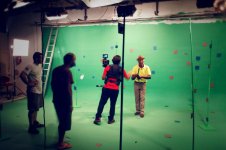
Thx Andrew, i used the glidecam 4000 with the vest and the arm. the thing was impossible to stabilize....took me hours to figure out the scarlet was to heavy for it. Then i put some more weight on the glidecam and it worked just fine.
Glidecam is smooth, only negative point is the backpain if you wear it for more than 3 hours in this configuration :)
The whole stuff with camera on it is close to 10 kilos (22 lbs)

Anyone have tried another steadycam ?
 
Last edited:
Thx Andrew, i used the glidecam 4000 with the vest and the arm. the thing was impossible to stabilize....took me hours to figure out the scarlet was to heavy for it. Then i put some more weight on the glidecam and it worked just fine.
Glidecam is smooth, only negative point is the backpain if you wear it for more than 3 hours in this configuration :)
The whole stuff with camera on it is close to 10 kilos (22 lbs)

Anyone have tried another steadycam ?


The photo of you wearing the Glidecam is of course a snapshot in time, but still .... 'Bad posture' comes to mind seeing you operating. Leaning so far to the back isn't a good posture, maybe that could be a major contribution to the backpain you are experiencing. Try to keep the back vertical as much as possible as if you were standing straight (without a steadicam). This will exercise your erector muscles which is better in the long term. You can find very good info on this on http://www.steadivision.com/steadipos I hope this will be a good help.
 
looks great!

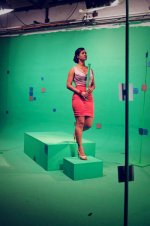
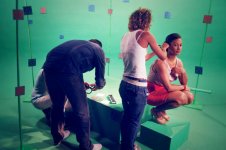
curious about the amount of tracking markers you've got going on there... in my experience with matchmoves, scarlet or otherwise, we usually just need a few solid tracking markers here and there, but i see you have a considerable amount of varying colours and placements. do you find this resulted in a more consistent track? or are they more for organisational purposes in post? would like to know more about that aspect of your workflow!

cheers,
c
 
The photo of you wearing the Glidecam is of course a snapshot in time, but still .... 'Bad posture' comes to mind seeing you operating. Leaning so far to the back isn't a good posture, maybe that could be a major contribution to the backpain you are experiencing. Try to keep the back vertical as much as possible as if you were standing straight (without a steadicam). This will exercise your erector muscles which is better in the long term. You can find very good info on this on http://www.steadivision.com/steadipos I hope this will be a good help.

Cheers philip, i didn't know those thing about posture. thanks for the share i am looking ot their site right now.
 
looks great!

curious about the amount of tracking markers you've got going on there... in my experience with matchmoves, scarlet or otherwise, we usually just need a few solid tracking markers here and there, but i see you have a considerable amount of varying colours and placements. do you find this resulted in a more consistent track? or are they more for organisational purposes in post? would like to know more about that aspect of your workflow!

cheers,
c

You are right, we need a few trackers usually, but this time due to the move, i wanted to make sure computer will have suffisant info to deal with.
I used syntheyes to track the whole stuff. I found the 64 bit version quite handy to use. I tracked some of the tracker manually, but for most plan i used the auto one. the errors where minimal ( close to 0.7 )
I've imported the whole solve in cinéma 4d and begin to check the matchmoving using a foregroud plate with the keying result on it
when i was satisfied, I asked the team to roto those trackers.
I used colors trackers cause i wasnt sure the green one would keep up. ( first time me making green screen tracking ) I m glad I used some orange ones.
Roto took half a day in after effect for each 10 seconds sequences.
Does it answer your question ?
 
Very cool Glen. Starting some green screen work myself. This is inspirational. Where did you buy the trackers or did you make them?
 
Very cool Glen. Starting some green screen work myself. This is inspirational. Where did you buy the trackers or did you make them?
You CAN finD everything you need on Éric alba web site. He also give free tracker template
 
My experience is that if you use round small black tape dots not bigger than a pinky nail then you not only get a very high precision in your tracking, the dots are also "roll independent" this means that your tracker can look at the same reference frame even when camera rolls... also the size for the dots are small enough to pretty much disappear in the "shrink of the matte and they usually stay visible far longer than you think when you are on set. Big tracking dots does not mean more than that you might see them a bit longer when they go into the DOF. A huge "A" does not stick better than a small dot... and the more contrast you have the better it will work. So on green screen the color giving most tracking precision is black. I tried all the different solutions with black and white checker marks etc. But small and with high contrast on the background gives the best track. Then you can argue that for example dark green dots on green is more simple to retouch and that is true but then again they will not give the same precession. And the small black will if placed correctly disappear in the keying process.

Just my five cents, 19 years on the flame has given me the time to evaluate them all :)

Syntheyes is the Tracker to use superior all the others even on price.

Hope they soon implement Epic/scarlet motion sensor data, that would be huge.
 
My experience is that if you use round small black tape dots not bigger than a pinky nail then you not only get a very high precision in your tracking, the dots are also "roll independent" this means that your tracker can look at the same reference frame even when camera rolls... also the size for the dots are small enough to pretty much disappear in the "shrink of the matte and they usually stay visible far longer than you think when you are on set. Big tracking dots does not mean more than that you might see them a bit longer when they go into the DOF. A huge "A" does not stick better than a small dot... and the more contrast you have the better it will work. So on green screen the color giving most tracking precision is black. I tried all the different solutions with black and white checker marks etc. But small and with high contrast on the background gives the best track. Then you can argue that for example dark green dots on green is more simple to retouch and that is true but then again they will not give the same precession. And the small black will if placed correctly disappear in the keying process.

Just my five cents, 19 years on the flame has given me the time to evaluate them all :)

Syntheyes is the Tracker to use superior all the others even on price.

Hope they soon implement Epic/scarlet motion sensor data, that would be huge.

Man, your answer is full of info. Its great you share your experience with us. Thanks. Im visiting your web site right now your ref are awesome. Reduser is fun!
 
Back
Top