Welcome to our community

Be a part of something great, join today!

  • Hey all, just changed over the backend after 15 years I figured time to give it a bit of an update, its probably gonna be a bit weird for most of you and i am sure there is a few bugs to work out but it should kinda work the same as before... hopefully :)

Sandy Bridge E processors out today...

SSD compression

SSD compression

I'm just a DP and I don't know much about computers, but recently I HAD to learn a bit about SSDs...

Read and write speeds that are relevant for video and film are tested regularly. It's apparently called AS-SSD:
http://www.anandtech.com/show/5147/the-ocz-octane-review-512gb/3

AS-SSD have also made it into the marketing numbers, by some manufacturers:
http://eshop.macsales.com/shop/SSD/OWC/Mercury_6G/

And, then there are the stories I hear at the rental houses about shoots with external recorders where somebody decided to put a Sandforce based SSD into it (even though it's not recommended!). Of course with disastrous results, otherwise it wouldn't be a story worth telling. ;-) But the more serious aspect being the cost of recovering the footage, with a starting price higher than a Scarlet. That last point being less relevant to this thread since SSDs used for these purposes won't hold camera originals.

My conclusion so far:
For an OS drive and general computing Sandforce based SSDs are awesome.
For a media drive Samsung & Intel leads the pack, and Sandforce based SSDs are possibly a really bad idea.

I would, of course, love to be proven wrong about the negative aspects of this post!

Hope that helps.
 
I also read somewhere that CS5 doesn't take advantage of more than 4cores (not even the additional threads of HT), which would make even hexacore a waste, but Jeff said it's actually efficient up to like 12-16 threads now. With that in mind, Hexacore (+HT) seems to be the route to take.

I can tell you from first-hand experience on my SB-E 3930k build that CS5.5.2 does utilize all 12 threads and distributes the load pretty equally. Perhaps you are right regarding the old CS5. No input to offer on that.
 
I can tell you from first-hand experience on my SB-E 3930k build that CS5.5.2 does utilize all 12 threads and distributes the load pretty equally. Perhaps you are right regarding the old CS5. No input to offer on that.

I figured as much; I mean I didn't think Kilgroe was lying or anything. What I want to know is how transcoding with Adobe software (media encoder through PPro or AE) compares to going through RCX? Knowing that CS5.5.x does take advantage of 12+ threads, does that mean you can convert from .r3d to, say, ProRes or DNxHD using the 12+ thread efficiency of Media Encoder or is limited by the RED SDK (which Adobe had to use in order to support the format in their apps)?

@Wolf: I think AS-SSD is just a benchmark that tests incompressible data. I'd be interested to hear the horror stories you've heard/read? I just assumed it was slower, not that it completely killed a workflow somehow.

EDIT: It was way faster in Adobe... But I think I may have had Alchemy group enabled in RCXp, so if that's the case it's not a very good test (even for a quick reference). Plus this is on a Macbook Air, so only 2cores/threads total... Kind of crappy compared to the potential of 4c/8thread.
 
Last edited:
@Wolf: I think AS-SSD is just a benchmark that tests incompressible data. I'd be interested to hear the horror stories you've heard/read? I just assumed it was slower said:
That is my understanding too, that AS-SSD basically tests the incompressible data speeds. So a relevant number for image data. And that the compressed numbers are irrelevant.

I won't share any horror stories here, but it's basically total loss of all data. Sandforce has so far not been the leader in reliability.
 
Just made the purchase and found a 3930K with an ASUS X79 Pro in stock. I plan to OC it to 4.7 to keep it stable with the H100. Now I just need to figure out my storage/RAID setup for on set DIT work. Vertex 3 for the OS & apps with a software RAID-0 setup for scratch and work backed up to an external RAID should work...

Many many thanks to Jeff & Jon for helping making sense out of all these numbers and options!

Anyone with the ASUS boards have any experience with the SSD cacheing feature and performance numbers yet?
 
I'm getting about 40 to 50% cpu utilization on P.Pro 5.5 .
Jon, Do you have high bit depth and maximum render quality in render settings ?
I'm going to and coming from an SSD, and the data rates are low, it should not be data rate bound.
I'm using a 1920 timeline, and making sure the 5K is fitting ( resizing ) into the 1920 window. Otherwise it was cropping, which may be easier to decode since it can throw away pixels.
Also, I'm saving as DPX, since they are easy to write, because it's not a codec, so it uses almost no cpu in comparison to a compressed codec.


When I use Red's RCX, I use the command line version to light up more cores. The redline command uses the rmd meta data to know how to export, as it was set in the RCX interactive GUI session.
redline is non GUI.
-Les


I can tell you from first-hand experience on my SB-E 3930k build that CS5.5.2 does utilize all 12 threads and distributes the load pretty equally. Perhaps you are right regarding the old CS5. No input to offer on that.
 
Last edited:
So that's almost 2 frames per second to get the 5k to a 1920 sized dpx, with Prem. cs 5.5
( I'm using the r3d of a forrest scene that someone posted. It's 698 megabytes or so )
-Les
 
I get a sick feeling in my stomach whenever anyone talks about liquid cooling. I lost my previous encoding rig to a liquid cooler failure; the bloody thing sprung a leak and flooded the insides of the PC. Buh-bye pretty much everything in it.
 
I get a sick feeling in my stomach whenever anyone talks about liquid cooling. I lost my previous encoding rig to a liquid cooler failure; the bloody thing sprung a leak and flooded the insides of the PC. Buh-bye pretty much everything in it.

Scary thought...
 
I've lost more systems over the years to power issues than anything else. Usually when a PSU decides to toast itself, it takes the motherboard and/or a few other components with it. Have had a couple liquid-cooled systems leak as well. The current crop of liquid systems are pretty good though -- both times were quite some time ago. Once it didn't cause any harm, the other, the system overheated while rendering when the coolant bled out.

There are alternative fluids to the typical glycol solution that will not harm electronics or disrupt anything if it drips onto components, even while running. Many mineral oils and industrial coolants are inert enough you can submerge an entire system in them while running. Saw someone on here posted pics of a system they built in a small aquarium. There's also more exotic coolants like liquid fluorine compounds or "fluorinert". Some models of old Cray supercomputers kept their CPUs and other core electronics in tanks filled with this stuff -- I believe it's also considered a carcinogen. It was kinda magical watching some of these systems as the system would circulate the cooling fluid and all the cables / wires would wave about. The whole think kinda looked alive.
 
So, I pulled the trigger on one of these systems. It will be at least a week before I get it setup. Highlights include 32GB of RAM, a pair of striped SATA III SSDs for the OS, 20+TBs in SATA III local drives and a EVGA GTX 580 video card with 3GB of RAM. I went with an ASRock X79 Extreme9 motherboard and an i7-3930K CPU. I'll post the full specs when it's all setup. Now, I just need to figure out what I'm going to do for a new monitor...

Motherboard review: http://www.tweaktown.com/reviews/4491/asrock_x79_extreme9_intel_x79_motherboard_review/index.html
 
Last edited:
@Brandon,

Sounds like a nice build. Are you going with the 3930k or the 3820 SB-E chip? There is no 3920k. With RED footage the differences from the 4 core 3820 and the 6 core 3930k and 3960x are significant for debayering if you are running without a rocket. Are you planning to OC or run stock frequencies? Congrats!!
 
Yeah, that was a typo. I went with a i7-3930K. Yes, I'm planning to overclock it. Thanks!
 
I'm wanting to build a system for Premier and Resolve for finishing in 1080p from R3D 4kHD.

3930 processor air cooled planning to overclock to 4 - 4.5 ghz.
Rampage IV or 79X79 Pro motherboard


Since Premier cannot use multiple GPU's which of these GPU options would be better for both programs?

1) Quadro 600 + GTX 580
2) 590 GTX
3) GTX 560 + GTX 560
4) another option in this price range?


I'm confused about RAM choices. The higher speed numbers mean they come overclock tested from the factory right? How much difference in real world performance will this make?

Is there a significant speed advantage to using a PCI-E RAID card like an Areca card compared to the onboard RAID controller on the motherboard?

This thread has been extremely helpful, thank you all!
 
Last edited:
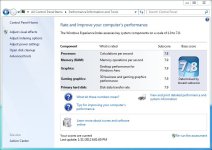
Just got my new Sandy Bridge E workstation up and running today. Still getting stuff installed, but here is the Windows Experience Index rating so far (no overclocking)...

http://www.reduser.net/forum/attachment.php?attachmentid=20322&d=1327171066
attachment.php
 

Attachments

  • Windows Experience Index.JPG
    Windows Experience Index.JPG
    81.3 KB · Views: 0
OH man, Brandon... 7.7 is the processor barrier for Windows Performance Index with my i7 920. It stays at 7.7 regardless of whether it's 3.8GHz or 4.4GHz... I guess the extra two cores helps, but you aren't overclocking which means you're at 3.2GHz (or whatever the base clock of the 3930k is... in either case, I thought it tops out at 3.733GHz with boost, so it's still demolishing non-SB-e i7s.) Granted WPI isn't really indicative of real-world performance, it's still cool.

May I ask why you went with mirrored for the OS drives? Seems to me that it's the least likely to require redundancy (if it sh**s the bed, you just re-install everything in an hour or two.) With striped, you'd be rocking a theoretical 1+GB/s... that's a really sexy number.
 
Back
Top