Welcome to our community

Be a part of something great, join today!

  • Hey all, just changed over the backend after 15 years I figured time to give it a bit of an update, its probably gonna be a bit weird for most of you and i am sure there is a few bugs to work out but it should kinda work the same as before... hopefully :)

Resolve won't play R3D smoothly WITH ROCKET - previously worked fine

Eric Haase

Well-known member
Joined
Apr 1, 2009
Messages
1,041
Reaction score
0
Points
36
Location
Los Angeles
Website
www.ericjhaase.com
Running Resolve 9.1.3 Lite on a Macbook Pro Retina (latest) w/maxed out RAM and SSD. 10.8.2 Mountain Lion.

Redrocket with latest drivers and firmware freshly installed connected by Sonnet Echo Express Pro Thunderbolt.

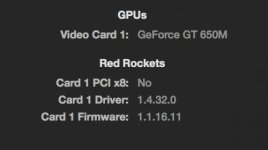
Resolve plays back at 3 or 4 fps. In SYSTEM OVERVIEW it recognizes card as it always has in the past (see attached pic). Camera RAW set to Half Good as usual. Used to work perfectly like this. Not sure what has changed!

R3D footage plays back perfectly in RedcineX Pro through the Rocket.

I have tested footage off an external drive connected by Esata/Tbolt through LaCie and also footage from the local SSD that I know to have played perfectly fine in the past.
I have also turned audio off as this was an issue in the past.

Anyone have any ideas? Thanks in advance for your help.

Eric
 

Attachments

  • Screen Shot 2013-05-23 at 2.51.52 PM.jpg
    Screen Shot 2013-05-23 at 2.51.52 PM.jpg
    10.1 KB · Views: 0
Are these 4k or epic 5k images?
3-4 fps sounds like resolve is not using the rocket at all. If you disconnect the expander does the fps change?
Can you cross ref the rocket driver and firmware for 9.1.3 in the Resolve read me, same for CUDA.
Peter
 
5KHD images.

The Resolve Config Guide describes the latest versions as follows: CUDA 5.036, RR Driver 1.4.27, RR firmware 1.1.16.5.
This is what I have running on my MacBookProR: CUDA 5.045, RR Driver 1.4.32, RR firmware 1.1.16.11

Looks like I have more recent versions of everything.

HOWEVER, TOTAL ROOKIE MOVE on my part - somehow the AUTOMATIC GRAPHICS SWITCHING got checked again. I didn't think to look at this setting because when I first started using Resolve I made sure it was unchecked. I unchecked it again and now everything is working as expected!!!

Thanks everyone for the responses. I greatly appreciate it.
 
Yes, it's common mistake. You could have spared yourself a lot of grief, if you just checked the Resolve preferences. It would have immediately showed you which GPU you're using for processing. Keep it in mind, if you ever run into a problem.
But what i can't understand, usually when wrong GPU used (like in mine I have GT120 and GTX 570) Resolve will complain, that your system is not using optimal setting. Wasn't that what should have happen in your case? I never tried to use MacBook with Resolve, so I'm curious. Was there no such warning?
 
Yes, it's common mistake. You could have spared yourself a lot of grief, if you just checked the Resolve preferences. It would have immediately showed you which GPU you're using for processing. Keep it in mind, if you ever run into a problem.
But what i can't understand, usually when wrong GPU used (like in mine I have GT120 and GTX 570) Resolve will complain, that your system is not using optimal setting. Wasn't that what should have happen in your case? I never tried to use MacBook with Resolve, so I'm curious. Was there no such warning?

Jake, in resolve 9, what card do you use for your GUI to get best performance? I have the same cards and was curious if continuing to use the GT120 for GUI would leave the 570 for GPU, but some have suggested that Resolve has changed and basically uses one card.
 
Jake, in resolve 9, what card do you use for your GUI to get best performance? I have the same cards and was curious if continuing to use the GT120 for GUI would leave the 570 for GPU, but some have suggested that Resolve has changed and basically uses one card.

Yes, Resolve 9 now allows a single card use, but you still can continue to use dual GPU set up. I tested it both ways with and without GT120 and I found, that usually I would get 2-3 frames less during the playback. Not a huge difference, but sometimes, that's just enough to make the difference between real time and dropped frames. Said that, i'm planning to upgrade to a single GTX680. Today, this is the most powerful set up on a PowerMac without resorting to an external enclosure or external power. Unfortunately, with the introduction of V10, even 680 may be not enough, as now you'll need much more processing power to be able to process all that great new stuff, like motion compensated NR and flow motion, as well as all Sapphire goodness. As much as I hate it, I may need to invest in external enclosure...
What I really would like is an expansion of caching capabilities. Right now on FilmMaster or Baselight you can debayer, noise reduce and sharpen images, save it to cache and grade it from there. No RR, no quarter resolution playback, no need for multiple GPUs, none of that crap. V10 is taking a big step toward cache usability by introducing persistent cache, but sadly, no advanced caching yet, like I just mentioned.
 
Yes, it's common mistake. You could have spared yourself a lot of grief, if you just checked the Resolve preferences. It would have immediately showed you which GPU you're using for processing. Keep it in mind, if you ever run into a problem.
But what i can't understand, usually when wrong GPU used (like in mine I have GT120 and GTX 570) Resolve will complain, that your system is not using optimal setting. Wasn't that what should have happen in your case? I never tried to use MacBook with Resolve, so I'm curious. Was there no such warning?

There was no warning. Now I am running into the same problem again. What graphics card should it be using. It says NVIDIA GT 650M. I only get 10 fps. RedcineX plays full speed. Unchecking the automatic graphics switching seemed to work before. Not sure what the problem is this time....
 
Anyone have any helpful ideas?

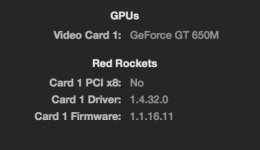
I'm still not able to get more than 3 fps playback on my MacBookPro Retina. I have tested a project on my iMac with the same rocket/Sonnet Echo Express TB enclosure and it works great. I exported the project and tried on the MacBookPro Retina with the same rocket and enclosure and it is not working - only 3 fps. Incidentally, I get the same frame rate with the rocket unplugged.

BOTH SYSTEMS ARE running the following:
OSX 10.8.2
RESOLVE LITE 9.1.4
CUDA 5.0.59
Rocket Driver 1.4.32.0
Rocket Firmware 1.1.16.11

On the laptop Redcine X plays R3D files in realtime no problem. Resolve seems to be the problem. I have turned automatic graphics switching OFF. This exact setup used to work fine on the laptop. Any help would be greatly appreciated. I have tried reinstalling rocket drivers, firmware, and resolve and just reset the PRAM. Any ideas?!

Thanks in advance. -Eric
 

Attachments

  • Screen Shot 2013-06-08 at 2.33.52 PM.jpg
    Screen Shot 2013-06-08 at 2.33.52 PM.jpg
    10.5 KB · Views: 0
You said you did a PRAM reset. Is that the same as an SMC reset? If not, you might try the suggestion at the following link. I've had a few MBP users tell me this fixed their poor Resolve performance issues. http://reviews.cnet.com/8301-13727_7-57561694-263/fix-poor-retina-macbook-pro-graphics-performance/

You are a total GENIUS. Thank you SO MUCH. I have performed the SMC reset and it is now working!!! A small note- after resetting the SMC I had to go back into Energy Saver prefs and uncheck automatic graphics switching again. Thanks again.
 
Back
Top