Welcome to our community

Be a part of something great, join today!

  • Hey all, just changed over the backend after 15 years I figured time to give it a bit of an update, its probably gonna be a bit weird for most of you and i am sure there is a few bugs to work out but it should kinda work the same as before... hopefully :)

Resolve - render setting for R3D and M1 Max

Patrick Tresch

Well-known member
Joined
Aug 2, 2007
Messages
5,808
Reaction score
86
Points
48
Age
55
Location
Switzerland, Lausanne
Hello,
I'm using a MacBook Pro 16 M1 Max 32Gb ram to render a R3D timeline in Resolve and I wonder why the rendering isn't going faster as :

- my hard drive can speed up to 300mb/s and it's at 25mb/s read 35mb/s write (reading and writing on the same disk)
- memory used is at 26 GB
- CPU load is about at 20% (12% user, 8% system)

Thanks for your input.

Patrick
 
There's a lot of reasons why you don't see faster rendering speeds. Your hard drive really needs to be faster. SSD's, typically, can I/O around 800-1200 mb/s. It's, also, important what kind of interface you're using between the hard drive and the Macbook, as some brands bottleneck the SSD. But, probably, the most important feature is your video card. Resolve uses GPU and videocard memory. An 8Gb video RAM isn't large enough for r3d. Depending on what you're doing on your timeline, 16Gb may not be fast enough for FX.
 
hmmm...I don't think so, but, I have no evidence to support my opinion. Other than I've always run 32Gb and it has never bottlenecked my playback or render speed, while the difference in video RAM between 12GB and 24GB is strikingly faster.
 
The problem I have with my render time is that it doesn't specs out the computrer but it doesnt get faster either

Disk speed is faster than what it actually uses
There is more memory than what is uses
CPU load is freakingly low (10%) and dont get faster even so.

What's wrong?
 
YLstJNF
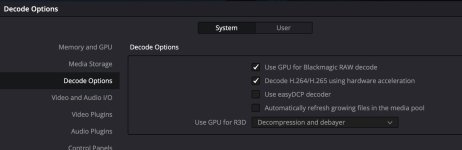
Pat, try GPU compr+Deb in Decode option.dsdfsfd.jpg
YLstJNF
 
You’ve got the latest version of resolve right? (Like you’re not using a older version that doesn’t natively support AS by chance?)

Usage/limits in Resolve can depend a lot of what filters/plug-ins you’re using and also what codec you’re rendering to. For example, noise reduction maxes out the GPU so heavily that your CPU will be waiting idle for it (so the CPU won’t go much beyond 10~20% load). Similarly, some older early-201x plugins aren’t multi-threaded (like at all), so when used they end up hitting just one core while the rest remain idle (so again ~15% usage). Actually, the only time I see CPU hit 90~100% is if GPU acceleration on render is unchecked, which tends to be substantially slower on Intel/AMD (but typically makes for a higher quality render.)

Conversely, another thing I’ve noticed with Apple Silicon is that using CPU-only render isn’t much slower than when ‘use hardware if available’ is checked (presumably because it’s all the same CPU/GPU/neural processor/Metal/video co-proc/etc using the same pool of RAM). In any case, that’s where I’d start; turn off GPU hardware assisted rendering (not r3d debayer/decompression mind you) and see if the CPU hits 90%+ in Activity Monitor>View CPU usage (so that it shows each individual core’s usage in that little graph thing.)
 
Last edited:
Back
Top