Welcome to our community

Be a part of something great, join today!

  • Hey all, just changed over the backend after 15 years I figured time to give it a bit of an update, its probably gonna be a bit weird for most of you and i am sure there is a few bugs to work out but it should kinda work the same as before... hopefully :)

Resolve Grade: 10 mins of life gone...

Actually, I barely use LUT at the node level. I use it in a node if there is a specific reason such clip will be needing a different look for a particular reason (flash-backs, etc.).

Once you are committed to LUT (either for film-out, DCP or broadcast), you use the settings to establish which and under what setting you assign it. If it is for film-out, you just select it as the "monitoring" one, so yo can see which will be the effect once the DPX is printed to that particular stock. That way, the rendered files will NOT have the LUT burned into them.

On the other hand, if you it will be used for Broadcast, or even DCP, you will use it as an "Output" LUT, hence it will be burned into the files. In the case of the DCP, you substitute it at the end (if you are not monitoring it already using DCI compliant color space) for a transformation LUT that will bring it from RGB to XYZ color space.

PS: And yes, you will RedLogFilm as the setting...
 
Very interesting thread and video.

I agree with everything. I'm not a very experienced colorist. I mostly grade my own projects whenever I have no money to hire someone. But I researched the whole LUT theme quite well.

Personally I also use the Kodak LUT mostly on the first node whenever I grade something for REC709 or the internet. I do only basic correction on the first node before the LUT and then everything else after.

For a friend we set up the grading workflow with the LUT at the end as a display LUT. It was a short film intended for DCP and we decided this for creative reasons.

Mostly it's a matter of personal taste. But there is an important factor that has not been stated here yet:
If you put the film LUT at the very end of the chain you will restrict yourself to use only colors that are possible on a film print. Especially the bright, very saturated colors are not possible anymore.
In most cases this is preferable as most people don't like these "neon" colors. But I think it's an important thing to know before you decide where to put the LUT.

Of course if your project is printed to film you have to use the film LUT in the end.

If you grade for REC709 or P3 (which are quite close) you have several creative options:
-Put the LUT in the first node and grade in linear.
-Put the LUT on a node in the end and grade in log before the LUT. Like this you still have the option to add a node after the LUT and go beyond the film colorspace.
-Put the LUT as a monitor or output LUT and restrict yourself to the film colorspace.

These are my personal conclusions. Hope it's interesting for someone. Correct me if you think I'm wrong
 
If you put the film LUT at the very end of the chain you will restrict yourself to use only colors that are possible on a film print. Especially the bright, very saturated colors are not possible anymore....

...Of course if your project is printed to film you have to use the film LUT in the end...

...If you grade for REC709 or P3 (which are quite close)...


Simon,

Three comments to your posting:
  1. The main reason you need/want to use LUTs as part of the "Settings", as opposed to using it at the node level, is to accomplish and/or avoid what you are describing. However, you DO want the LUT to restrict the colors to the gamut you are correcting to. As I wrote before, if it is for film-out you only use it as a "Preview" LUT, because you do not want it to be burned into the rendered final DPX sequence (i.e, in Log mode). Nevertheless, you need it for grading since it will tell you how it is going to look once the image is transferred to the film stock, and how it will respond to that specific emulsion.
  2. On the other hand, if the footage is for broadcast purpose, you want to use it as "Output" so it is burned-in as part of the image because your TV is not going to do any kind of transformation, as the film stock does, and it will try restrict it to such color space, crating unexpected and unnecessary artifacts. Otherwise, it will not be accepted for broadcasting since it will be deemed "ilegal" (both, colors and/or saturation levels).
  3. As the film-out process is dying down and giving space for DCPs, the above described workflow is getting less and less used. Then, basically you have two potential workflow scenarios, depending on the calibration of your reference monitor/projector:
a. You will still need to use an "Output" LUT if you are grading using an RGB calibration. Then, before rendering out the TIFF sequence, you will swap it for a conversion LUT to bring it from RGB to XYZ.

b. On the other hand, if the calibration is already for DCI, then your LUT must still be used as "Output", but it should be previously modified to reflect the desired emulsion in XYZ.​


PS: Rec.709 and P3 are not close at all, as you stated. The Rec.709 color space is limited to the HDTV color gamut, which in nature is very limited compared with the DCI (P3/P7/XYZ), which is are very wide in color reproduction. Also, DCI color space biases toward a "greenish" tint since the white point is different than the Rec.709 one.

EDIT: You can always use the "Track" selection to create nodes, and insert LUTs, too. That way, you do need to do it on every clip. It will be affecting every clip that is added to the timeline.


Respectfully,
 
Because film prints happen less and less... why use LUT's at all? I never use LUT's because every shot is different and I always find that LUT's might crush blacks or whites without much control.
I rather create the look from scratch, making it unique to that specific shot. And with all the different types of cameras out there, one single LUT is never applying in the same way to any of them.

I get having a LUT for seeing critical "end" result for print, but for anything else, I don't see why I should use one.
 
That is a good point, Christoffer. LUTs are tools that help to give you a specific color profile and behavior. A good starting point.
 
Because film prints happen less and less... why use LUT's at all?

Exactly... only use a film LUT if you like the effect it has on your footage.

I never use LUT's because every shot is different and I always find that LUT's might crush blacks or whites without much control.

Applying a LUT is no substitute for shot to shot balancing. It isn't a one size fits all instant grade of your shot. In fact I think in a lot of circumstances you actually need more grading experience to make a LUT look good. And when you push through this I think you can get results that are not possible without a LUT or without a lot of work.

I rather create the look from scratch, making it unique to that specific shot.

This is no different to when you grade with a film LUT applied. You still need to design a look as much as with no LUT applied and it still needs to be specific to each shot.

And with all the different types of cameras out there, one single LUT is never applying in the same way to any of them.

A film LUT doesn't care if you shot on an iphone or on Kodak Vision 3 it only transforms the values you present it, of course it's not going to apply the same way to all cameras nor do you want it to.

I get having a LUT for seeing critical "end" result for print, but for anything else, I don't see why I should use one.

If you don't like the aesthetic it brings to your footage then you shouldn't be using one!
 
But the aesthetics of a LUT is more often gone when you are done with your grade. If I apply a LUT and then grade my footage it will be the same as if I was aiming for that look in the first place.
May it be that LUT's are just shortcuts for when you don't know how to achieve a specific look? That you apply it to get the feeling of a type of film stock or something for which you don't have any reference to?

But as I said, I rather go from scratch entirely.
 
It is not a shortcut. It makes your grading decision react in a specific way, emulating a specific film stock.
 
Very interesting

Just to add to the discussion. Some images:

Kodak 2383 inside P3 colorspace:
kodak2383-in-p3.jpg


rec709 inside P3:
rec709-in-p3.jpg


P3 inside XYZ
p3-in-xyz.jpg


As you see the Kodak has a warmer white point than P3, is less bright and the primaries are not as wide. The bright saturated colors of P3 are far out of reach for the Kodak. As opposed there are some colors in the low range, that are not covered by P3

rec709 and P3 are "somewhat" close. Of course the P3 has a bit of a wider gamut.

XYZ is a different thing. It's more of a scientific color space that covers the whole range of humanly perceivable colors. In DCPs XYZ is rather used as a way to encode colors. XYZ is never used as a display color space. If you look at XYZ encoded pictures without conversion you get the greenish white point and the strange gamma.

Hope this adds to the thread
 
It is not a shortcut. It makes your grading decision react in a specific way, emulating a specific film stock.

I would say mainly for those used to those filmstocks when grading with them included, but mostly I would say LUT's are best used as references to the print and disabled before rendering out (if going back to print).
 
Very interesting...rec709 and P3 are "somewhat" close. Of course the P3 has a bit of a wider gamut....XYZ is a different thing. It's more of a scientific color space that covers the whole range of humanly perceivable colors. In DCPs XYZ is rather used as a way to encode colors. XYZ is never used as a display color space. If you look at XYZ encoded pictures without conversion you get the greenish white point and the strange gamma.
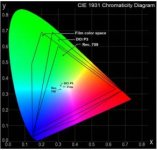
XYZ is a mapping method. But, it is used to display colors. The reason you see it greenish is because you are viewing it through a device calibrated for RGB. If you calibrate it within XYZ limits, then the images are going to look "normal". That is exactly what the digital cinemas are calibrated so you enjoy the movies...In terms of color spaces, I prefere to use the CIE graph to compare color diferences and capabilities. See this one (a little small since I could not find the bigger image version). It has the Color Diagram, and the different color spaces outlines, along with their respective white points. It is better, I think, when you want to make comparisons:

Color_Spaces.jpg

Cheers!

PS: The document on this link, I think, is a a good one that explains some basic things: http://www.amiaconference.com/techrev/V12-05/papers/colorspace.pdf
 
I would say mainly for those used to those filmstocks when grading with them included, but mostly I would say LUT's are best used as references to the print and disabled before rendering out (if going back to print).

Christoffer,

In reality, the decision of using or not using LUTs, as any form of art, is a matter of personal preference. And it should be dictated by what you are trying to accomplish. For the most part, I agree 95% with you that you can get to the image look you are aiming for, with or without LUT. The difference is how fast and accurate, and by default, how many more or less nodes/layers, you will need to achieve your look.

But let's go to basic: what is a LUT? In a simplistic definition, it is a matrix (Table) which tells the grading system to Look for a color value A (expressed in a x,y,z coordinates), and instructs it how to interpret and transform it into B value. Moreover, it helps you and the system, to limit the colors to a specific color space gamut. You can have a film stock emulating LUT in different flavors (RGB, Rec.709, sRGB, P3/P7), so you chose the one you are intending your footage to be used for, and the translation will never instruct the system to go out of such gamut levels.

Another approach, as I do it in my case, is to grade to the widest color space (film RGB), and use transformation LUTs that will limit the colors to each one of the different gamuts (RGB, Rec.709, sRGB, P3/P7, etc.). So, it is a two-fold tool that is very convenient.

I hope this information helps to clarify why in the "professional" environment, the use of LUTs is more or less a given.


PS: All this makes sense based on the premise that you have profiled your reference monitor/projector, and that the LUT was created based on such profile. Otherwise, it is not accurate.
 
I agree that it is a personal preference and I wasn't speaking any "truth" in that sense, only that I personally prefer to work from scratch. The reason for it is that shots are very often different in lightning, white balance etc. which means every shot I want to grade will look different and a LUT will only make it harder to get to that starting neutral look. I use LUT's, but I use them for precisely the reason you talk about, to limit everything to different gamuts, to check the end result.
That is what I think and recommend using LUT's for; to aid in matching your grade to something.

What I don't agree on (based on my personal preference), is the use of LUT's for a "look", I think it's a shortcut that makes grades harder because you miss looking at each shot with a clean eye, disregarding the troubles and errors of the shoot (or at least making it harder for you to spot them).

So, I recommend not using them, but if you are experienced as a colorist and know everything "underneath" the LUT then go ahead, that might be a good shortcut.
 
XYZ is a mapping method. But, it is used to display colors. The reason you see it greenish is because you are viewing it through a device calibrated for RGB. If you calibrate it within XYZ limits, then the images are going to look "normal". That is exactly what the digital cinemas are calibrated so you enjoy the movies...In terms of color spaces, I prefere to use the CIE graph to compare color diferences and capabilities. See this one (a little small since I could not find the bigger image version). It has the Color Diagram, and the different color spaces outlines, along with their respective white points. It is better, I think, when you want to make comparisons:
PS: The document on this link, I think, is a a good one that explains some basic things: http://www.amiaconference.com/techre...colorspace.pdf

Very good document. Downloaded and read.
Yeah "mapping" is probably the more accurate term than "encoding" for xyz and P3

The images I posted are screenshots from a color calibration system (which I don't own). You can rotate the color spaces in 3D with your mouse, which helped me a lot in understanding. Of course a screenshot it is not as useful. I thing the CIE graph is very good for the digital color spaces like rec709 and P3 but for film it's not so accurate as the gamut of film changes a lot relative to brightness. The color gamut of film is very non-linear and in the 3D representation you see that it is indeed larger in the dark tones but much smaller in the bright ones, which is caused by the subtractive nature of film prints vs. additive of digital projectors.

But as we have some super savvy people here (Luis?) two things that I would like to ask:
When you work for DCP and use a film emulation LUT, do you adapt the film white point of D55 to D65 for DCP or do you keep D55? I think I have seen both in cinemas. Some films keep the warmer tones of a film print and some seem to adapt to the colder DCP whitepoint. I have LUTs of both flavors.

There are several out of gamut mapping methods for LUTs: Limiting / Minimum Delta / Constant Hue / SCLIP / CLIP in combination with L*a*b* or IPT - Do you know what are the differences and which are preferable?

Cheers
 
Christoffer,

I think your line of thought is representing the new trend in the DI world as the Digital Cinema is emerging as the dominant one, and as the killer of the film (and also the emerging of the new crop of Colorists). I think we are witnessing a pivotal moment in the Cinema history, so we are all part of what is going the new way of doing things. And your position is, in my opinion, what is going to be part of the new workflow.

It is important to mention, if I recall it correctly, that the way Fincher's "The Girl With The Dragon Tattoo" was graded was exactly that way. The reference monitor (THX I think) was calibrated for DCI P3/P7, the 4K sequence images were extracted from the 5K R3Ds as Log DPXs, and color graded without any LUT.


Simon,

I color correct within the RGB color space (waiting for the Red Projector), and the LUT is a film stock emulation with a D65 white point already built-in. So, graded images are, by default, adjusted to what looks good to me and my clients at that temperature. Hence, my transformation LUT from RGB to DCI P3/P7 does not need to adjust that parameter at all. I agree with you re: DCPs at D55. I dislike what happens to the images transformed into the D55 domain because it looses the organic tones. Answering your second question, I am 95% sure my transformation LUT are "ConstLclip".

BTW, thanks for your comment, but I am still learning, and there is a lot out there to assimilate about this art. I think there is no point for stopping the learning process. I have had the blessing of having great contacts and mentors, that do not feel intimidated on sharing their knowledge. I just try to participate on this and other forums to give my perspective in a respectful way. I learn a lot by exchanging ideas and analyzing others opinions, specially when they are substantiated by facts, or accompanied by real-life examples.

We live in this "microwave" age, in which everything is almost instantaneous. Specially the changes in the technology we all use and depend on to do our best.
 
I think the LUT's linked to this thread are awesome. I would love to see more film stock LUT'S if anyone has them?
 
Can you put a link in the original post so that we can access it with an ipad. Thx.

david
 
Sorry if someone already asked this, but having never used Davinci, it would be much more helpful (to me at least) if instead of just turning a node on and explaining what it's doing, you actually show us how you changed the settings to make it do what it did to the image.

I still have no idea how you adjusted the blacks and whites to have no color shift (be true black or white).

Thanks!
 
Daniel,

To answer your question it is necessary to get a hold of various training lessons available that will teach you how to use Resolve. It is impossible to use a forum to learn how to master the use of a software.

Now, in order to adjust the blacks and whites, you need to start with a calibrated display. That by itself, is another entire different topic that you will need to get the on-line training courses available.
 
Back
Top