Welcome to our community

Be a part of something great, join today!

  • Hey all, just changed over the backend after 15 years I figured time to give it a bit of an update, its probably gonna be a bit weird for most of you and i am sure there is a few bugs to work out but it should kinda work the same as before... hopefully :)

Resolve Feature Requests

Enter/Modify Data Directly in Bin

Enter/Modify Data Directly in Bin

Currently, the only way to modify an item in a bin is to open the Metadata window. This is unwieldy when working with a large number of bins and media files and organizing them for editorial.

A bin's contents should be editable directly in the bin's window. And we should be able to move around inside the bin similarly to how you move around inside a spreadsheet, and be able to change any field that is user modifiable from directly inside the bin's window.

Thank you for all of the work on adding editing features to Resolve!
 
Display Version Name in Node Graph Window

Display Version Name in Node Graph Window

Presently in Resolve the only way to display the Version Name is to display it under the Clips timeline. There are two limitations to this approach. First, you have to have Clips displayed. Second, if you choose to display Version Name under Clips you can't display other useful information under Clips, like Clip Name.

It would be nice to have the Version Name displayed somewhere else, like in the upper left of the Node Graph window. And this could be a pulldown from which you can select different versions.

Thanks so much!
 
Ability to Enter Numerical Values Directly in All Fields of All Pages

Ability to Enter Numerical Values Directly in All Fields of All Pages

Currently in Resolve, you can't enter numerical values via the keyboard for all fields.

For example, for the bars on the RGB Mixer, Primary Wheels and RGB Mixer pages, numerical values cannot be directly typed in. In some instances this can be rather annoying and it can make getting to precise value rather difficult.
 
Currently in Resolve, you can't enter numerical values via the keyboard for all fields.

For example, for the bars on the RGB Mixer, Primary Wheels and RGB Mixer pages, numerical values cannot be directly typed in. In some instances this can be rather annoying and it can make getting to precise value rather difficult.

Paul Dore has written an OFX plug-in that covers off entering precise values for the rgb mixer, and Jean Claude has ported them to Windoze & CL
https://github.com/baldavenger
 
For example, for the bars on the RGB Mixer, Primary Wheels and RGB Mixer pages, numerical values cannot be directly typed in. In some instances this can be rather annoying and it can make getting to precise value rather difficult.
The numbers shown for color values are arbitrary and mean absolutely nothing. Use a physical control surface and don't worry about what the numbers say -- only worry about the pictures. The knobs and scopes will tell you how the picture is reacting. I do glance at the bar graphs just to get a sense of whether I'm pushing one channel at the expense of another, which can sometimes lead to issues going from node-to-node.
 
I request the ability to set audio handles in an AAF export from a timeline edited in Resolve. This inablilty seriously hobbles the editing feature. Anyone have a workaround for this? Am I missing something?
 
Hugh, I assume you mean set the audio handles to different length than the video handles, right? B/c I have to think that the video handles length also includes audio when exporting an AAF.
 

Attachments

  • HandlesResize2.jpg
    HandlesResize2.jpg
    8.9 KB · Views: 0
Hugh, I assume you mean set the audio handles to different length than the video handles, right? B/c I have to think that the video handles length also includes audio when exporting an AAF.

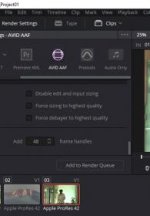
Thanks for responding, Peter. Since I'm exporting to ProTools, I have been trying the ProTools setting for outputing the AAF. When you select the Advanced Video Settings and add frames to the handles text box, it all looks good. When you render, the settings area greys out and, oddly, the Add text box disappears. The render does not contain handles. I tried a half dozen times. That doesn't happen when I export using the Avid AAF preset which I tried after seeing your screen grab.

With the Avid AAF preset, right away you could see, during the render, that it was going back before the cut creating tails. On the first take, I saw the slate. When I open the Avid AAF in ProTools, I get an error inside protools as it was constructing the session
Missing renderings
V1<01:00:00:00>no rendering for transition effect: ;substituting a cut.

However, the files that did make it to the ProTools timeline, do have handles. That's substantial progress. I need to track this error down but definitely progress. So thanks for replying.

I'll fix that error and report back. There could be a bug with the ProTools, deliver preset. Probably better to go to the other thread with it. Anyway, thanks.
 
Hi Hugh, you are very welcome!

BTW, I would recommend reaching out to the guys on this thread over at liftgammagain (which Marc ;) turned me on to):

http://liftgammagain.com/forum/index.php?threads/prep-resolve-timeline-for-protools-guys.8583/

And if you find that there are issues, needed features or bugs, let me know and I'll gladly add them to the list. For example if you find that there's still no way to fix the Protools export to include handles, then that should be added as a feature request (or bug).

So keep us in the loop ;)


P.S. I just tested it out some more and don't see a way to actually add handles when doing Protools or Audio Only exports. That's a pretty serious flaw, IMHO.
 
I just tested it out some more and don't see a way to actually add handles when doing Protools or Audio Only exports. That's a pretty serious flaw, IMHO.
Others have said that an Avid round-trip AAF export does give you the ability to add handles, so all you'd have to do is just do this kind of export and turn the video part of it off.

Given that Blackmagic Design bought Fairlight last year, I would not be at all surprised if they introduce some fairly serious post sound gear and software at NAB in a few weeks. I would assume this would also mean they'll provide better audio-export tools for Resolve, because the Fairlight people need the same stuff as the Pro Tools people. Avid and Pro Tools have very tight integration back and forth, and it should be possible to do it for almost every editing program out there if they work enough at it. But FCPX is a nightmare, FCP7 is challenging, and even Premiere is not a breeze.

I don't know of any software that preserves pan or audio level information, but the reality from what I've seen is that most re-recording editors and mixers through all that stuff out anyway. They do use a temp track from the editor as a reference in another set of tracks, so they can compare the new mix decisions to the old and determine how to best give the filmmakers the mix they want to hear.
 
Set Pre-roll and Post-roll Lengths from the Edit Page and via Keyboard Shortcuts

Set Pre-roll and Post-roll Lengths from the Edit Page and via Keyboard Shortcuts

Often times when editing you want to change the Pre-roll and Post-roll lengths for playing around a mark, clip or edit point. For example when doing a rough assembly, I only need to see three frames before and after. But when refining the edit, I may want to see closer to a second before and/or after the edit.

Changing the Pre-roll and Post-roll settings is currently only available on the Edit section of Project Settings. That's kind of pain to get to, even when using Shift 9.

It would be nice to be able to set Pre and Post-roll times directly from an Edit Page menu item. And it would be nice to have the ability to set these times directly via user modifiable keyboard shortcut. For example, Ctrl+Shift+1 sets Pre-roll time to 1 second.

Thank you!
 
BTW, I have been told that there are over 1000 items on the "to do" list of Resolve changes, so be prepared to be patient.
 
No doubt, lol! But seriously, that's one of the reasons why it's good have a list to help organize things. Coming from the Avid world, where feature requests are a haphazard mess. And while starting a list over at LGG seems like a good idea, I balked for two reasons.

First, I feel like too much of a newcomer there to create a list, *esp.* when there already is one. And second, on Reduser there is no time limit for editing posts. That makes it easy to update, correct, change, etc. a thread. For example, the ongoing summary list on the first post of this thread would be impossible to maintain over at liftgammagain.

I hope people feel free to contribute to this list and it helps Peter and others at Resolve a bit.
 
I have comments on Resolve 8 that I don't think they've quite addressed yet... :001_unsure:
 
I feel your pain, lol!... There are Avid Symphony guys who have been waiting for fifteen years for color correction improvements. :gun: :beatdeadhorse5: :frown:
 
Not to muddy up this thread any more, but I thought I'd report back. I have been successful in exporting from Resolve to Protools by following Marc's suggestion of an audio only export. I selected the Avid AAF preset and just exported audio. It imports fine into protools with handles. Then I render an mxf video and import that. They sync right up on the timeline. I have 2 pops in there but since it's the same timeline, they line up. This workaround is quick, easy and doesn't require additional software.

Thanks Peter, for confirming the no handles issue with the preset. It helps to know I'm not crazy. I really appreciate being able to interact with the experienced hands over here at reduser.

Right... features!
 
So the glad the folks here could help you!!
 
Not to muddy up this thread any more, but I thought I'd report back. I have been successful in exporting from Resolve to Protools by following Marc's suggestion of an audio only export. I selected the Avid AAF preset and just exported audio. It imports fine into protools with handles. Then I render an mxf video and import that. They sync right up on the timeline. I have 2 pops in there but since it's the same timeline, they line up. This workaround is quick, easy and doesn't require additional software.
Wow, glad to hear that works! i can tell you that everybody struggles with what I call "the hand off" to the sound department, particularly from newer software like FCPX. The guys who worked on Focus (one of the first big movies finished in FCPX) had some huge challenges handing off to the Pro Tools mixers.

As much criticism as everybody has, I have to say that the Blackmagic guys are really responsive and care a lot, and they generally do follow through on software issues (particularly catastrophic problems). Again, when you compare Resolve 8 or Resolve 9 from just a few years ago and look at what we have now, it's astonishingly different and much better. I don't think there's a company that works harder on this stuff... and it's particularly surprising when you consider there's a free version of Resolve out there. (I would actually rather they sell the light version for $99, but that's me.)
 
Yeah, that worked great, thanks. I agree with you that Blackmagic Design should charge for the lite version, or make it more like a trial, just to keep the development efforts flush. I don't know how they do it. Blackmagic's level of innovation shames the bloated pirate ship that Adobe has become by a long shot. I would pay just to keep it coming - maybe increase support. We'll see. Stabilization will probably be the feature that gets me to buy and I will cheerfully make the investment. With the new linux ports and affordable hardware, I think they're killing it.
 
Hugh, just want to mention that the free version of Resolve does have stabilization right now.
 
Back
Top