Welcome to our community

Be a part of something great, join today!

  • Hey all, just changed over the backend after 15 years I figured time to give it a bit of an update, its probably gonna be a bit weird for most of you and i am sure there is a few bugs to work out but it should kinda work the same as before... hopefully :)

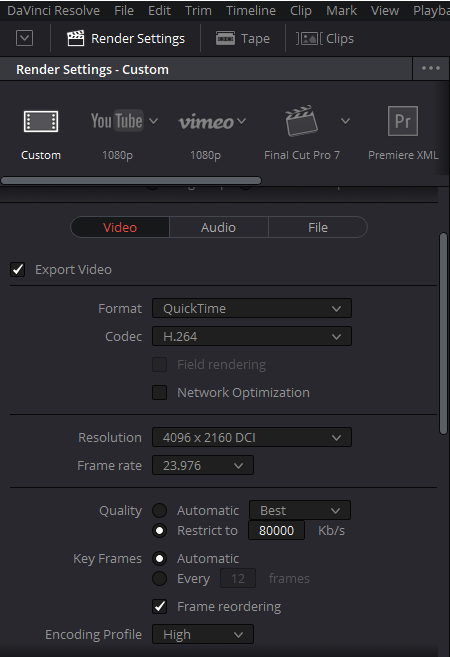
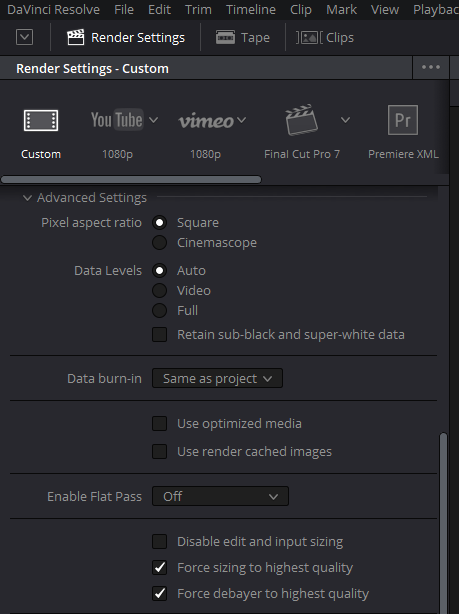
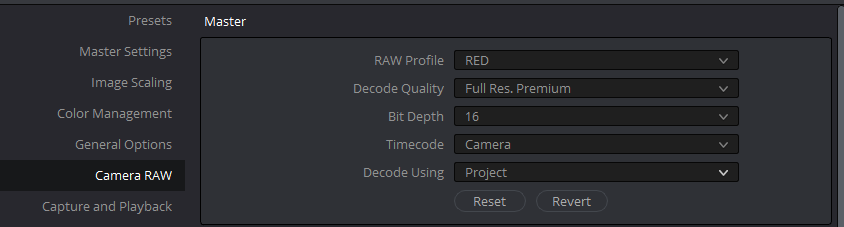
Resolve Export Settings

Sterling,


These are the settings I use Personally, However others may have something different.


1)
Screenshot_171.png


2)
Screenshot_172.png


3)
Screenshot_173.png


Just "Raw Profile", "Decode Quality" and "Bit Depth"
 
Rand, do you get compression artifacts when exporting 4K H.264?

I always get 4K H.264 artifacts in Resolve 14 and 15b. 2K H.264 is clean for me though.

I've even tried to first export R3D to DNxHR (no artifacts) and then to 4K H.264, as some suggested in the Resolve Facebook Group, but it still gives artifacts after being transcoded to H.264.

For YouTube, I usually export 4K DNxHR and everything is clean, so there are no problems.

For Facebook, for 4K, I'm stuck at the moment because Facebook doesn't currently accept DNxHR. I'm on Windows, so I can't export ProRes.
 
Last edited:
Akin,


I always use a very high bit rate to try to help negate that somewhat. Before my last Mac died, I exported the project out as ProRes 422HQ. However, since I switched back to PC, I have been just using H.264 at really high bit rates. I'm still trying other output codecs, but some are simply not compatible with Youtube or Vimeo.
 
I don't upload to YouTube so I am not familiar with the artifacting. What are some of the concerns there?

I know YouTube handles 50Mbps files with no issues -- do you actually see artifacts when uploading at 50Mbps?
 
Not sure if this pipeline would help others:

+) As H.265 creates smaller files than H.264 for the same quality / has fewer artifacts (that I am aware of).
+) And FCPX can work in parallel creating H.265 on the same machine with Resolve working on something else.

My workflow was :
1) Export in a high quality from Resolve (Prores 4444 XQ) (Pretty quick)
2) Open file with FCPx (Compressor) -> Export as H.265 (Quite slow) : For uploading to Vimeo
3) Open file with FCPx (Compressor) -> Export as 4k Apple Device (Pretty quick) : For a local copy on an iPad

As soon as (1) is complete you can continue project work in Resolve.

4) SIDE NOTE : As there a previously a bug in MONSTRO exports in Davinci -> I have sometimes had to import the output into FCP-X and manual fix the corrupted frames. BM never stated the cause (and I have not seen it specifically fixed) - however - I did note (if Peter Chamerbin is reading) that RED themselves has a fix for this 'sort of anomaly' in a recent R3D framework patch.

AJ
 
Misha,

Thanks for that. But "Rand" isn't an authority on Davinci Resolve no more than anyone else on this forum. Peter Chamberlain of Blackmagic Design, and Marc Wielage, a certified Resolve Trainer, would both be a much better reference.
 
Back
Top