Welcome to our community

Be a part of something great, join today!

  • Hey all, just changed over the backend after 15 years I figured time to give it a bit of an update, its probably gonna be a bit weird for most of you and i am sure there is a few bugs to work out but it should kinda work the same as before... hopefully :)

Resolve 15 crash on loading screen

Christoffer Glans

Well-known member
Joined
Jun 11, 2007
Messages
4,993
Reaction score
36
Points
48
Age
42
Location
Stockholm, Sweden
Just installed Resolve 15 on a new system. It worked for a few days and without any changes to the system it suddenly stopped working. It crashes without any error message once the loading screen gets to "loading waveform".
I've re-installed, restarted the system many times, re-installed desktop video drivers, tried running as admin, tried just about anything thinkable.
 
It now booted up without a problem. I do not know what causes this, seems pretty random. It's way too unstable for professional work. I can't startup the program fine one day just to have it fail the next, clients are gonna flee.

Even though it works for now, we need to know what causes this to prevent it from happening.
 
Christoffer,


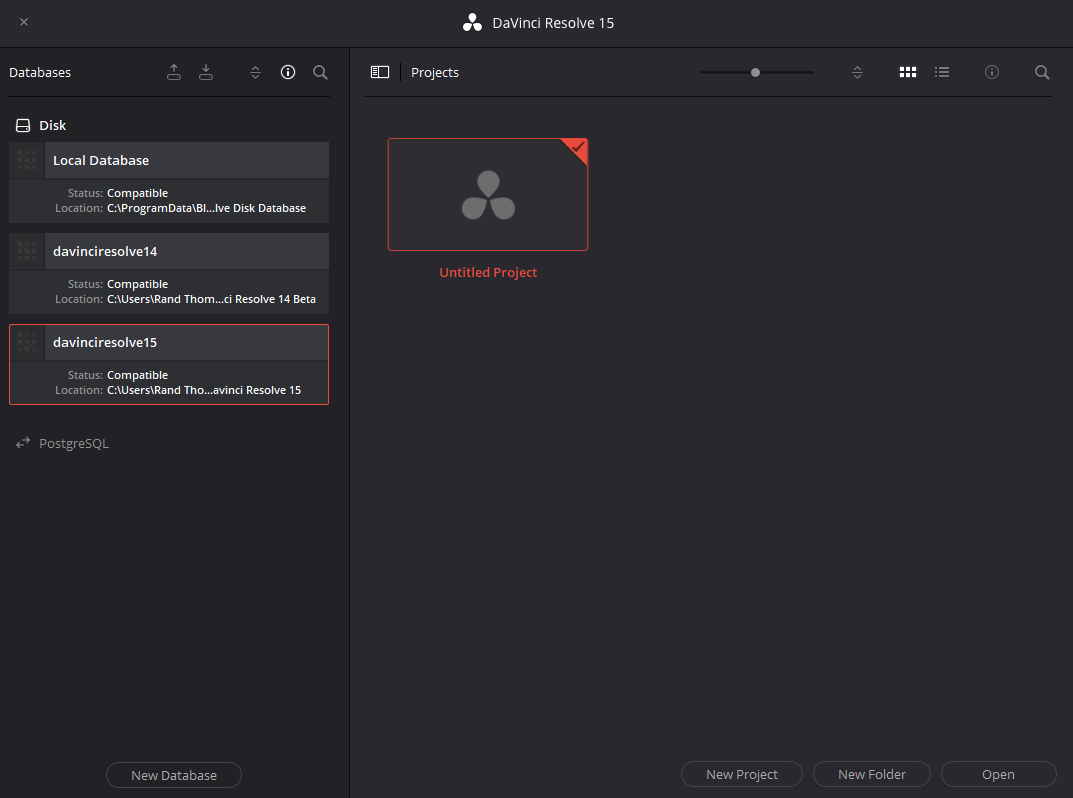
Make sure your Default write disk is still checked and that their "is" a default disk shown. And, I believe this "Full Version" of Resolve 15 requires a new or compatible database. I have set up a new database for the Resolve 15 "full Version". Christoffer, try to export a project and see if it gives you some type of "disk write permission error". If it does, it could be from the default disk selected or resolve 15 is trying to read from an incompatible database.


Check the Databases listed in Resolve's database list to see if there are any "yellow" triangles (problems shown).


Screenshot_228.png


Screenshot_226.png
 
Just installed Resolve 15 on a new system. It worked for a few days and without any changes to the system it suddenly stopped working. It crashes without any error message once the loading screen gets to "loading waveform".
I've re-installed, restarted the system many times, re-installed desktop video drivers, tried running as admin, tried just about anything thinkable.

Any time you ask for help, you need to tell about your rig- hardware, (specifically the GPU) OS version, exact Resolve version etc. But, if you're on Windows, you may be asking for trouble if you don't have a full start up drive back up, as Win OS, especially Win 10 will do system "update" without your OK which may or may not be the root of your problem...
 
But, if you're on Windows, you may be asking for trouble if you don't have a full start up drive back up, as Win OS, especially Win 10 will do system "update" without your OK which may or may not be the root of your problem...

Open a command prompt as an administrator, copy paste this and hit enter:

Code:
reg add "HKLM\SOFTWARE\Policies\Microsoft\Windows\WindowsUpdate\AU" /v NoAutoUpdate /t REG_DWORD /d 0 /f
reg add "HKLM\SOFTWARE\Policies\Microsoft\Windows\WindowsUpdate\AU" /v AUOptions /t REG_DWORD /d 2 /f
reg add "HKLM\SOFTWARE\Policies\Microsoft\Windows\WindowsUpdate\AU" /v ScheduledInstallDay /t REG_DWORD /d 0 /f
reg add "HKLM\SOFTWARE\Policies\Microsoft\Windows\WindowsUpdate\AU" /v ScheduledInstallTime /t REG_DWORD /d 3 /f

No more automatically forced updates. This will notify when updates are available and you get to decide when to install them.

For stopping Windows 10 from doing all the other annoying stuff it does, check out this page:
https://fdossena.com/?p=w10debotnet/index_1803.frag
 
i also prevent windoze updates from downloading and installing until i'm sure i have time to sort anything that goes off the rails

v15 has been stable here for the most part, running on mutiple machines, delivering shows on time with client attended sessions since b1
 
Ah, thanks a bunch Aaron! Windows can really mess things up and its easy to feel like a passenger.
 
In windows 10 Pro you can basically change every parameter (in home it's all automatic as a standard, there are work-arounds) only update the things you need.
There is a free program that can block a lot of data gathering from Microsoft: O&O ShutUp10 - Free antispy tool for Windows 10 https://www.oo-software.com/en/shutup10, for the rest use a fire-wall or switch to Linux.

Resolve often needs the latest graphics drivers.
 
Chris, make sure you send a big report over to the Resolve team as well!

They are really great at squashing bugs as they come up!
 
Back
Top