Welcome to our community

Be a part of something great, join today!

  • Hey all, just changed over the backend after 15 years I figured time to give it a bit of an update, its probably gonna be a bit weird for most of you and i am sure there is a few bugs to work out but it should kinda work the same as before... hopefully :)

Redmote won't complete upgrade connection.

Mark Deeble

Well-known member
Joined
Aug 20, 2010
Messages
188
Reaction score
0
Points
16
Location
Kenya
Website
www.deeblestone.com
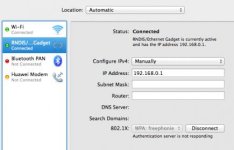
I am trying to upgrade my redmote from firmware 2.0.9 to 2.0.12. I had never had trouble connecting before, but when I open sys prefs/ network I see the redmote as being attached / connected but it won't complete the connection, saying that the 'Authentication Server is not responding" - which I take to be the redmote?
I have tried 2 different macs, 2 different cables, hard shutdown of redmote, red mote off camera, on camera etc.
Unfortunately as it will not complete the connection I cannot roll-back to previous firmware.
Any thoughts appreciated!
 

Attachments

  • Screen Shot 2012-05-03 at 10.57.40.jpg
    Screen Shot 2012-05-03 at 10.57.40.jpg
    17.8 KB · Views: 0
I had the same problem, and sent my message 10 minutes ago to red support. Got the mail from Brian Clark (red support). This is his answer: ----------- Two things I would suggest with the REDMOTE, I would turn Airport off and also add the Subnet Mask: 255.255.255.0 below the IP: 192.168.0.1 in the Network properties for the REDMOTE device.
--------------------------------------------------------------------------------
I did it and the problem resolved! Thanks RED for the fasted support.
 
Last edited:
Had trouble connecting at first. Said successful connection in NETWORK but the app wouldn't connect. Fixed it by turning off the Ethernet connection, which must have been conflicting. Worked great after that.
 
I had the same problem, and sent my message 10 minutes ago to red support. Got the mail from Brian Clark (red support). This is his answer: ----------- Two things I would suggest with the REDMOTE, I would turn Airport off and also add the Subnet Mask: 255.255.255.0 below the IP: 192.168.0.1 in the Network properties for the REDMOTE device.
--------------------------------------------------------------------------------
I did it and the problem resolved! Thanks RED for the fasted support.

Is this answer a sticky somewhere? It took me awhile to find this, and none of the steps are mentioned in the readme or manual.
 
Back
Top