Welcome to our community

Be a part of something great, join today!

  • Hey all, just changed over the backend after 15 years I figured time to give it a bit of an update, its probably gonna be a bit weird for most of you and i am sure there is a few bugs to work out but it should kinda work the same as before... hopefully :)

Redcine-x Transcodes to Prores 4444 look WASHED OUT

I thought i'd revive this thread.....since this is STILL the case...RCX images look great IN RCX, but transcode out to Prores and you get washed out images.....I've learned to live with it and actually go to another color grade program. but too bad we don't have WYSIWYG out of this.


Good news everybody! The new RedCine X build 246 finally matches when it transcodes to ProRes4444!

Looks the same in QT as it does in the RCX, and looks the same in FCP!

Yep, no more washed out QT files, it's like a 98% match, which is more than close enough for me!

Great day!

QT Pro 7.6.6
RCX 246
Red Rocket
 
Now this might be in the thread somewhere its 13 pages long and im not gonna look.

Are you making sure to click Gamma Correction to NONE?
and it still does a washed out look?
 
Hi Johnny,

As you know the gamma issue is well known and documented, but as has been mentioned in this thread, RCX, QT7 and FCP7 should all match. Indeed, I just retried it myself and confirmed. 1920x1080 Prores 422. Can you verify this case?

Edit: I should also mention I'm viewing everything on the same monitor, no Red Rocket.

Thanks,
David
 
HI David,
For me and a few other underwater film guys....this has been a constant bother. No WYSIWYG....we can get the image looking beautiful; tack sharp and pleasing with colors in RCX, but transcode out to prores 4444 or 422 and we get de-saturated and not such sharp images. I'm running off of a RR card and the other film-maker I know is NOt using a RR card---we BOTH get same results.....and both of us are using different systems to monitor colors.....so we're not seeing the same issue from the same corner of the street. I find that in order to get the image to work well i have to take it to FCP or COLOR and (the prores file) and work on it to get WYSIWYG. I WISH this was not the case and i've seen it all to often. Underwater we can really see this......Glad to post images of how this works.....i believe back in this thread i had done so....however they are just compressed uploads.
 
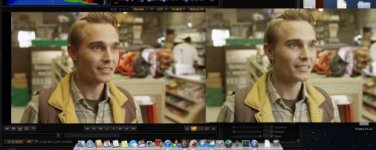
I know this is an old thread but I've been experiencing this as well.. below i'll attach a screen grab. Total change right?

I then stopped playing the transcodes in quicktim (10 currently) and started using VLC and things looked more like I had originally graded them.

So I'm assuming this is a weird redcine/quicktime thing or maybe more on quicktimes end.

again, VLC gave me the proper look.

blow is a redcine/quicktime comparison
 

Attachments

  • Screen Shot 2012-12-10 at 5.49.37 PM.jpg
    Screen Shot 2012-12-10 at 5.49.37 PM.jpg
    21.9 KB · Views: 0
It's the new OSX thing no?
Apple has taken quicktime to yet a new level of mystery. It's like no matter what you do with QT you will for sure end up with the wrong gamma. As I understand it's their change form 1.8 to 2.2 gamma that messes everything up.

Before I could export a uncompressed qt from my flame it would be identical on a mac.... latest osx installed, then not so much the gamma is pushed down what looks to be a setting that tries to look at the file as gamma 2.2 when it's actually 1.8....
 
It's the new OSX thing no?
Apple has taken quicktime to yet a new level of mystery. It's like no matter what you do with QT you will for sure end up with the wrong gamma. As I understand it's their change form 1.8 to 2.2 gamma that messes everything up.

Before I could export a uncompressed qt from my flame it would be identical on a mac.... latest osx installed, then not so much the gamma is pushed down what looks to be a setting that tries to look at the file as gamma 2.2 when it's actually 1.8....

Well, i've been experiencing this from day one (2007) with the first trancodes out of not redcine, but the program before that. You can do anything you want in the settings such as choose none or auto for gamma settings in RCX, but no matter what you do, transcode to Tiff, QT, Prores whatever you get a washed out desaturated look. After having an experienced colorist look at it, his assessment was that it was a RCX transcode engine issue. For whatever reason, using RCX will not give you color accurate to prores or as i've found out even to tiff and DPX---well, i've never gotten it to be color accurate. BUT, when taking same into Resolve, i can get accurate transcodes Oh....Even in Apple Color it's accurate. This is very disappointing that we have had to live with this for as many years in that RCX COULD be a great one light transcode tool, but i've found after spending hours and hours grading in RCX and then transcoding---it was all for nothing....and very disappointing to waste all that time.
 
Well, i've been experiencing this from day one (2007) with the first trancodes out of not redcine, but the program before that. You can do anything you want in the settings such as choose none or auto for gamma settings in RCX, but no matter what you do, transcode to Tiff, QT, Prores whatever you get a washed out desaturated look. After having an experienced colorist look at it, his assessment was that it was a RCX transcode engine issue. For whatever reason, using RCX will not give you color accurate to prores or as i've found out even to tiff and DPX---well, i've never gotten it to be color accurate. BUT, when taking same into Resolve, i can get accurate transcodes Oh....Even in Apple Color it's accurate. This is very disappointing that we have had to live with this for as many years in that RCX COULD be a great one light transcode tool, but i've found after spending hours and hours grading in RCX and then transcoding---it was all for nothing....and very disappointing to waste all that time.

If make a screendump with RCXP open I get same color as my tif renders.... if I'm not completely mistaken.
 
Well, i could get exact WYSIWYG from Color.....when transcoding to Prores for my stock. RCX a nightmare in that nothing every comes out as colored in the monitor. that said, i'm coloring individual clips for stock agency and have tried numerous software--color for me works very well...Resolve better. Can't tell you how many times i have been back and forth on this and comparing with guys like Howard Hall who experiences the exact same issues and is now i think back to using colo again.

Color is/was not accurate. But that is a different story...
 
If make a screendump with RCXP open I get same color as my tif renders.... if I'm not completely mistaken.

Bjorn, what is a screendump? and RCXP ? do you mean using premier and the raw tools?---that what you mean with RCXP ?
 
I've always had the same issue trying to open the files on QT X, and even used to happen with QT 7. Then one day, it stopped happening, which made me happy. Later on I did an OSX update and went back to washed out colors. Was a bit frustrating but found a preference on QT7: "Enable Final Cut Studio" color compatibility. Enabling this brought my clips colors back to normal. At least on QT 7. Make sure you have this enabled. If you do and you still have the same results, then it really is a head-scratcher.
 
Back
Top