Welcome to our community

Be a part of something great, join today!

  • Hey all, just changed over the backend after 15 years I figured time to give it a bit of an update, its probably gonna be a bit weird for most of you and i am sure there is a few bugs to work out but it should kinda work the same as before... hopefully :)

Redcine-X too wide for 13" screen

Are you saying you're unable to resize the viewer by dragging the left or right edges of it?
 
Are you saying you're unable to resize the viewer by dragging the left or right edges of it?

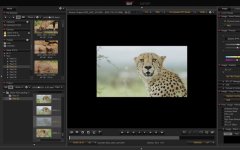
Hey Phil. I can resize it a bit but not enough to fit the media tab on the left and the Image tab on the right. Once the buttons/info above the viewer run out of space, I can't make it any smaller. See screenshot attached.
 

Attachments

  • Screenshot 2021-03-24 at 13.02.11.jpg
    Screenshot 2021-03-24 at 13.02.11.jpg
    80.8 KB · Views: 0
Is your screen set to max resolution? This happens on my 15" MBP, unless I select the furthest 'more space' option in the display settings.
 
Is your screen set to max resolution? This happens on my 15" MBP, unless I select the furthest 'more space' option in the display settings.

Thanks Chris. It was set to default. Setting it to more space does fix the problem, but then the text is a bit small.
 
Back
Top