Welcome to our community

Be a part of something great, join today!

  • Hey all, just changed over the backend after 15 years I figured time to give it a bit of an update, its probably gonna be a bit weird for most of you and i am sure there is a few bugs to work out but it should kinda work the same as before... hopefully :)

REDCINE-X (Early Beta)

It works pretty well in Wine on Linux but not as well as REDCINE did. While REDCINE worked almost perfectly, REDCINE-X has some weird problems with a lot of the text being invisible. I know it's not a supported platform,but I thought some people might be interested.

Hopefully someday you can support Linux too though - I mean, all the libraries you're distributing with it are natively available on Linux systems. The only thing you wouldn't have is Quicktime.
 
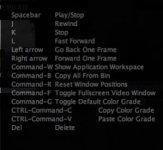
Pressing H brings up this little window with a list of commands.

EDIT: I looked around the other day and found that the look you are saving in RCX is an xml file that is saved (in Mac OSX)under your user library in Aplication Support/Red/RedCineX/Looks.
But I haven't found a way to export .RSK or .RLK etc.

I'm still figuring out how all these work, but I think it would make so much sense if there was a universal RED look file type that could be used in the camera as well as all the apps, is there something I am missing?
 

Attachments

  • Screen shot 2009-11-02 at 9.37.19 AM.jpg
    Screen shot 2009-11-02 at 9.37.19 AM.jpg
    10.3 KB · Views: 0
Anybody tries the R3D to AAF/MXF export? It seems slow as hell on a 8-core mac. And is there a way to disable the preview progress of the viewer?
 
I've got it working fine on Win Vista and Win 7.

Is there any guide anywhere as to functions?

I really want to export looks.


We're putting together a guide. Lots of changes/improvements will be happening in the near future as we get feedback.

The export looks to the camera will be happening soon as we tie things together to make them compatible Epic and Scarlet also.
 
Pressing H brings up this little window with a list of commands.

EDIT: I looked around the other day and found that the look you are saving in RCX is an xml file that is saved (in Mac OSX)under your user library in Aplication Support/Red/RedCineX/Looks.
But I haven't found a way to export .RSK or .RLK etc.

I'm still figuring out how all these work, but I think it would make so much sense if there was a universal RED look file type that could be used in the camera as well as all the apps, is there something I am missing?

The universal look file will be added in the next few weeks. (see prior post)
 
We're putting together a guide. Lots of changes/improvements will be happening in the near future as we get feedback.

The export looks to the camera will be happening soon as we tie things together to make them compatible Epic and Scarlet also.

Don't forget delete, undo, and the ability to scale the timeline, turn off the expanding-playing thumbnails and easily be able to distinguish between different clips on the timeline!
 
Just a heads up. I'm on a vista 64bit quad core with 4gb of RAM, Nvidia card and editing, curves, works fantastic. When I try to render a quicktime REDCINE-X crashes.

So far very stable up until rendering. Fantastic job guys.

Can you please email me the log files?
user folder/Application Data/RedCineX

Can you also check if you have the latest quicktime installed?
 
Dean,

Should RedCine-X use the REDRocket when running on Windows? I am running 64-bit Win7 and I don't see any video playback when I have it set to full. It seems to play OK at 1/2.

Can you compile a 64-bit version to use?


64bit will come later on as there are some parts that aren't 64bit yet.

REDcineX should be using REDrocket if the menu option is selected.
 
Except for the obvious limitations, this is looking veeeery promising.

I would love it to become a full fledged conform tool to run out DPXs for online through RED - rocket and with SDI out through either RR or Kona, but already as it is it is just soooo promising.

Would love to see a full feature-set goal, or is it ok to start a thread?

I guess....
 
Yes, it would have been nice to have a basic manual or white paper.
But I can see it's going to be great!

The videos you guys did for the previous version were a huge help. That would be cool if you did that for the new version.

:cheers2:
 
Back
Top