Welcome to our community

Be a part of something great, join today!

  • Hey all, just changed over the backend after 15 years I figured time to give it a bit of an update, its probably gonna be a bit weird for most of you and i am sure there is a few bugs to work out but it should kinda work the same as before... hopefully :)

REDCINE-X Build 351... finally.

Every time I try to open a clip, the program immediately locks up / crashes. This is not exclusive to this build, or even recent builds.

I had assumed my computer simply didn't have sufficient horsepower, but I recently got CS5 and discovered I could edit R3Ds just fine there (not FAST, but fine).

What steps should I take to diagnose this?

Please send a log file to redcinex at red dot com. The easiest way to do this is to select "Save Report..." from the Help menu and attach the zip file it creates to an email. We'll try to help you from there.
 
try to install the redrocket update - no luck
dose not open the terminal?
if i try to start the installer manualy in the terminal
tells me only permission denied

help please
all rights checket via the diskutility

Did you install the new driver first, and then do the firmware update? Needs to be done in the right order or it won't work.
 
I've been transcoding a batch of clips with REDLINE set to 6... Unfortunately something seems to have gone wrong though - the exports are done, so to speak, but the Prores proxies won't open in QT, VLC or FCP - FCP doesn't even recognize the files!

Is it due to REDLINE, or is it build 351? I just don't know whether I should let the batch finish in the hopes that it somehow has to finish the whole batch before I can use all of the files, or restart... Could someone please advise? I'm on a tight deadline cos we're doing a feature, so I need to make a decision very soon.

It sounds like the disk might be full. Can you email the log files to redcinex at red?
 
Just playing with the new color science quickly and comparing it to old on one shot.

I could much more easily adjust the overall dynamic response of the scene to bring detail and contrast into the shadows without losing the highlights. Please bear in mind that these were not created with a view to a starting point to a grade but with a view to creating a decent look for a transcode for offline.

Original exposure had washed out/filled in blacks I think from internal reflections in the lens.

Here is a grab with metadata settings applied (old RedColor and Red Gamma)

A001_C003_1020PK_meta.jpg


The next image is a first light with the new RedColor2 and RedGamma 2 that took me about 10 seconds.( saturation upped to 1.31 (perhaps OTT), shadow down to -0.21)

A001_C003_1020PK_RC2_RG2_plus.jpg


And finally a quick attempt to get close to the results above but using the older RedColor and RedGamma and fiddling with curves and other settings, which took a couple of minutes.

A001_C003_1020PK_RC_RG_FLUT_Curves.jpg


These are the settings I used in the last example (a tiny bit of additional saturation might have brought them even closer):

RC_RG_settings.jpg


Hopefully all the above images come out. I've never posted images on here before.

Edit **-- Yay, they seem to have come out fine when I view the page, oh and yes that is some unfortunate IR contamination on the furry material on his shoulders, just goes to show that one should make sure one does camera tests on costumes using the ND filters and IR cut you are planning on shooting with--**
 
I'm still getting the problem with the first clips using the Redline option on export end early and being small unreadable clips.

Also the center crop I set up resets itself to custom still whenever I change the debayer quality in the viewer window and so leaps up to the top of frame.

Log files sent.
 
Are the guys doing the photoshopping playing fair though! If they are using selective area correction, you'll never be able to fully match their still images without power windows/tracking masks!

That is true and something we have had to accept. The other thing is that when we have tried to match their look too closely the footage has been rejected. This is usually because skin tones in the stills are slightly blown out and pale looking, in motion it makes the models look a bit sickly but is more easily accepted by the viewer in stills for some reason.

The whole selective area correction thing is why I want to try and establish what they are actually doing when photoshopping their stills. Whatever the case I think we are still both aiming at giving a pretty true to life representation of the garments colors and textures. Too bad my internship at The Post Factory has finished, I'd really like to get deeper into this.
 
RC2 and RG2 QT Proxies?

RC2 and RG2 QT Proxies?

When I try and render new QT wrapper with the RC2 and RG2, I get green QT files. If I go back to the original RedColor and RedGamma, the file is fine. Are QT wrappers not fully functional with RC2 and RG2 at this point in time? Or am I missing something?
 
When I try and render new QT wrapper with the RC2 and RG2, I get green QT files. If I go back to the original RedColor and RedGamma, the file is fine. Are QT wrappers not fully functional with RC2 and RG2 at this point in time? Or am I missing something?

Not yet. We're getting that updated as soon as we can.
 
The shortcut "Shift Z" - fit timeline to window - doesn't work anymore (at least in the OSX 64 version). The corresponding menu-item still works though.
 
I encountered a huge problem with the new driver / firmware for the RedRocket!

I was grading a project that has his deadline tomorrow. I shouldn't have upgraded during the project ...

I was running:
OSX 10.6.5
running RCX348 - 64
RR old driver (can't remember which version)
source: 4K 25fps RC36
encoded to: Prores HQ - 1080p 25fps
encoding quality: full

Got no problems and the QT just came out without defects.

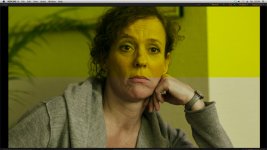
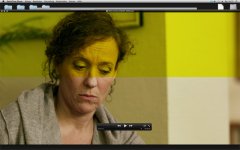
I was updating RCX, RR driver & RR firmware and suddenly my material gets screwed up like attached.

The problems suddenly also show in older RCX versions so it must be the RR driver and / or RR firmware.

- problem is always in the upper half of the frame
- other colors also appear (green, red/black) but it's mostly yellow (maybe because of content or applied grading?!)

strange thing:
- it shows in realtime playback in RCX (every version) (1/2 debayer, scale to fit screen)
- it shows in rendered QT (full debayer, 1080p scale)
- it DOES NOT show in TIFF Screenshots (full debayer, 4K)

Attached:
- screenshot of RCX (r3d)
- screenshot of QT-X (Prores QT)
- rendered TIFF from RCX


Since my deadline for this project is tomorrow:
- Can I downgrade my RR firmware and RR drivers safely?
 

Attachments

  • afk_k.jpg
    afk_k.jpg
    79.6 KB · Views: 0
  • afk_qt.jpg
    afk_qt.jpg
    84 KB · Views: 0
  • afk_tiff.jpg
    afk_tiff.jpg
    74.5 KB · Views: 0
Update:

I just rebooted to Windows to hunt down the problem:

Win7 Pro - 64
RCX 348 - 64
new RR firmware (1.1.10.1.)
OLD RR driver (1.3.3.0) (not updated yet)

Problem still exists and looks the same. Deactivating RR support in RCX renders just fine.

So I can hunt down the problem to the new firmware:

- shows in both OSX and Win7
- shows in all RCX versions
- shows with old (Win7) and new (OSX) RedRocket drivers
- doesn't show with RR deactivated

Can I safely install the old firmware again? I'm not sure what version that firmware was (1.1.8.6 ???) but I can remotely remember that, during the update of the firmware, the installer showed a version with some brackets in the number - i.e. "v1.1.8.6 (1.10.1)"
 
I've been transcoding a batch of clips with REDLINE set to 6... Unfortunately something seems to have gone wrong though - the exports are done, so to speak, but the Prores proxies won't open in QT, VLC or FCP - FCP doesn't even recognize the files!

Is it due to REDLINE, or is it build 351? I just don't know whether I should let the batch finish in the hopes that it somehow has to finish the whole batch before I can use all of the files, or restart... Could someone please advise? I'm on a tight deadline cos we're doing a feature, so I need to make a decision very soon.

I'm getting the same problem with REDLINE set to 4. All QT's come out short of the file size expected and won't open anywhere except for some reason the last 2 which are fine.
I had this problem with build 348 too but it usually applied to only the first 4 (or however many Redlines were set) clips in a batch export. Whatever has been done to make multiple redlines continue processing multiple files throughout a batch has made more of them go screwy.

I would advise against using the redline option for now if you are having this problem and on a deadline. For me the normal export from the 64bit build of 351 works, it may be slow but it seems to make both cores in my MBP run at 100% and uses less RAM than multiple Redlines. I will test further and report back if I come up with a better solution.

log files winging their way to RED as I type this.
 
I reinstalled the old RedRocket firmware (1.1.8.6) without problems and everything is back to normal.

working system so far:
- old RCX (348)
- new RR driver (1.3.5.0)
- old RR firmware (1.1.8.6)

The new 351 RCX build won't support the RR though, which is sad cause RedColor2 really looks nice... now I'm hoping for a new firmware for the next project.

@Red:
if you need more information or data to solve this problem for a future release I'll gladly help you.
 
This may be a little off subject, but it's on message since we are all on the subject of RCX. RCX has the ability to help render neutral color in your footage if you use a gray card. Now I've seen a ton of examples floating around this forum, some from colorist, but it looks like they miss the target on sweet skin tones. Now as most of you know, I've been a advertising still shooter for over 35 years and a digital capture consultant for fashion advertising and editorial for the past 13 years. I never do a shoot without the use of a gray card to bring my color into place.

Jim designed the RED like a digital still camera (that shoots motion), so yet not use the tools associated with digital still? It makes sense, and it will make your post life, and your final project better. I took the liberty and balanced one of Sanjin's images, see the before and after. Now had I had a gray card in this shot, it would have been easily (quicker) to correct.

Sanjin_Before.jpg
Sanjin_After.jpg


With all the new updates and new color sciences evolving with the software (RCX), which is allowing the RED footage to look better and better, the simple task of shooting gray cards IN YOUR KEY LIGHT, will benefit all of you so much.

voncard.jpg
 
Last edited:
Back
Top