Welcome to our community

Be a part of something great, join today!

  • Hey all, just changed over the backend after 15 years I figured time to give it a bit of an update, its probably gonna be a bit weird for most of you and i am sure there is a few bugs to work out but it should kinda work the same as before... hopefully :)

REDCINE-X Build 183...

Try updating your drivers to the latest on nvidia's site.

The 3500 came out about 4 years ago so there could be something RCX is doing that's not supported on that card. Do you have a newer card you can try?

I had this problem with my 9600GT. What was causing it was OpenGL support was set at v1.1 (Something I had to do to get another peice of software working). Using Rivatuner I set my OpenGL support to 2.0 and the problem went away.
 
Last edited:
Deanan,

Are 30" Apple Cinema Displays supported in the preview out monitor at 1920x1200? I was able to get a 720p signal out to the 30" and a 1920x1200 signal out to a 23" Apple Cinema display. We have two 30" displays in the studio and would love to use the second one as the RED Rocket™ monitor. Currently getting nothing when setting is at 1920x1200.
 
Can someone please tell me what I may be doing wrong? When I put my clips in a timeline and go to export all the clips to QT I setup my export as follows;
- Choosing QT
- Set my Debayer settings to FULL
- in OUTPUT LOCATION - I choose "Output with Clip Filename to selected folder"
- I select a specific folder and click "Sub-folder per clip"

I want my quicktime files to be in seperate folders hence the "Sub-Folder per clip" checked box. Also, I want my file names from the source R3D to be represented in the individual exported clips. But when I hit export it is asking me to name the file which i don't want to do ( I want the app to know each clips filenames) and its exporting all the clips in the timeline to one single file.
Its probably me but I would assume that the export settings I have chose would grant me what I'm looking for but no luck. Any help would be appreciated.

Yup. Same problem here. I did have good luck doing this with RCX-158 though.

EDIT: Never mind. I was only having luck with 158 on sub-folder per clip when going "Timeline (selected clips)." and then highlighting all clips on the timeline (cmd- a).
 
when I click on the link I get "oops bad page"...what is the correct link? for 183

got it...got it
 
Last edited:
Thanks for the update! I needed something to do. I already read every post on this board....and was getting board. he he.

pointblankBANNER.gif
 
My RED Rocket is out on rental.. can someone test monitor out to a 30" ACD and see if it works on this new build.
 
I still can't get good color out of Red Cine X compared to Apple's Color. In Red Cine, the Red and Blue Channel is at the same level as the Green Channel. This is causing the whole image to look washed out. In Apple's Color, the Red Channel and Blue Channel are much lower relative to the Green Channel. I'm not sure what is causing this, but it's been a problem in every build of Red Cine that I've tried.

Red Cine X:
http://www.dvdxdv.com/NewFolderLookSite/VeeScope/RedCine-versus-Color/RedCine-in-Veescope-Live.png

Apple's Color:
http://www.dvdxdv.com/NewFolderLookSite/VeeScope/RedCine-versus-Color/Color-in-Veescope-Live.png

Settings used for Red Cine X:
http://www.dvdxdv.com/NewFolderLookSite/VeeScope/RedCine-versus-Color/RedCine-Settings.png

Settings used for Apple's Color:
http://www.dvdxdv.com/NewFolderLookSite/VeeScope/RedCine-versus-Color/Color-Settings.png
 
Deanan or Jim,

Wondering if you guys have considered adding a still store feature to RedcineX. I think a lot of people want to use this to create very nice looking dailies. It is nearly impossible to accurately match color grades shot to shot without a still store implementation. I think it would be a feature that would get a lot of use.

Thanks,

Eric
 
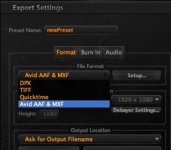
Where is open exr export?

Where is open exr export?

Where is Open EXR export Jim?
 

Attachments

  • Screen shot 2010-03-27 at 11.50.24 PM.jpg
    Screen shot 2010-03-27 at 11.50.24 PM.jpg
    13.7 KB · Views: 0
Deanan or Jim,

Wondering if you guys have considered adding a still store feature to RedcineX. I think a lot of people want to use this to create very nice looking dailies. It is nearly impossible to accurately match color grades shot to shot without a still store implementation. I think it would be a feature that would get a lot of use.

Thanks,

Eric

yes we have considered it and it's on the todo list.
 
You dont have the same color space set up. In color you have rec.709 as colorspace, not in RCX. Don't know if this will explain the whole difference though.
 
In the release notes it says no exr support on win yet.

Deanan,

I'm talking about Mac?

My screenshot is from Mac?

Attached full screenshot for your reference.
 

Attachments

  • Screen shot 2010-03-28 at 12.25.54 AM.jpg
    Screen shot 2010-03-28 at 12.25.54 AM.jpg
    94.5 KB · Views: 0
Deanan,

Are 30" Apple Cinema Displays supported in the preview out monitor at 1920x1200? I was able to get a 720p signal out to the 30" and a 1920x1200 signal out to a 23" Apple Cinema display. We have two 30" displays in the studio and would love to use the second one as the RED Rocket™™ monitor. Currently getting nothing when setting is at 1920x1200.

We would like to use the 30" also but it's probably the most limited monitor we've come across in terms of formats it supports. By comparison, the NEC higher end monitors support practically everything.
 
Deanan,

I'm talking about Mac?

My screenshot is from Mac?

Attached full screenshot for your reference.
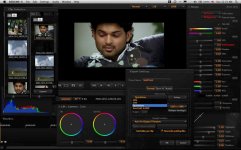
You're right. Looks like it setting didn't make it in for the final build.
 
Back
Top
