Welcome to our community

Be a part of something great, join today!

  • Hey all, just changed over the backend after 15 years I figured time to give it a bit of an update, its probably gonna be a bit weird for most of you and i am sure there is a few bugs to work out but it should kinda work the same as before... hopefully :)

RED to Avid to Smoke

These are the steps my Avid editors use for exporting to Smoke

1. Flatten sequence
2. Save a separate EDL for each video track
select V1 from track selector. Click Update. Then append V1 to the end of the title and click Update again. append V1,V2, V3. Disable audio tracks.

Save with .edl extension
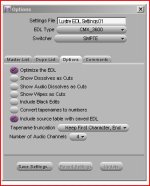
EDL Type: CMX_3600

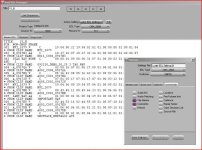
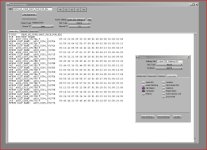
SEE ATTACHED IMAGES FOR SETTINGS

he also exports AAF LINKED MEDIA not embedded.

Finally make sure all your R3D files stay in the same folder structures througout the entire offline/online process and do not change file names.

hope this helps.
 

Attachments

  • edl3.JPG
    edl3.JPG
    36.5 KB · Views: 0
  • edl2.jpg
    edl2.jpg
    95.6 KB · Views: 0
  • edl1.jpg
    edl1.jpg
    97.5 KB · Views: 0
The picture samples are from a Canon 5D and can is using the CMX3600 EDL template. For RED files, you will want the 16Char template to support up to 16 characters of the R3D file name.

I also notice that the clip names stayed the same... when source and clip name are the same, it is a bit redundant. I usually change the clip name to something more relevant like scene/take. But different productions have different preferences.

Michael
 
The picture samples are from a Canon 5D and can is using the CMX3600 EDL template. For RED files, you will want the 16Char template to support up to 16 characters of the R3D file name.

I also notice that the clip names stayed the same... when source and clip name are the same, it is a bit redundant. I usually change the clip name to something more relevant like scene/take. But different productions have different preferences.

Michael


Are you referring to my images? I just grabbed a recent project, it has Red and 5D footage...but the settings are our preset for Red footage.

EDIT:
I see what you are talking about...yes I should be using the Red16 Template. It can be found here unless there is a newer version Im unaware of:
http://web.me.com/jabezolssen/metacheater/main.html

Just drop that in your Avids Templates folder and select it instead of CMX
 
UPDATE:
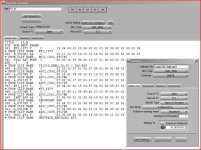
The reason they use CMX is that Lustre (or Flame or Smoke) has always preferd the CMX format and uses the COMMENTS field to fill in the missing data. We just tested the Red16 template and it works fine as well. I'll try renaming clip names now and see if that screws up the linking.
 

Attachments

  • EDL4.jpg
    EDL4.jpg
    94.4 KB · Views: 0
Thanks Greg for checking. The 16Char and 32Char are part of the EDL templates when EDL manager is installed. Other changes to the template include having more than 254 sources. In this file based world, each file is a source. Using 16Char and 32Char will allow you to have more events in the EDL.

Michael
 
Thanks Greg for checking. The 16Char and 32Char are part of the EDL templates when EDL manager is installed. Other changes to the template include having more than 254 sources. In this file based world, each file is a source. Using 16Char and 32Char will allow you to have more events in the EDL.

Michael
damn...never noticed those.
 
Hello,

I'm doing a Red/Avid/Smoke job now and am running into obstacles. I have read through this and other threads, but am still a bit lost. Please let me know if you have any advice or things I should try.

Workflow:
-Avid (5.0.3)
-Loaded Red files AMA, then transcoded to DNxHD 115 (23.98)
-Offline editorial
-Export EDL (using Red16 template). Edit includes 14 unique shots.
-Bring EDL into Smoke (2011), try to relink/conform.
-Here's where I run into problems.

*Extra notes:
-would like to downsize 4k r3d's to 2k for Smoke
-sequence includes timewarps. Can that carry over somehow?

Main question:
How do I get Smoke to load just the ins and outs of my EDL (with chosen handles) instead of needing to copy the entire .r3d files onto the Stones? How do I get it to relink? We don't have enough room on our Stones for all 14 .r3ds, so we'd love to just do the ins and outs of the EDL.

Is there a way in Smoke or through Wiretap to do this? I followed the "Import Red" workflow using Wiretap. I get to the section where I can either load individual Red files, import FCP XML, or EDL. I load the EDL, make sure that it includes all 16 characters, choose my settings, and hit submit, but it just spins and doesn't work. Should that have worked and it's just faulty install of Wiretap on my system?

Alternates:
-If I kick out an AAF from Avid instead of an EDL, what settings should I use? Linked to media? If so, can Smoke import that or do I have to go through Wiretap?

-Should I automatic duck my sequence to FCP, then export an XML from there? Will that carry over the necessary info to then relink to my raw red files?

I have a few workaround solutions where you just manually recreate the EDL (using Monkey Extract to create folders of DPX files or just export hi-rez QTs from Avid to bring into Smoke), but I'd love to master a solid technique of going from Avid to Smoke with Red files and have everything relink like it's supposed to.

Any help would be appreciated. Let me know if you have questions about my setup or workflow.

Thanks,
Dan
 
I would import the EDL into either REDCINE 348 or 351 and use the new TRIM R3D feature. You can add up to 10 frame handles within REDCINE X. Then just bring those files over to smoke for EDL conform. As far as smoke issues, I cannot help you there.

If doing AAF, then you can use "link to" since that will only be the compositional metadata needed. But if you have nothing but straight cuts, nothing gained via AAF.

Note that AAF puts R3D filename in a SOURCE FILE rather than TAPE so some third parties may not have updated their conform code to do so via AAF. There is a whitepaper on the Avid Knowledgebase that tells coders where to find that info in the AAF file.

I would also suggest you register for the Avid RED Webinar to be held on Thursday 2PM EST that will cover some of these very same workflows.

http://www.avid.com/US/resources/media-composer-webinar


Michael
 
Back
Top