Welcome to our community

Be a part of something great, join today!

  • Hey all, just changed over the backend after 15 years I figured time to give it a bit of an update, its probably gonna be a bit weird for most of you and i am sure there is a few bugs to work out but it should kinda work the same as before... hopefully :)

RED specific iPhone Slate App

Jeremy Neish

Well-known member
Joined
Jan 3, 2007
Messages
279
Reaction score
0
Points
16
Location
Provo, UT
Website
www.rivetal.com
We just completed a RED specific Slate app for iPhone, but it's missing one major feature, TimeCode sync. The simplest solution would be to get the timecode via USB from the camera.

What is it going to take to talk RED into sending TimeCode via USB?
 
I would imagine it's pretty much impossible to get accurate TC sync out of the RED (or any camera that happened to have the port)- via USB.

Noah
 
Err... Surely the simplest thing to do would be to get the timecode out of the timecode port?!

Or are you interested in USB as it is simpler to get into an iPhone? iPhone's have mic inputs, though, right (I'm probably the only person on this forum without one, so please bear with me if I make an incorrect assumption)? If so, you could feed the signal from the TC port to the mic in (it's only an audio signal), and lock to that...

Dom.
 
I would imagine it's pretty much impossible to get accurate TC sync out of the RED or pretty much any camera that happened to have the port- via USB.

Why do you think that?

Though not my favorite standard, I can't think of any technical reason why accurate timecode couldn't be sent via USB. Think of it this way, let's say I play two compressed QuickTime movies on my Mac, one from the internal drive and one from an external USB drive. I start them at the same time (cmd-return) and watch the time codes. They will stay in perfect sync. So not only is USB keeping up with the time code, it's also sending audio and video with it, all in perfect sync.

Thusly I can only assume something with as low datarate as a timecode stream, shouldn't have any difficulty via USB.
 
I don't see why timecode out over USB would be a problem. Lots of different synchronizing applications out there that use USB -- not talking about camera timecode, but other uses.

Thre real concern would be getting the iPhone to keep accurate sync with the external source.

Timecode out from the camera USB would obviously make it easy to go direct to the iPhone, otherwise it will start to take special cables and/or converters to get it there. The iPhone does have a mic / voice input and TC capture from that port could work well. Just look at apps like the Leaf Trombone and others that make interactive use of audio input.
 
Err... Surely the simplest thing to do would be to get the timecode out of the timecode port?!

Or are you interested in USB as it is simpler to get into an iPhone? iPhone's have mic inputs, though, right (I'm probably the only person on this forum without one, so please bear with me if I make an incorrect assumption)? If so, you could feed the signal from the TC port to the mic in (it's only an audio signal), and lock to that...

Dom.

Interesting idea, I'll talk to my programmer about that. But in the long run, I can see USB being more reliable, especially in a noisy environment (though a direct connection should be possible via the mic in on the headphone jack). Obviously Scarlet and Epic will support TC sync over Bluetooth, but that's the future.

As for our App, it syncs your slate data with your local server or machine running a server-side app. Then when you download your footage, it will cross reference which takes were "circle" takes as indicated on set within the iPhone app and automatically start converting them to the format of your choice.
 
It's just my gut that USB is not quite up to SMPTE accurate timecode especially as I've never seen any TC slate or audio gear use it for that purpose. But moreover it's my understanding that the way the iPhone itself counts time cycles makes it all but impossible to have totally accurate SMPTE sync. Close to within a frame or two sure, but for some applications that's not good enough. That said, I'm all for seeing some have a go at at and making it work. We need more cool iPhone RED apps.

Noah
 
Hey guys, not to hijack the thread, but it just so happens I recently compiled a list of useful cine-related iPhone apps and posted it to our blog, Cine Technica. Check it out here:

http://blog.abelcine.com/2009/08/03/iphone-apps-for-the-modern-cinematographer/

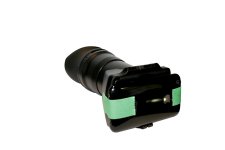
I also came up with a handy-dandy viewfinder for the iPhone on sunny days, but we decided not to post silly stuff to our company blog. Pull the eyepiece off an EX3 and stick it to an iPhone -- it's a great fit! Couple this with the new Zacuto handle for the iPhone and you have a real rig going. Now if I could just get ARRI to build an itty-bitty mattebox ...
 

Attachments

  • NBG_MG_9928.jpg
    NBG_MG_9928.jpg
    36.3 KB · Views: 0
Don't you want to get timecode from something other than the camera anyway, audio recorder, TC generator box?

In our case, no. Most of our shooting lately has been corporate and industrial, so we haven't had a TC generator or separate audio recorder on set.

However, you bring up a good point. On many movie sets, the original source of the TC isn't usually the camera but rather some other sync device. So maybe the audio TC decode is the ideal option. Though I could see a workflow where sync is set on the camera from the external device, then the iPhone app grabs it from the camera.
 
what is the name of the app? and when will it be available on iTunes store? how much will it cost?
 
Yeah I'd be careful- the thing with the iSlate app is it's fine for a fun slate but useless as an actual timecode reader because of inaccuracy. I'd be all over iPhone as frame accurate reader/source but I wonder if that's something it's capable of doing.

Noah
 
Back
Top